Number of 1234 in hex is $ 04 D2 which yields a default network address
of 10.0.4.170 and network mask of 255.0.0.0
If there is no DHCP server available, the PC NIC (Network Interface
Controller) may be configured to the 10.0.0.0 /8 CIDR. This may require
administrator privileges to change settings. Please refer to the
documentation or support resources for your operation system for
configuring a static IP address.
3.4 Setting Up GetSet MV
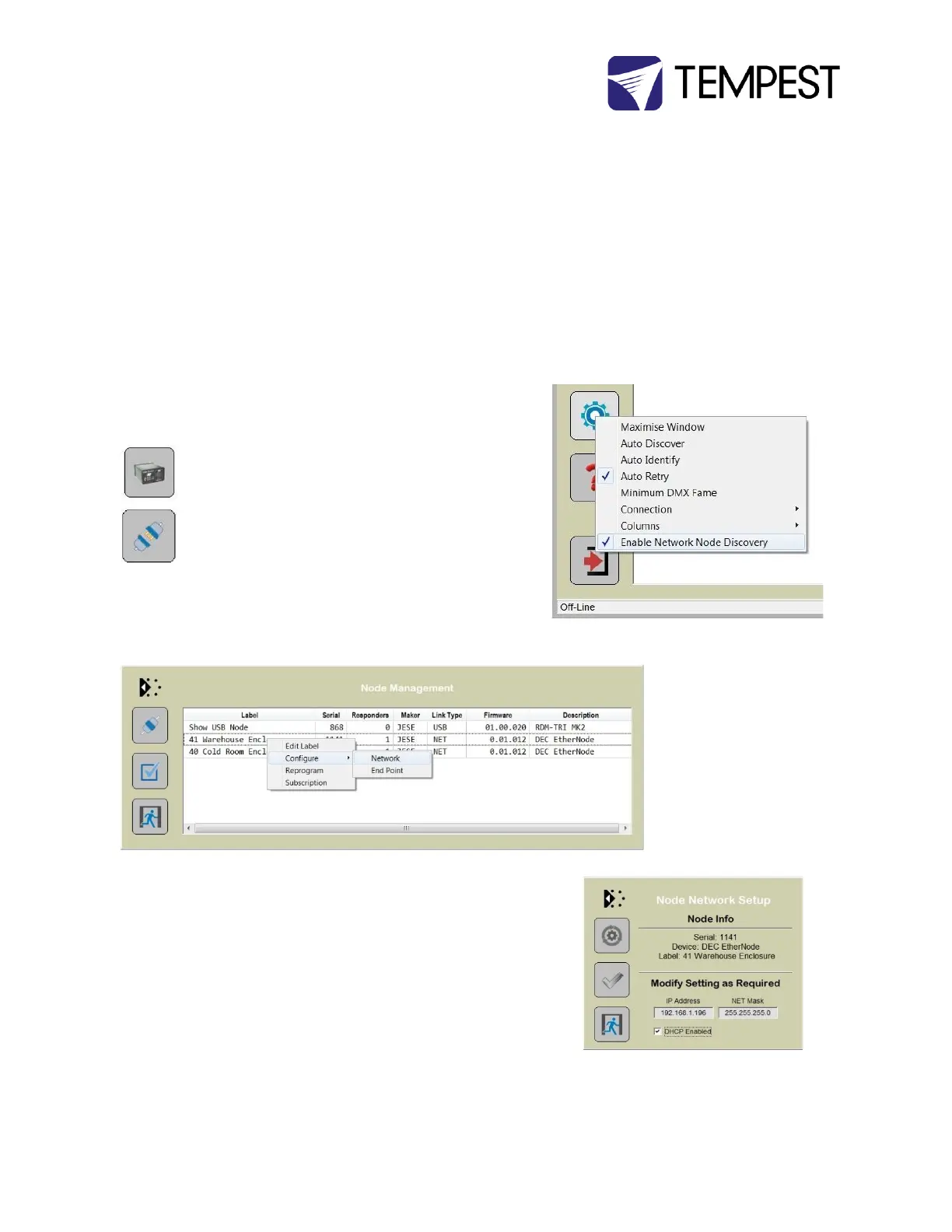
For GetSet to discover EtherNodes on the same network, check the
‘Enable Network Node Discovery’ option in the Settings menu.
Next, click on the Node Button to open the Node Manager.
Click on the Connect Button to initiate a node discovery and
populate the Node Manager with all USB and network enabled
Nodes.
To assign a meaningful label to each of the nodes in the manager, right
click on an entry and select the 'Edit Label' option.
EtherNode Configuration
A node network configuration tool mat be accessed from the Node
Manager by right clicking on an entry and selecting the Configure-
>Network Option.
Be aware, that setting an address and mask outside of the network used,
will cause the connection to be lost.
To restore an EtherNode to default addressing and DCHC, Press and hold
the DHCP reset on the EtherNode module, whilst powering up the DEC.


 To Next Page