EasyManua.ls Logo

Ten-Tec JUPITER - Page 33

Ten-Tec JUPITER
92 pages
Print Icon
To Next Page IconTo Next Page
To Previous Page IconTo Previous Page
Loading...
amplifier
and
JUPITER.
QST
and
other
amateur
radio
publications
have
published
articles
on
such
devices.
Тһе
Code
Transmission,
Digital
Communications,
ог
Station
Setup
chapters
in
recent
ARRL
Handbooks
have
some
suitable
circuits.
3.15.2,
OPERATION
WITH
A
TEN-TEC
QSK
AMPLIFIER
To
use
a
Ten-Tec
(or
similar)
QSK
amplifier
to
greatest
advantage
оп
СУМ,
cable
these
connectors
to
corresponding
input
and
output
jacks
on
the
amplifier
and
enable
this
Joop.
See
Figure
3-2
for
a
connection
guide.
То
enable
the
keying
loop,
select
the
KEYING
LOOP
item
on
the
Menu
screen
by
first
pushing
MNU
and
then
turning
the
main
tuning
knob
to
highlight
KEYING
LOOP.
Next,
rotate
the
MULTI
knob
until
ON
appears
opposite
TRANSMITTER.
Pushing
MNU
again
returns
you
to
the
previous
screen.
The
connectors
should
run
in
shielded
cables
to
corresponding
KEY
IN
and
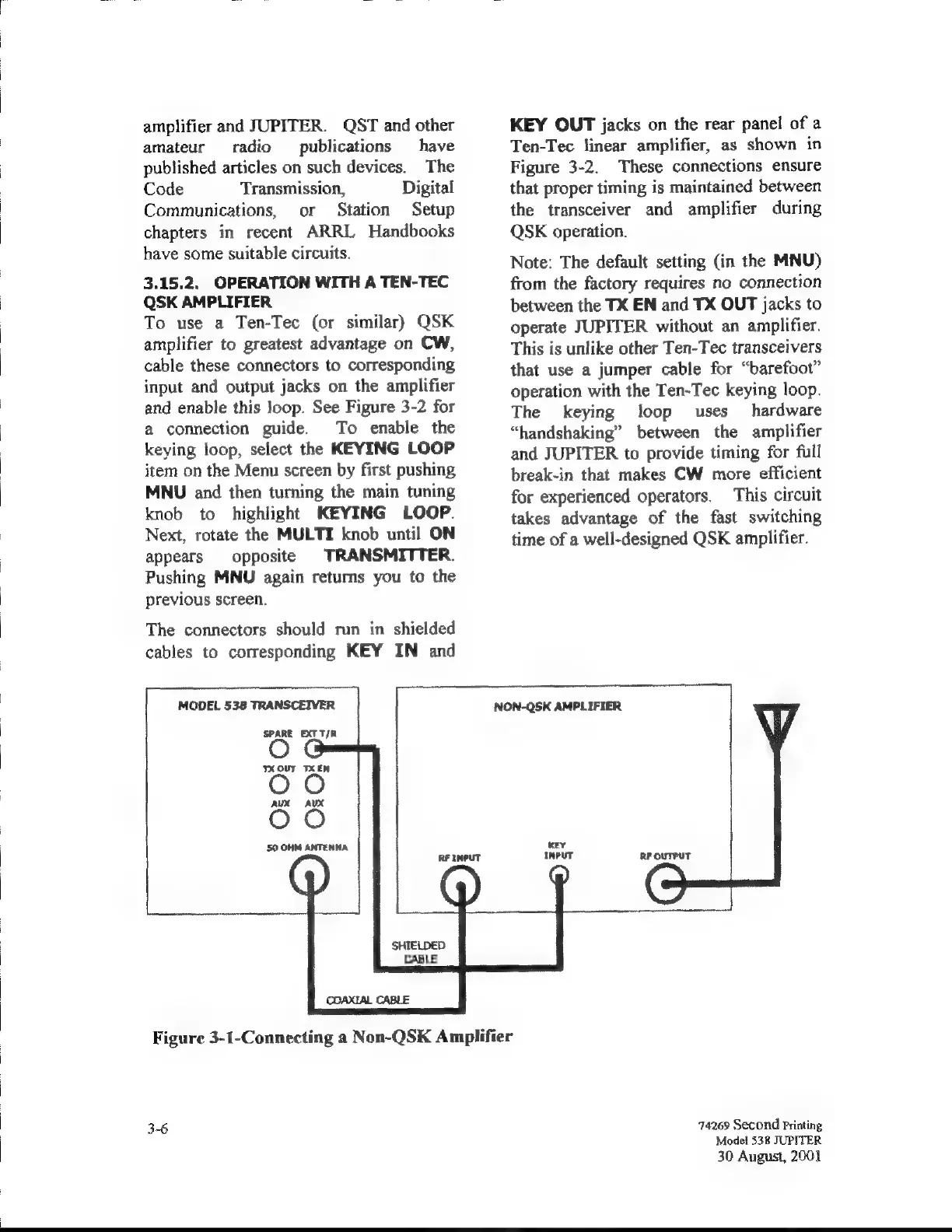
MODEL
538
TRANSCEIVER
SPARE
EXT
T/A
ТХ
OUT
ТХ
ЕМ
AUX
AUX
50
ОНМ
АМТЕНМА
NON-QSK
AMPLIFIER
KEY
OUT
jacks
on
the
rear
panel
of
a
Ten-Tec
linear
amplifier,
as
shown
in
Figure
3-2.
These
connections
ensure
that
proper
timing
is
maintained
between
the
transceiver
and
amplifier
during
QSK
operation.
Note:
The
default
setting
(in
the
MNU)
from
the
factory
requires
no
connection
between
the
TX
EN
and
TX
OUT
jacks
to
operate
JUPITER
without
an
amplifier.
This
is
unlike
other
Ten-Tec
transceivers
that
use
a
jumper
cable
for
“barefoot”
operation
with
the
Ten-Tec
keying
loop.
The
keying
loop
uses
hardware
“handshaking”
between
the
amplifier
and
JUPITER
to
provide
timing
for
full
break-in
that
makes
CW
more
efficient
for
experienced
operators.
This
circuit
takes
advantage
of
the
fast
switching
time
of
a
well-designed
QSK
amplifier.
SHIELDED
CABLE
Figure
3-1-Connecting
a
Non-QSK
Amplifier
3-6
74269
Second
Printing
Model
538
JUPITER
30
August,
2001

Related product manuals