EasyManua.ls Logo

Ten-Tec JUPITER - Page 34

Ten-Tec JUPITER
92 pages
Print Icon
To Next Page IconTo Next Page
To Previous Page IconTo Previous Page
Loading...
MODEL
538
TRANSCEIVER
SPARE
ЕХТТ/В
50
OHM
АМТЕММА
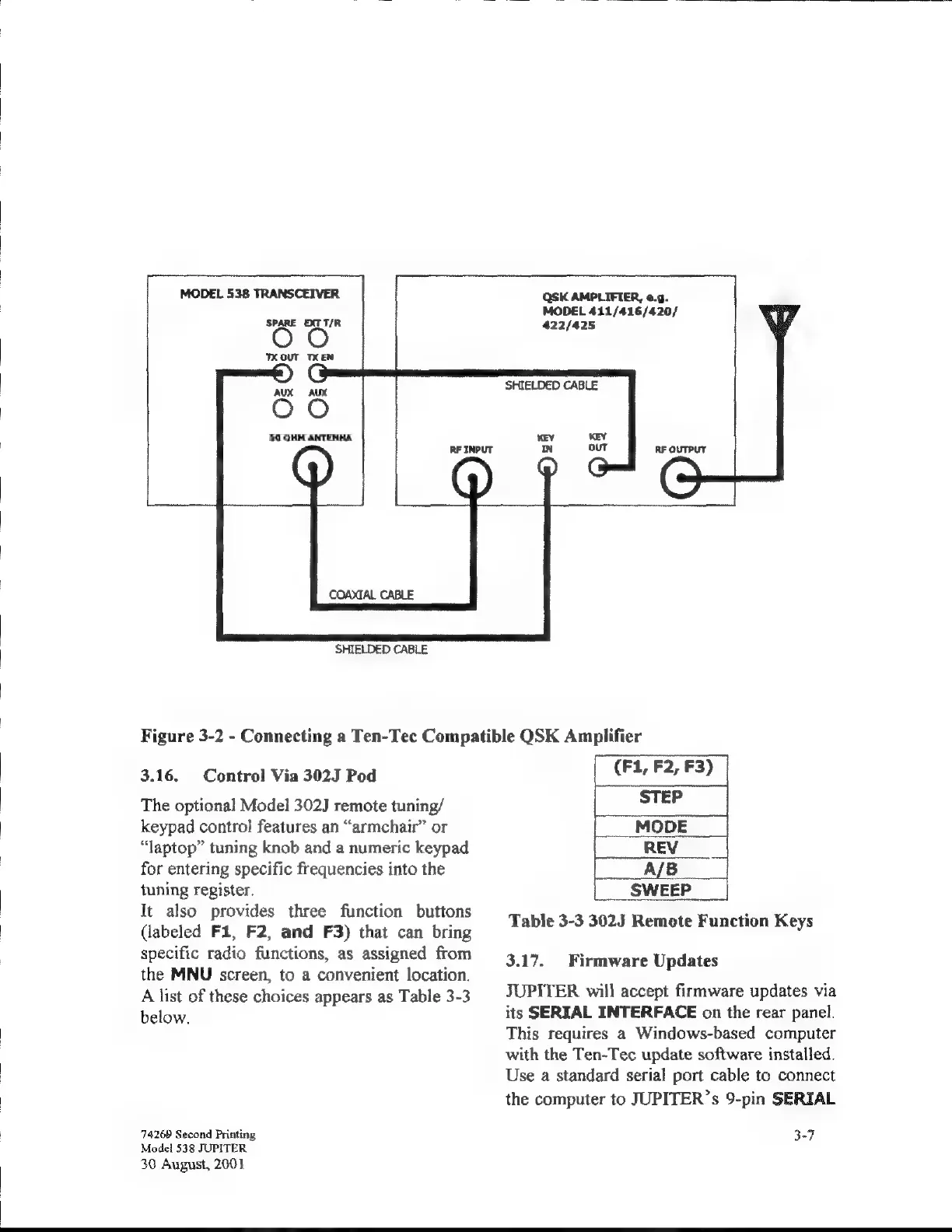
SHIELDED
CABLE
QSK
AMPLIFIER,
e.g.
MODEL
411/416/420/
422/425
SHIELDED
CABLE
Figure
3-2
-
Connecting
a
Ten-Tec
Compatible
QSK
Amplifier
3.16.
Control
Via
302J
Pod
The
optional
Model
302J
remote
tuning/
keypad
control
features
an
“armchair”
or
“laptop”
tuning
knob
and
a
numeric
keypad
for
entering
specific
frequencies
into
the
tuning
register.
It
also
provides
three
function
buttons
(labeled
F1,
F2,
and
F3)
that
can
bring
specific
radio
functions,
as
assigned
from
the
ММИ
screen,
to
a
convenient
location.
A
list
of
these
choices
appears
as
Table
3-3
below.
74269
Second
Printing
Model
538
JUPITER
30
August,
2001
(Е1,
Е2,
ЕЗ)
Table
3-3
3023
Remote
Function
Keys
3.17.
JUPITER
will
accept
firmware
updates
via
its
SERIAL
INTERFACE
on
the
rear
panel.
This
requires
a
Windows-based
computer
with
the
Ten-Tec
update
software
installed.
Use
a
standard
serial
port
cable
to
connect
the
computer
to
JUPITER’
5
9-pin
SERIAL
Firmware
Updates
3-7

Related product manuals