Document Version: V1.0
39
9.5 ISP upgrade
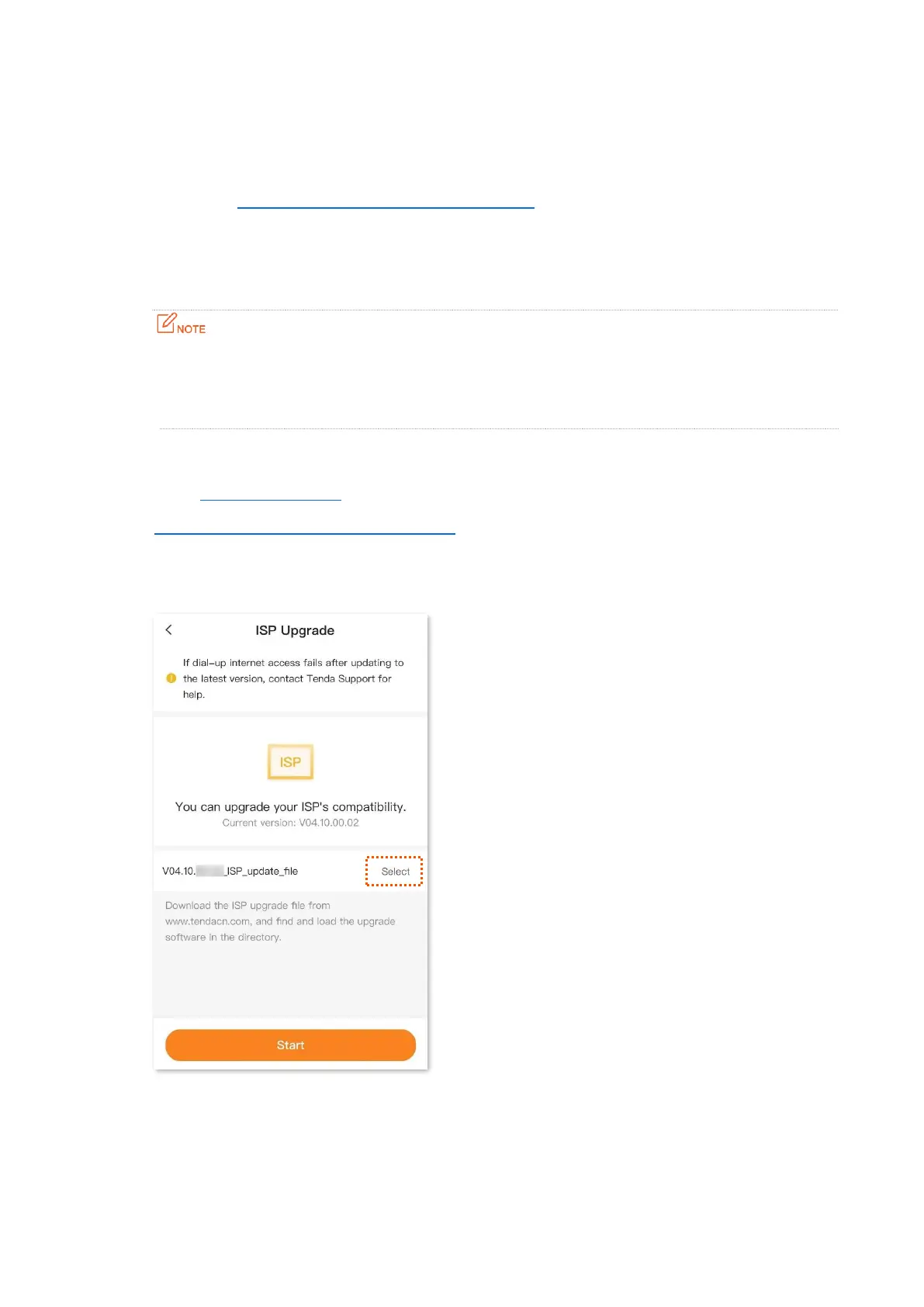
To access the page, log in to the web UI of the mobile Wi-Fi, and navigate to More > ISP Upgrade.
On this page, you can update the ISP information to obtain the better user experience. When the
compatibility problem of the ISP or the APN mismatch appears, you can try to use this function to
solve the problem.
To prevent the mobile Wi-Fi from being damaged:
− Ensure that the update file is applicable to the mobile Wi-Fi.
− When you are updating the ISP information, do not power off the mobile Wi-Fi.
Procedure:
Step 1 Go to www.tendacn.com. Download an applicable ISP update file to your smartphone.
Step 2 Log in to the web UI of the mobile Wi-Fi, and navigate to More > ISP Upgrade.
Step 3 Tap Select, and tap Choose File. Select and upload the ISP update file that has been
downloaded in Step 1, and tap Start.
---End


 To Next Page