Teo IP Phone 4101 User Guide 21
S
S
e
e
t
t
t
t
i
i
n
n
g
g
U
U
p
p
t
t
h
h
e
e
C
C
a
a
l
l
l
l
D
D
i
i
r
r
e
e
c
c
t
t
o
o
r
r
y
y
Up to 12 telephone numbers can be stored in the Call Directory.
Directory entries are similar to Speed Dial keys, but are
accessed from a display menu. Place your most frequently-
dialed numbers on Speed Dial keys, if available, and put other
numbers in the directory.
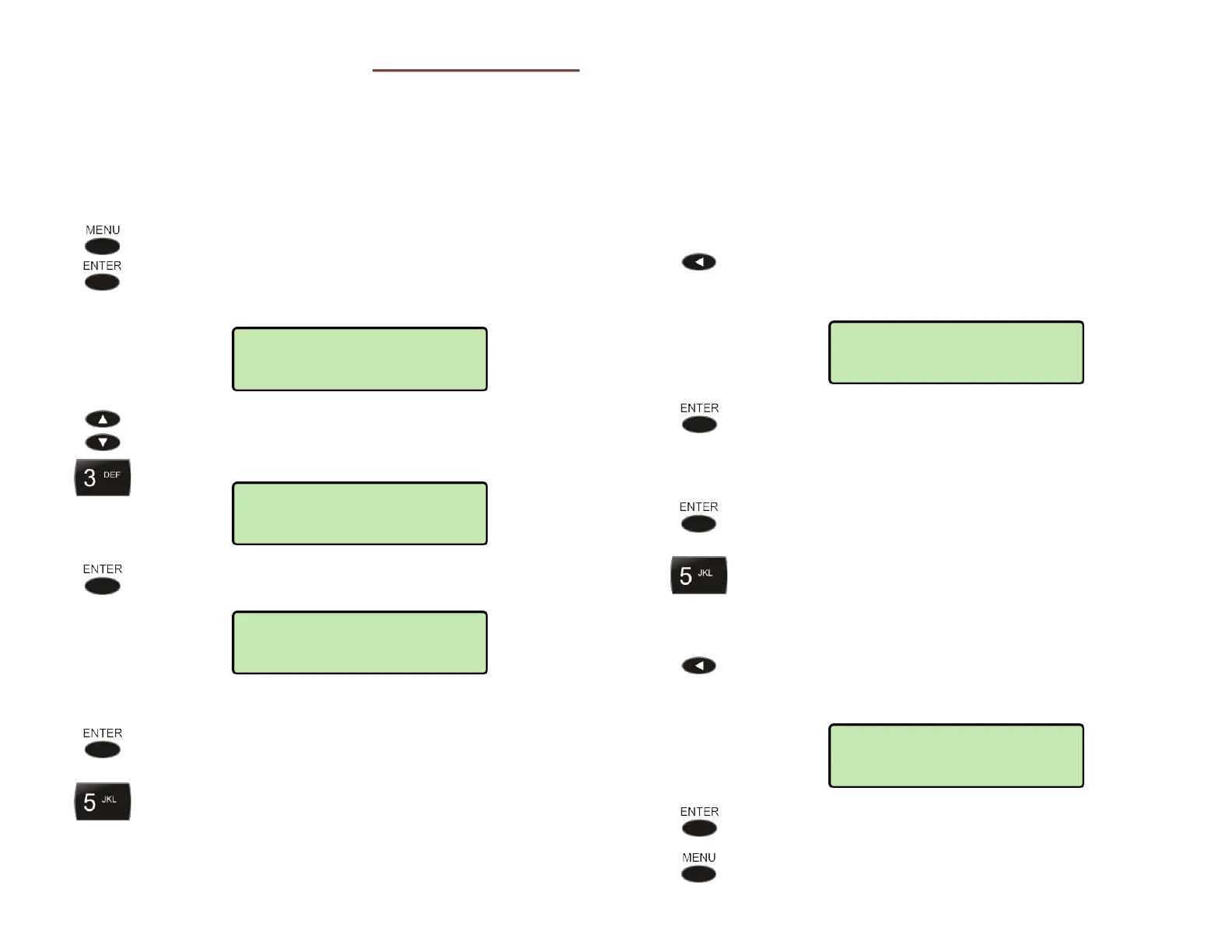
From the User Options menu, select EDIT
DIRECTORY.
(
MENU → USER → EDIT DIRECTORY)
The first directory entry will be displayed.
To display a different entry, press the Up Arrow or
Down Arrow key, or press the dial pad key
corresponding to the entry.
Press the ENTER key to select the displayed entry for
editing.
D
D
i
i
s
s
p
p
l
l
a
a
y
y
N
N
a
a
m
m
e
e
Select NAME to edit the display name.
Using the dial pad, enter a name to identify the
directory entry (13 characters maximum). Press the
dial pad key repeatedly until the desired number,
lowercase letter, or upper case letter appears in the
display (page 17).
For example, repeatedly pressing dial pad key 7
produces these characters:
7 p q r s P Q R S 7
…
Spaces and punctuation can be entered with the #
and
*
keys.
After a short delay, the flashing cursor will advance
to the next character. Press the Right Arrow key if
you want to manually move to the next character.
If you need to make corrections while entering the
name, press the Left Arrow key to delete the previous
character.
Press the ENTER key when finished entering the
name.
D
D
i
i
a
a
l
l
i
i
n
n
g
g
S
S
t
t
r
r
i
i
n
n
g
g
Select NUMBER to edit the dialing string.
Enter up to 128 digits with the dial pad.
Enter a # character at the end of the dial string to
allow immediate dialing when the directory entry is
selected.
If you need to make corrections while entering the
number, press the Left Arrow key to delete the
previous digit.
Press the ENTER key when finished entering the
dialing string.
Press the
MENU key to return to key selection.
DIR>EDIT>NUMBER=
5554321#
DIR>EDIT>NAME=
Jill Morton
DIRECTORY>EDIT
NAME
03=Jill Morton
5554321
01=Mike
10238



 To Next Page