Teo IP Phone 4101 User Guide 4
C
C
o
o
n
n
t
t
r
r
o
o
l
l
s
s
a
a
n
n
d
d
I
I
n
n
d
d
i
i
c
c
a
a
t
t
o
o
r
r
s
s
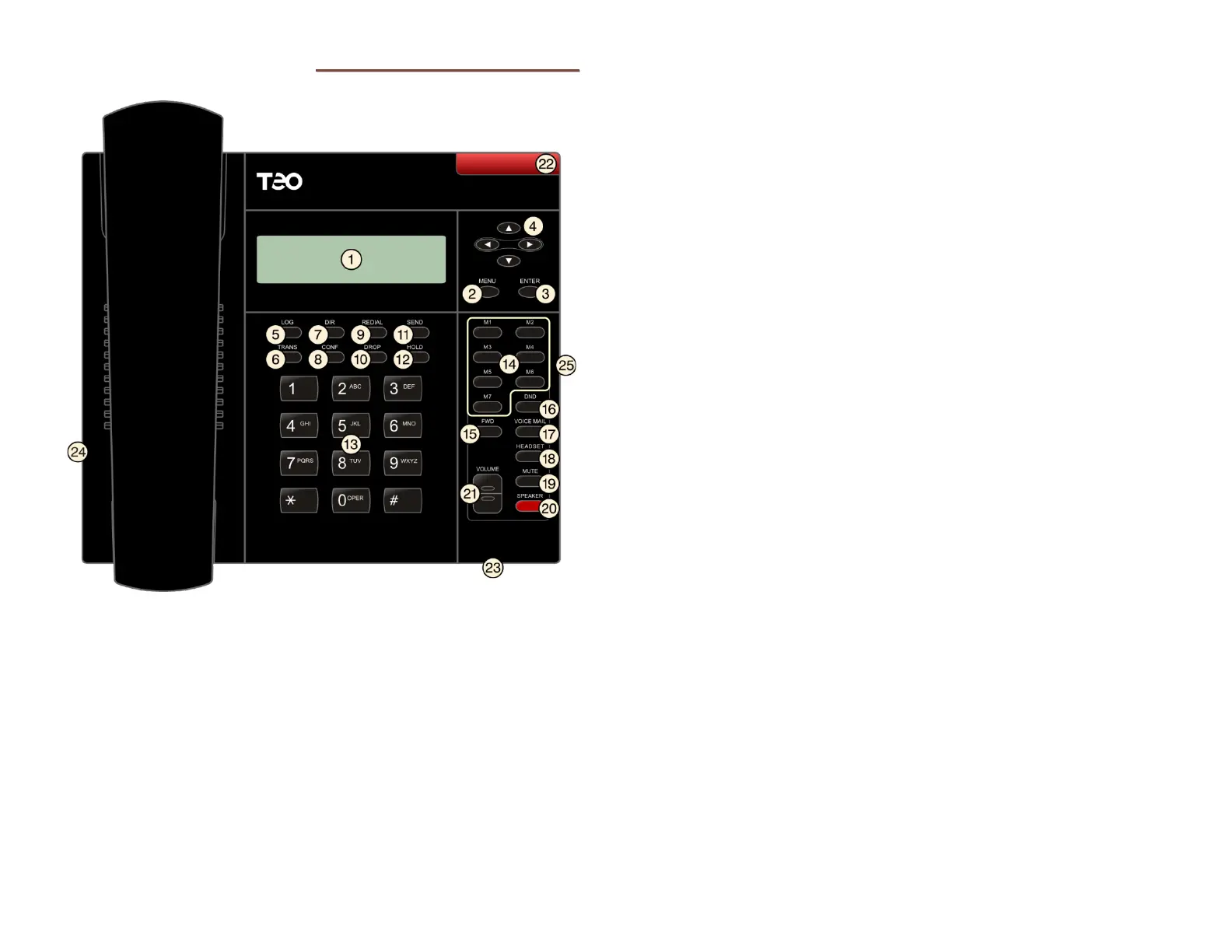
1) Display – shows the line ID, call state, caller ID, dialed digits,
network call control messages, elapsed time during calls,
the date and time of day, and setup options.
2) MENU Key – enters and exits Setup Mode (page 16).
3)
ENTER Key – selects menu options, saves option changes,
and can be used to initiate dialing.
4) Navigation (Arrow) Keys –
and
keys navigate within
menus. In editing modes, the
key moves the cursor one
position to the right and the
key moves the cursor one
position to the left and deletes characters.
5) LOG Key – displays Call Log options (page 11).
6) TRANS Key – transfers a call (page 7).
7) DIR Key – displays the Call Directory (page 13).
8) CONF Key – adds other parties to a conference call (page 8).
9) REDIAL Key – redials the last outgoing number (page 6).
10) DROP Key – removes the last party added to a conference
call, and disconnects you from a call and returns new dial
tone when not in conference mode (page
8).
11) SEND Key – initiates dialing after entering digits (page 6).
12) HOLD Key – places a call on hold (page 7), and enters a
pause in a Speed Dial or Voice Mail dialing string.
13) Dial Pad – dials telephone numbers, and sends DTMF tones
to external equipment such as voice mail systems. The dial
pad is also used for text and number entry during setup.
14) Multifunction Keys – programmable for use as Speed Dial
keys or feature activators (page
7).
15) FWD Key – forwards incoming calls to another phone (page
8), or may be used to set Presence (page 9).
16) DND Key – Do Not Disturb; makes the phone appear busy to
incoming callers (page
9).
17) VOICE MAIL Key – accesses voice mail services (page 15).
18) HEADSET Key – activates the headset (page 15).
19) MUTE Key – mutes the microphone when using the
speakerphone or handset/headset (page
14).
20) SPEAKER Key – activates the speakerphone or Call
Monitoring (if enabled by your installer) (page
14).
21) VOLUME Key – adjusts the receiver/speaker volume when on
a call; adjusts the ringer volume when on-hook (page
15).
22) Message Waiting Indicator – a bright red indicator is lit
when messages are waiting.
23) Microphone – used for hands-free (speakerphone) calling;
located under the right front of the telephone.



 To Next Page