GB
English
Instruction Manual
Multi Synergic 250 - Multi Synergic 380 - Multi Synergic 500 and Accessories
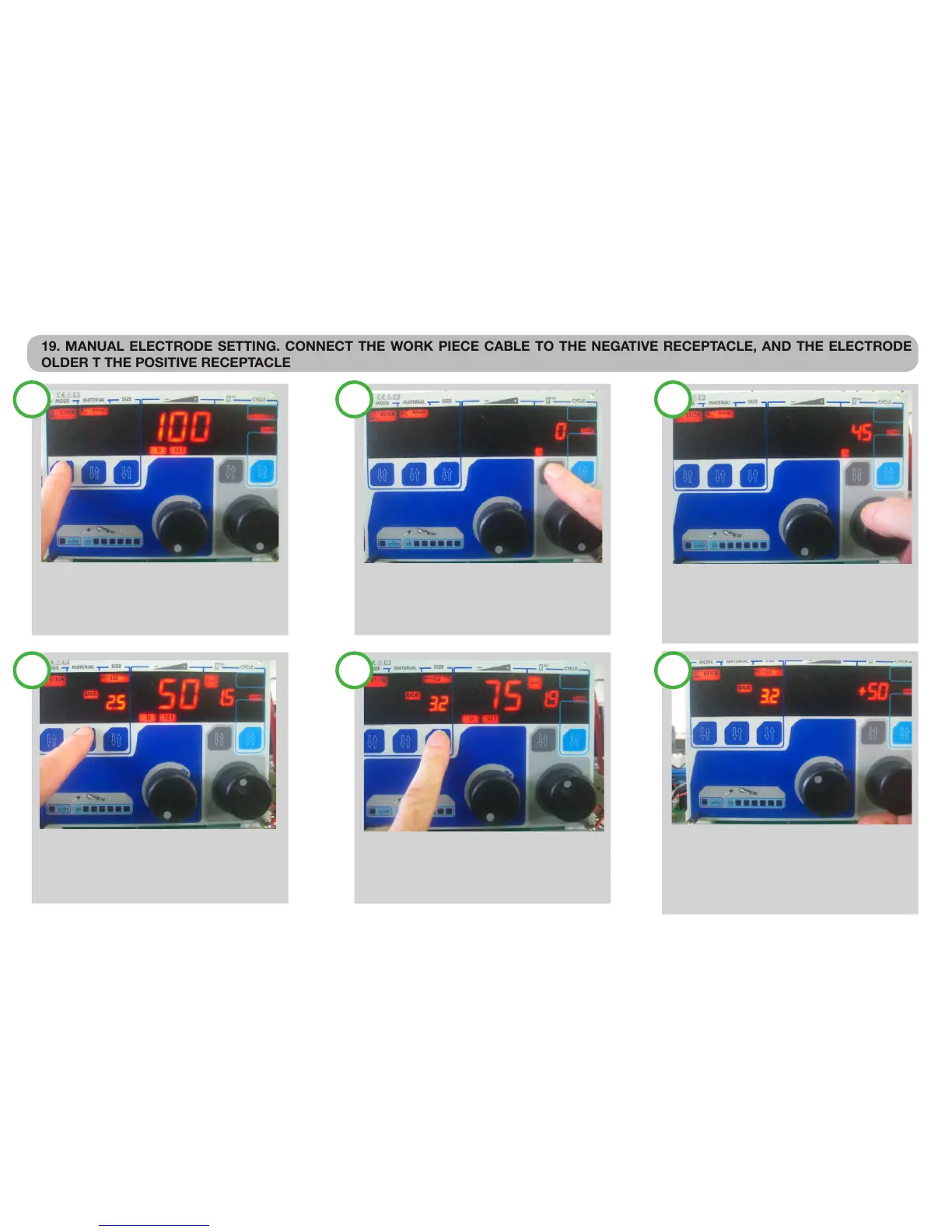
19. MANUAL ELECTRODE SETTING. CONNECT THE WORK PIECE CABLE TO THE NEGATIVE RECEPTACLE, AND THE ELECTRODE
OLDER T THE POSITIVE RECEPTACLE
SELECT MMA IN MANUAL:
With the rst push button, select STICK
With the second push button select MANUAL
With the main knob, adjust the welding current.
ADJUST THE WELDING DYNAMIC:
With the forth pushbutton select the dynamic
icon. The second display show the current set
value.
ADJUST THE WELDING DYNAMIC:
With the second knob, adjust the desired value
The dynamic can be adjusted from 0 to 100%
Dynamic increase the current for arc striking
Dynamic increase the current during drop transfer.
SELECT MMA IN SYNERGYC:
With the second push button, select the type
of the electrode.
SELECT MMA IN SYNERGYC:
With the third pushbutton select the size of the
electrode.
ADJUST THE WELDING CURRENT AND DYNAMIC:
With the FIRST knob, adjust the desired value,
the second display shows the material thickness.
Dynamic is automatic, but can be increased or
Decreased in % as the operator desire.
1 2 3
4 5 6
Page. 10


 To Next Page