GB
English
Instruction Manual
Multi Synergic 250 - Multi Synergic 380 - Multi Synergic 500 and Accessories
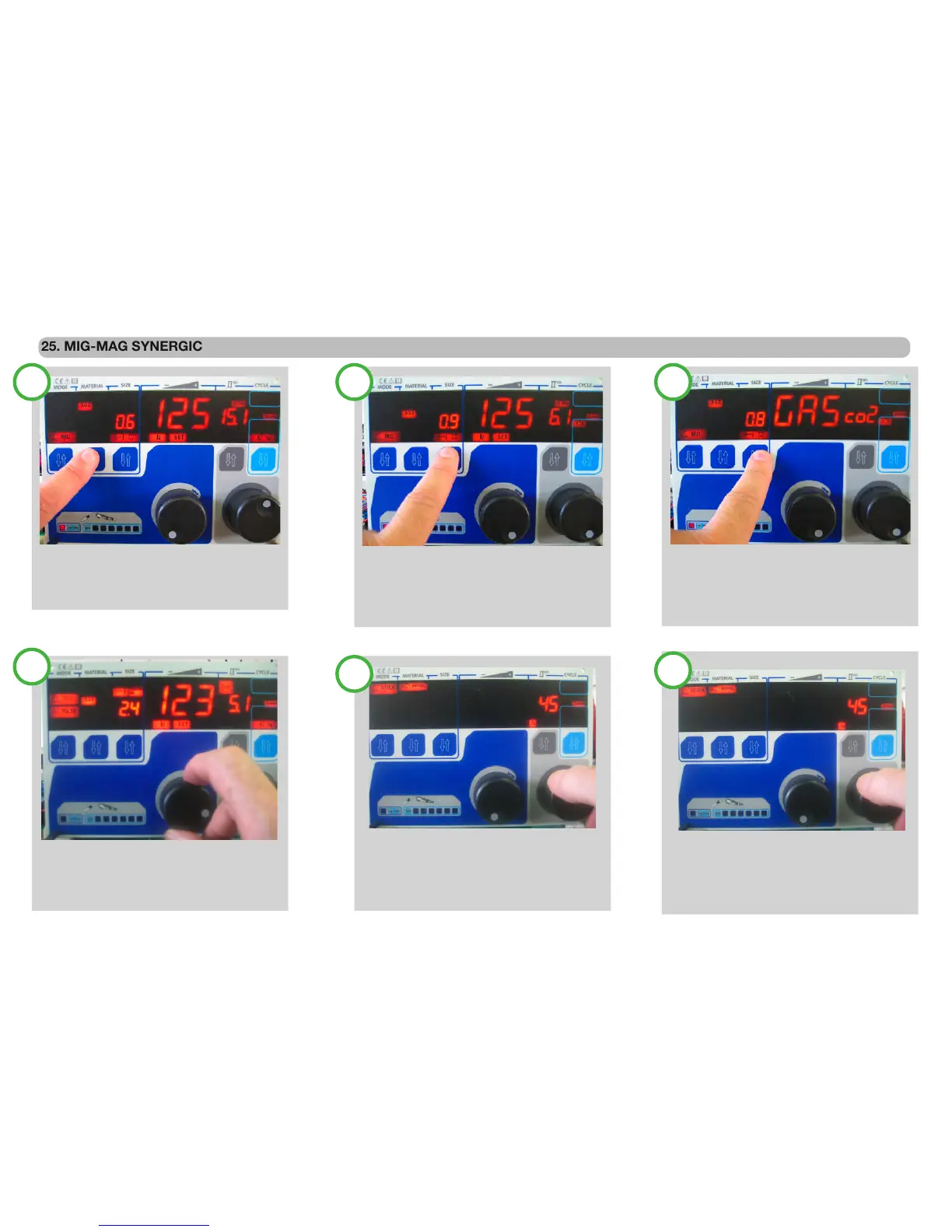
With the second knob, the arc length can e
adapted to the welding, The adjustment of the
arc length is +/- 20 and a symbol of the arc
length light on during the regulation
Adjust the welding current , in the little display
The value of the suggested thickness of the
welding material is proposed.
25. MIG-MAG SYNERGIC
To modify the second level parameters, select with the
forth push button.Once selected, use the second knob
to adjust. The little display, shows the correction value in
% That can increase or decrease up to 100% the
current synergic value.
SELECT SYNERGY MIG-MAG MODE:
With the rst push button, select MIG With
the second push button select the material in
Welding.
Complete the MIG Synergy selection:
With the third push button select the diameter
of The wire in use.. From this time all the adjust-
ment are automatically done from the synergy
selection.
Some synergic programs has more than one ver-
sion In this during the selection of the wire diam-
eter. The main display shows an indication about
this Program, use the main knob to select the de-
sired ones.
1 2 3
4
5
6
After 3 seconds of the adjustment trough one of the two knobs, the right display show the wire speed auto selected for the setting parameter.
Page. 16


 To Next Page