GB
English
Instruction Manual
Multi Synergic 250 - Multi Synergic 380 - Multi Synergic 500 and Accessories
20. TIG SETTING. CONNECT THE GAS INPUT TO THE GAS REGULATOR AND ADJUST THE GAS FLOW BETWEEN 6 TO 8 LITRES PER
MINUTE.
NOTE: generator provided with cooling unit can support even gas cooled tig torches. Do not forget to close the water circuit by using a suitable by-pass hose
placed between the inlet and outlet nipples (front and rear).
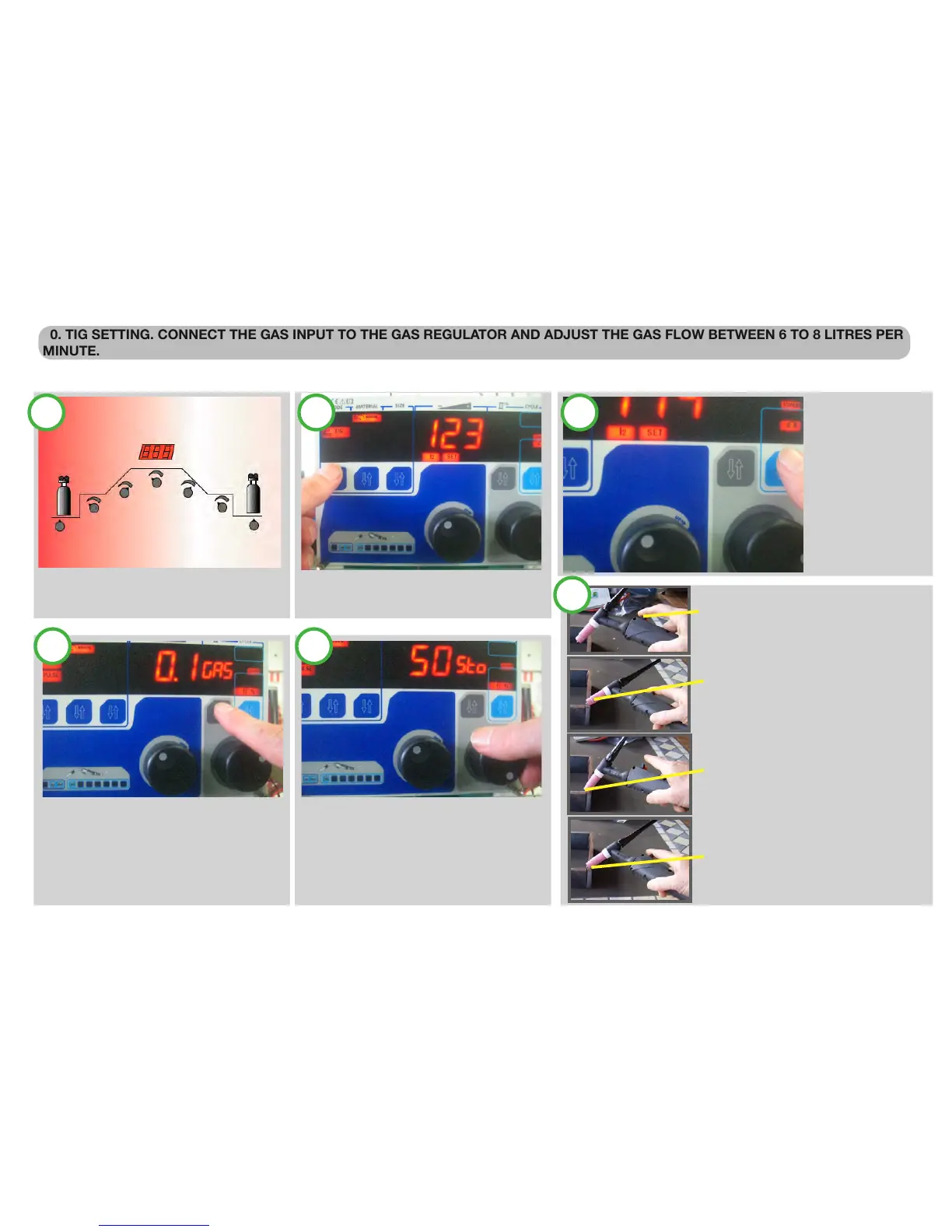
Full control of the cycle and easy access control. Pre-
gas; initial current; up slope; down slope; final craterfiller
current; post gas pulser TIG version.
SELECT MANUAL TIG MODE:
With the rst push button, select TIG
SELECT THE TORCH
SWITCH CYCLE:
With the fth push
button select the torch
switch Cycle.
If the timer cycle is se-
lected, than the time is
adjustable with the se-
lection trough the forth
Push button.
ADJUST THE SECOND LEVEL PARAMETER
With the forth push button select the other
welding parameter and adjust, with the second
knob, to the desired value PRE GAS; POST
GAS, icons light on and the Second display
shows the value.
ADJUST THE TIG CYCLE PARAMETERS:
When a cycle 2 step with slopes or 4 step with
Slope, is selected, the forth knob has also the
Capability to select the start current, up slope,
down slope and stop current.
All the data are stored in the internal memory
push the torch trigger
slow down the torch until the ceramic
nozzle touch the
workpiece; in this phase held the torch and
avoid any contact between tungsten and
workpiece
keeping the nozzle in contact, turn the
torch until the tungsten enters in contact
with the workpiece
maintaining the nozzle-work piece contact,
turn back the torch to the original posi-
tion; the arc strikes and the welding can be
performed
1 2 3
4 5
6
Page. 11


 To Next Page