The provided document is a Product Notice (Number 220009) from Genie, a Terex Brand, dated August 17, 2022, concerning a mandatory software update for specific aerial work platforms. It also includes an "ALC500 Software Update" installation instruction manual (Part No. 1303566GT, First Edition, First Printing, May 2022).
Function Description
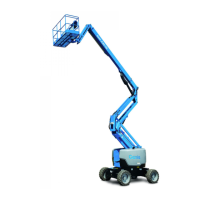
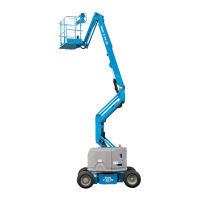
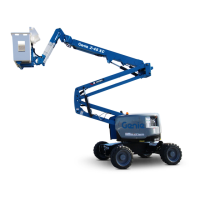
This document primarily addresses a mandatory software update for Genie Z-45XC and Z-62/40 aerial work platforms to ensure compliance with new ANSI/SAIA A92.20 and CAN/CSA B354.6 design standards. The update aims to correct two specific non-compliant features:
- Z-45XC:
- Allows full range of motion in transport configuration regardless of ground level.
- Enables manual platform leveling while another function is active.
- Z-62/40:
- Enables manual platform leveling while another function is active.
The software update will modify the machine's application firmware to bring these functionalities into compliance with the updated safety standards. The process involves downloading new firmware, installing it on a computer, and then transferring it to the machine's PCON (Platform Control) PCB using specialized software and cables.
The "ALC500 Software Update" manual provides detailed instructions for performing this firmware update, ensuring that the machine operates safely and in accordance with the latest industry regulations. It also emphasizes the importance of proper calibration after the software update.
Important Technical Specifications
The Product Notice and manual specify the following technical details and requirements:
Affected Models and Serial Numbers:
- Z-45XC: Serial numbers Z4525XCF-101 to 1848
- Z-62/40: Serial numbers Z62H-4653 to 4758
Required Application Firmware Versions:
- Z-45XC: S0866308 or newer
- Z-62/40: S0848106 or newer
Software and Hardware Requirements for Update:
- Computer/Laptop: Must have Microsoft operating system XP or newer.
- Cables:
- DB9 serial cable (female to male, suitable length).
- USB to DB9 adapter cable (if required).
- USB to DB9M cable (Genie Part No. 1252193GT, ordered separately).
- Software:
- WebGPIT™ software (Genie Part No. 215336GT, ordered separately). This software kit must be purchased if not already installed.
- Tools:
- 3/8 inch wrench
- 7/16 inch wrench
- 3/8 inch socket
- 7/16 inch socket
- Ratchet
- Documentation: Service and Repair Manual for the specific machine model (downloadable from Genie website).
Compliance Standards:
- ANSI/SAIA A92.20
- CAN/CSA B354.6
Allowable Hours for Update: 1 hour (for the software update procedure itself).
The manual also lists a comprehensive range of Genie models that utilize the ALC500 Control System, indicating the broad applicability of this type of software update procedure across various Genie aerial work platforms. These include S-40, S-45, S-60/S-65/S-60HC, S-60X, S-60XC, S-60 TraX, S-65 TraX, S-80/S-85, S-80X, Z-45/25 (J), Z-45 XC, Z-51/30, Z-60/34, and Z-62/40, each with specific serial number ranges.
Usage Features
The primary usage feature described is the software update procedure itself, which is critical for maintaining the safe and compliant operation of the affected Genie machines. Key steps include:
- Locating Affected Machines: Identifying machines within the fleet that fall within the specified model and serial number ranges.
- Accessing Firmware: Navigating to the Genie firmware website to download the correct application firmware file for the specific machine model (ALC500 Control System Type).
- Downloading and Installing Software: Accepting terms of service, downloading the zipped firmware file, unzipping it, and installing all executable files on the computer. Older software versions may be required to record existing parameters.
- Connecting to Machine: Opening the platform control box, connecting the computer's DB9 cable to the PCON PCB, and ensuring the key switch is set to platform controls with Emergency Stop buttons pulled out.
- Updating Firmware: Using the WebGPIT™ software to connect to the PCON, download the new Kernel file, and then the Application file. This involves selecting the appropriate files and following on-screen prompts.
- Parameter Management: Recording existing machine parameters (Setup/Models, Setup/Options, Setup/Speed Multipliers, Valve parameters) before the update, and then entering these parameters back into the machine after the update. The manual provides a detailed table for recording these parameters, including Machine Model, Engine Model, Market Selection, Steer Input, Lift Drive Option, Platform Level Cutout Out of Stowed, Alarm Option, Speed Dir 1, Speed Dir 2, and various Boom, Rotate, and Propel valve output minimum thresholds.
- Calibration: After the software update, the machine must be calibrated according to the procedures outlined in the appropriate Service and Repair Manual. This is a crucial step to ensure proper functionality and safety.
- Returning to Service: Once the update and calibration are complete, the platform control box must be securely closed, and the machine can be returned to service.
The document highlights the importance of timely action, stating that the software update "must be done as soon as possible but no later than 90 days from receipt of this notice."
Maintenance Features
The document outlines several maintenance-related features and responsibilities:
- Mandatory Action: The software update is a mandatory action required to ensure the machines comply with current safety standards.
- Qualified Personnel: The procedure "shall be completed by a person trained and qualified on the repair of this machine."
- Machine Condition: Emphasizes the need to "immediately tag and remove from service a damaged or malfunctioning machine" and "repair any machine damage or malfunction before operating the machine."
- Safety First: Before starting installation, users must "read, understand and obey the safety rules and operating instructions in the appropriate operator's manual" and "read this procedure completely and adhere to the instructions. Attempting shortcuts may produce hazardous conditions."
- Tool Availability: Ensures that "all necessary tools and parts are available and ready for use."
- Documentation: Requires reference to the Service and Repair Manual for calibration procedures.
- Warranty Information: The labor and travel miles for this bulletin are covered under Genie's LIMITED PRODUCT WARRANTY. Owners who are not authorized Terex AWP dealers are instructed to contact their nearest AWP dealer for assistance. Warranty claims are submitted online by dealers.
- Completion Form: A completion form is provided to verify that the Product Notice has been completed on the listed machines. This form needs to be filled out, signed, and returned to the Terex AWP Warranty Department or filed as an online warranty claim.
- Owner Update Form: An "New Owner Update Form" is included for sellers to report new owner information (name, address, phone number) to Genie within 60 days of sale, as required by Genie and ANSI standards. This form also allows reporting of machines that could not be inspected or repaired (e.g., scrapped, exported, stolen).
- Product Support: Provides contact information (email and telephone numbers) for Terex AWP Warranty Department and Product Support for various regions (North America, Asia-Pacific, Brazil, South America, Europe, Middle East, Australia, etc.) for warranty claims and technical assistance.
- Machine Registration: Encourages owners to register their machines via the Genie website.
- Open Bulletin Search: Directs users to a link to search for open bulletins for their machines.
- Mobile App: Mentions a "Genie Tool for Smart Phones and Mobile Devices" app that offers Safety and Product Notice information.
This comprehensive approach ensures that not only the technical update is performed correctly, but also that all associated administrative, safety, and support aspects are addressed, maintaining the long-term serviceability and compliance of the Genie aerial work platforms.

 Need help?
 General






 To Next Page
