EN
5
THE CONTROL PANEL
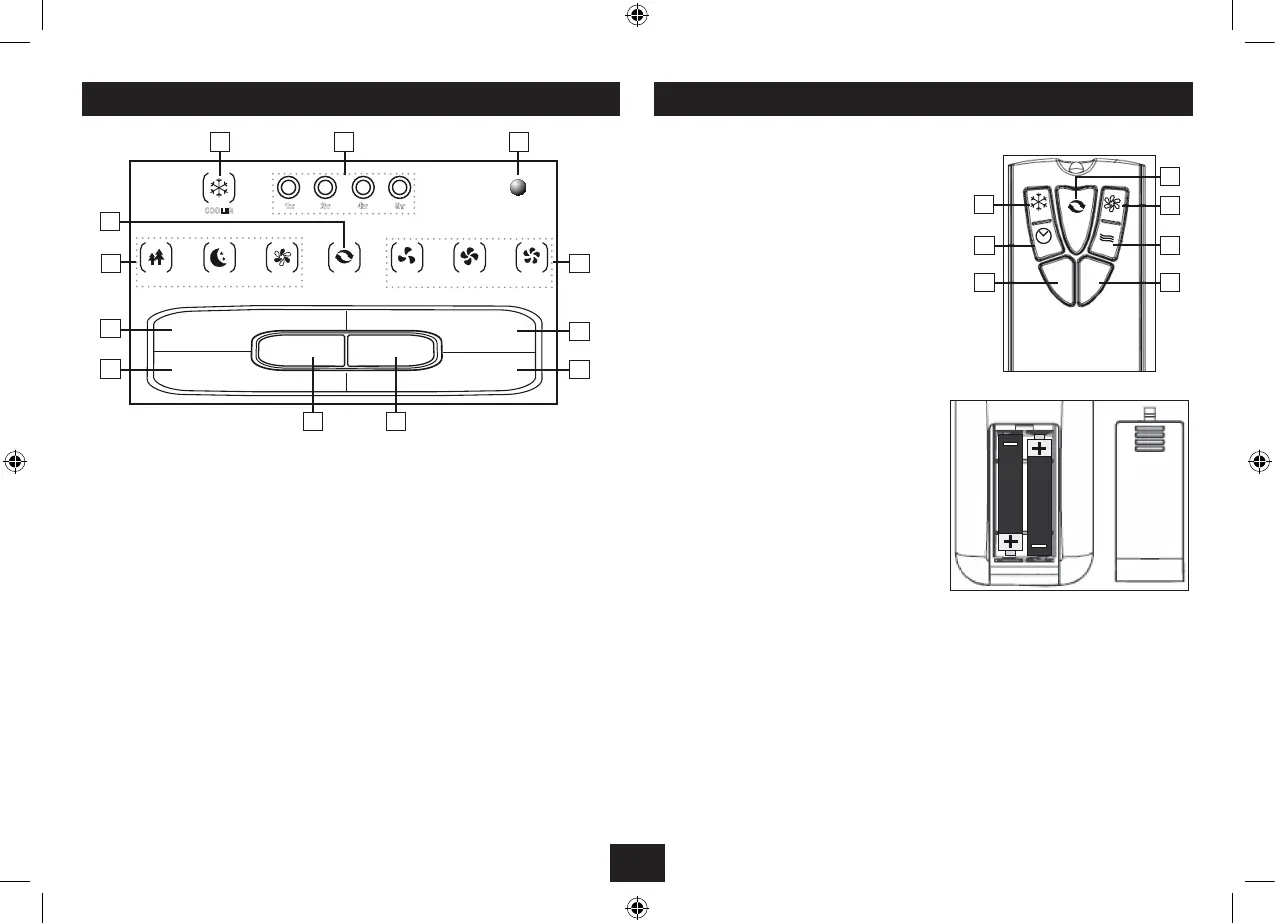
Control keys are at the bottom of the control panel and are indicated by numbers.
Status indicators are at the top of the panel and are indicated by letters
Timer: 1. Press to select timer operation. You can select 1, 2, 4, 8 hours or continuous operation.
When timer operation is selected the corresponding time indicator B will light up. If no timer
lights are on the cooler is in continuous operation mode.
Swing: 2. Press to select Swing operation. In this mode the horizontal louvres oscillate for wider
cooling. Swing mode is indicated by the Swing indicator D.
ON/OFF: 3. Switches the cooler to operational mode or Standby. In standby mode only the
Standby indicator C is illuminated. The Standby indicator is always lit when the cooler is on.
Speed: 4. Press to select Low, Medium or High fan speed. The appropriate speed is indicated by
the Fan Speed indicator F.
Mode: 5. Press this key to alter the mode. The mode light E indicates the selected mode. The
modes are described on the preceding page.
Cooler:6. Press to select Cooler operation. The cooler indicator A will illuminate. Cooler operation
can be used in conjunction with all operating modes.
REMOTE HANDSET
The handset replicates all Control Panel functions.
Cooler: 1. Select cooler operation.
Timer: 2. Select Timer operation.
ON: 3. Switch the unit on.
OFF: 4. Switch the unit to Standby.
Speed: 5. Select a Fan speed.
Mode: 6. Select an operating mode.
Swing:7. Select Swing operation.
There is a risk of re and burns if a battery is handled improperly. Do not disassemble, crush,
puncture, short external contacts, or dispose of in re or water. Do not attempt to open or service a
battery. Discard used batteries in accordance with recycling regulations in force in your area.
Handset Operation
Point the handset at the control panel of the cooler and press the relevant key.
The handset should be within 5 metres of the cooler and there must be a clear line of sight between
the two units.
Inserting Batteries
You will need to purchase two AAA batteries.
Open the cover. Unwrap the batteries and place
them in the battery compartment with the
polarity as shown. Replace the cover.
Always use AAA batteries and always replace
them in sets. Never mix old and new batteries.
Very weak batteries can leak and damage the
handset. Replace them in good time!


 To Next Page