EN
6
OPERATION
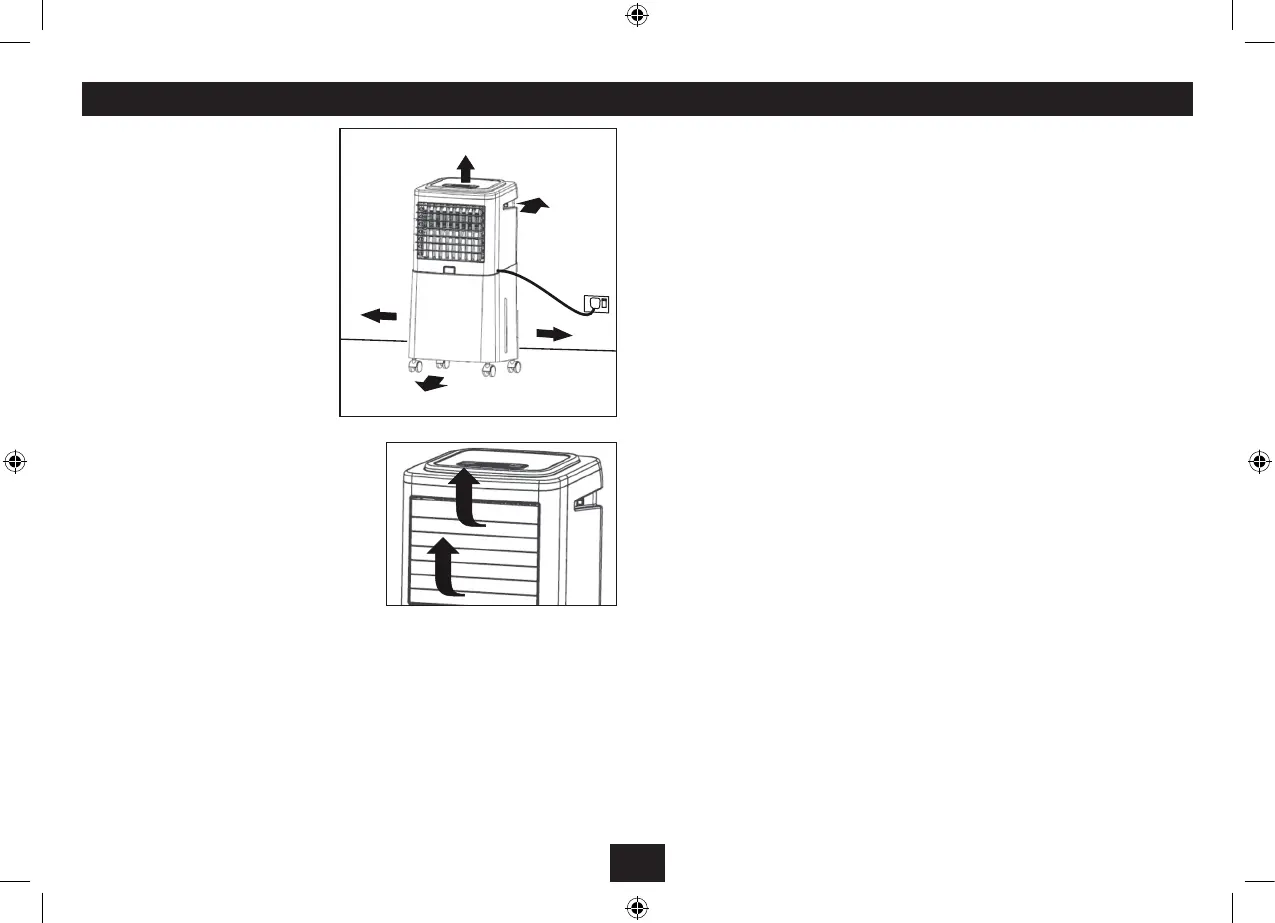
Place the cooler on a smooth, level oor.
Allow ample space all round and above the
unit for good air circulation.
For added security, press the tabs on the rear
casters down to lock them in place.
Ensure there is sucient water in the tank if
you are going to use the cooler facility.
Switch the ON/OFF switch on the cooler
to the OFF position.
Unwrap the power cord fully and plug the
unit into a mains point. Switch on at the
mains point if necessary.
Carefully place your ngers under the top and
second lowest louvres and lift them upwards.
Once open they can be angled up or down as
required.
As a safety feature the cooler will not operate if
the louvres are closed.
SWITCHING ON AND OFF
Switch the ON/OFF switch on the cooler to the ON position. The red Standby light on the cooler will
illuminate showing the cooler is ready for operation.
To switch the cooler out of standby press the ON key on the handset or the ON/OFF key on the control
panel. The default operating mode is Normal with a Low fan speed. When you switch the cooler on
at the mains this is the mode that will be selected when you bring the cooler out of standby.
To switch the cooler into standby use the OFF key on the handset or the ON/OFF key on the control
panel. In Standby the last selected operating mode is retained in the cooler’s memory. and will be
restored when the unit is next operated.
If the unit is not going to be used be used for some time switch the cooler o at the ON/OFF switch
and unplug the cooler from the mains.
Selecting a Fan Speed: Press the SPEED button to select Low, Middle or High fan speed.
Using ‘Modes’: Set the desired speed, then press the MODE button to change the operating mode.
The Swing Function: Press the SWING button to switch the horizontal louvres oscillation on/o.
Hint: By briey switching the SWING button on and o you can direct the ow of air in any direction
you choose.
Using the Timer: The Timer function allows you to select continuous operation or set the unit to
switch to Standby after the set period. This function can be operated under any mode.
Evaporative Cooling: When there is water in the tank, press the COOLER button to start using the
Evaporative Cooling feature of this unit. The “COOLER” indicator lights up on the Control Panel.
NOTE: If there is not enough (or no) water in the tank, the water pump noise will increase as a
warning. At this point you should either switch the cooler function o, or switch the cooler o
via the ON/OFF switch and unplug the unit from the mains before relling the water tank and
re-starting operations.
To rell the tank:
Switch o and unplug the cooler.
Carefully lift o the cooler unit and place it on a level surfacel.
Rell the water tank.
Re-assemble the cooler.
NEVER USE THE COOLER FEATURE WITH INSUFFICIENT WATER IN THE TANK
After Use: Set the cooler to standby. If you are not going to use the cooler for an extended period,
switch the cooler o, unplug the unit from the mains and then empty the water.
Do not leave water to stand in the tank for more than two days at the maximum. Always
operate the cooler with clean fresh water.
NEVER OPERATE THE APPLIANCE WITH CLOGGED FILTERS OR MISSING FILTERS.


 To Next Page