Driving basics
6-2 Driving your vehicle
Driving your vehicleDriving b asics
Starting the vehicle
To start the vehicle, turn the key to the ON
position.
All warning indicators on the instrument
panel will illuminate briefly. When these
indicators extinguish and the gear selector
buttons illuminate, the vehicle is ready to be
driven.
To drive the vehicle, press the brake pedal
and press the D (Drive) or R (Reverse) gear
button. Place your foot on the brake pedal to
change the gear out of P (Park) or N
(Neutral).
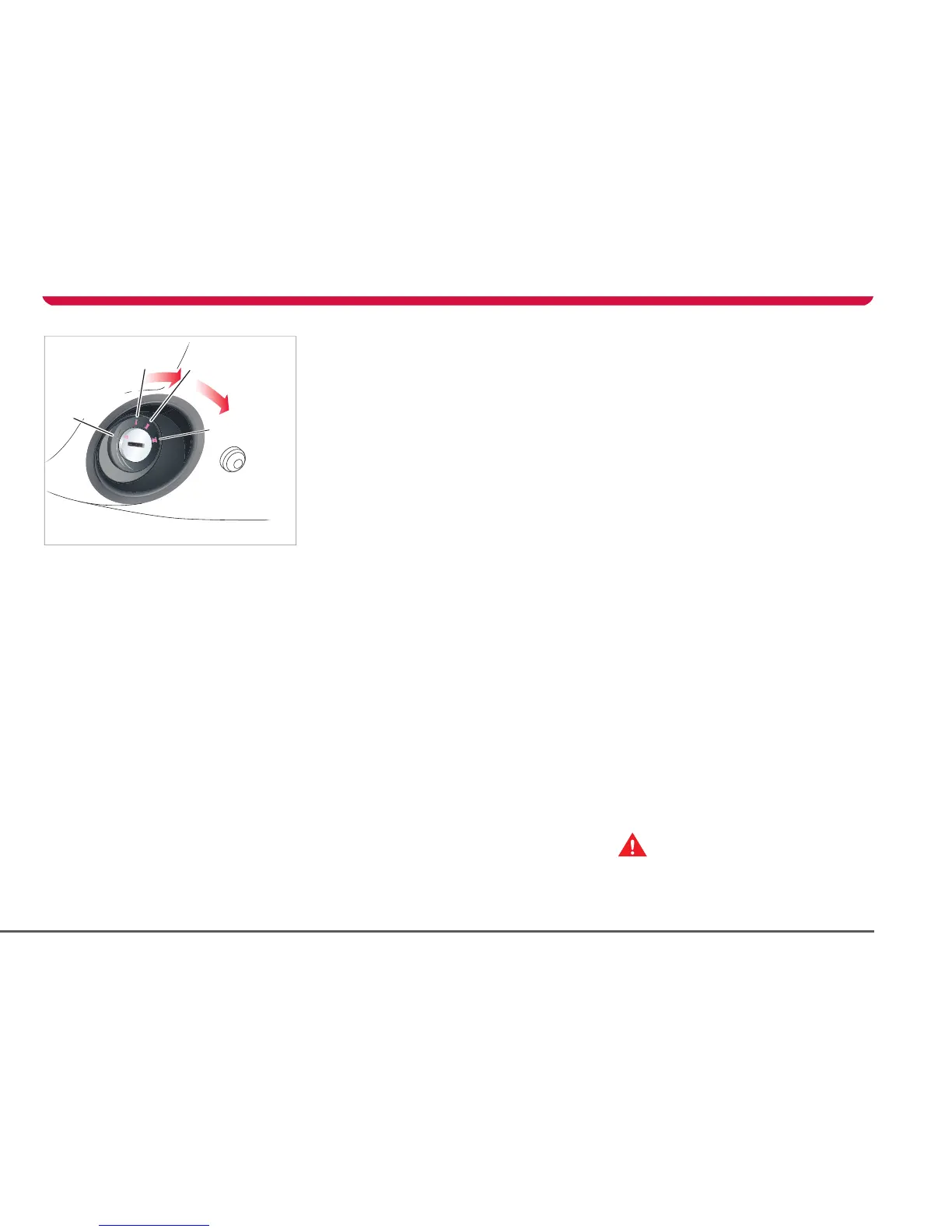
Key positions
The starter switch has the following key
positions to control the electrical circuits and
steering column lock.
OFF
When the key is OFF, the vehicle is
automatically in the P (Park) gear position
and the following features are operational:
• Touch Screen
All interior and exterior lights (including
trunk light and hazard warning lights)
• Central door locking switch
• Trunk release switch
Note: When you turn the key to the OFF
position, the circuits that operate in ACC
continue to operate until you remove the key.
ACC
In addition to the features that operate when
the key is OFF, the following features operate
when the key is in the ACC position:
• Audio and navigation systems
• Brake lights
• Windows
• Seat heaters
• LCD panel
ON
When the key is in the ON position, all
controls and switches, lights, instruments,
warning indicators and electrical circuits are
operational.
PERFORMANCE
Move the key all the way forward to engage
“Performance” mode. In Performance mode,
you can achieve maximum power and
minimize the time it takes to accelerate from
0-60 mph (0-100 kmh). When in
Performance mode, you’ll notice a small blue
letter “P” in the upper right-hand corner of
the Touch Screen’s Drive screen.
Note: You will be unable to use the key to
engage Performance mode within the first 10
seconds of starting the vehicle, or if you are
driving in Range mode with the Battery
almost fully depleted.
Use this mode with caution because it allows
the Battery to run at a higher temperature—
which reduces the life of the cells within the
Battery. Frequent use of this setting is
strongly discouraged.
To cancel Performance mode, turn the key all
the way forward again. You can also cancel it
using the Touch Screen.
You can also engage Performance mode at
any time using the Touch Screen. For more
information, see Performance, page 5-4 or
refer to the Touch Screen Users Manual
included in your owners package.
Removing the key
To remove the key, turn the key to the OFF
position. Exterior lights (except hazard
warning lights) automatically turn off when
you remove the key.
If you leave the key in and open the driver’s
door, you’ll hear an audible alert reminding
you to remove the key.
WARNING: Never remove the key when
the vehicle is moving. The steering
column will lock and you can no longer steer
the vehicle.
S


 To Next Page