8
ENG
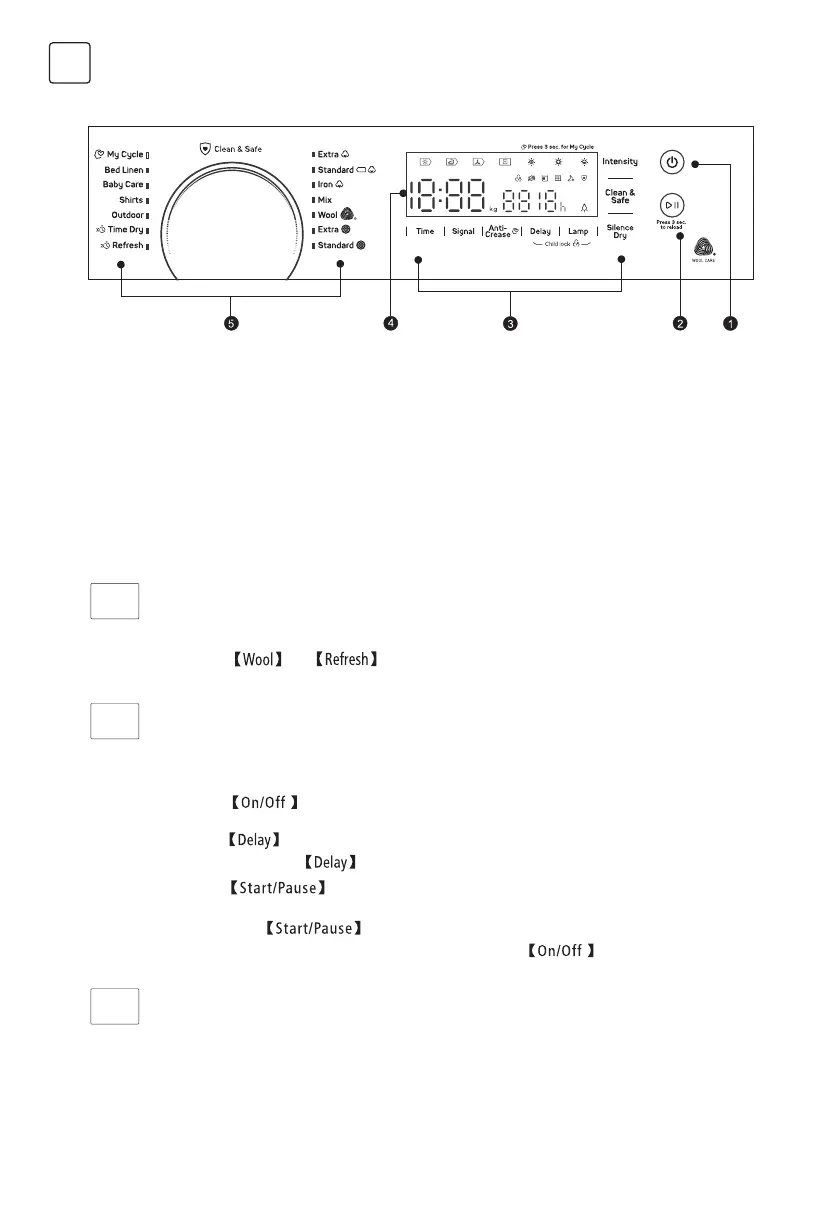
Control Panel
1. On/Off
Product is on/off.
2. Start/Pause
Press the button to start or pause the drying
cycle.
3. Option
These buttons are used for setting additional
functions.
4. Display
The display shows the setting, estimated
program time remaining and status messages
of your dryer.
5. Programmes
Different drying cycles can be selected
according to the users need and the type of
laundry to be dried.
WT10H90M
Option
Delay
This function is used for delaying the start of the drying programme up to 12 hours.
When the delayed programme starts, the time starts to countdown on the display and the delay icon
blinks.
1. Load your laundry and make sure the machine door is closed.
2. Press the button,then use the programme selector knob to select the desired
programme.
3. Press the button.
4. Repeatedly press the button to select the desired delay time.
5. After the button is pressed, the Dryer is at the running condition. The drying
procedure will be automatically performed when the delay time is over.
6. If you press the button again, the delay function will be paused.
7. If you want to cancel the “Delay” function, please press the button.
Anti-Crease
At the end of the drying cycle, the anti-crease time is 60 minutes (default) or 30minutes and
90minutes(selected).
This function prevents the laundry from creases. The laundry can be removed during the anti-crease
phase. Except and , all the other programmes have this function.
Silence Dry
Rotate speed of the drum will drop down to reduce the noise of the dryer,but the drying time will
extend.
Delay
Anti-
Crease
Silence
Dry



 To Next Page