5 First steps
11
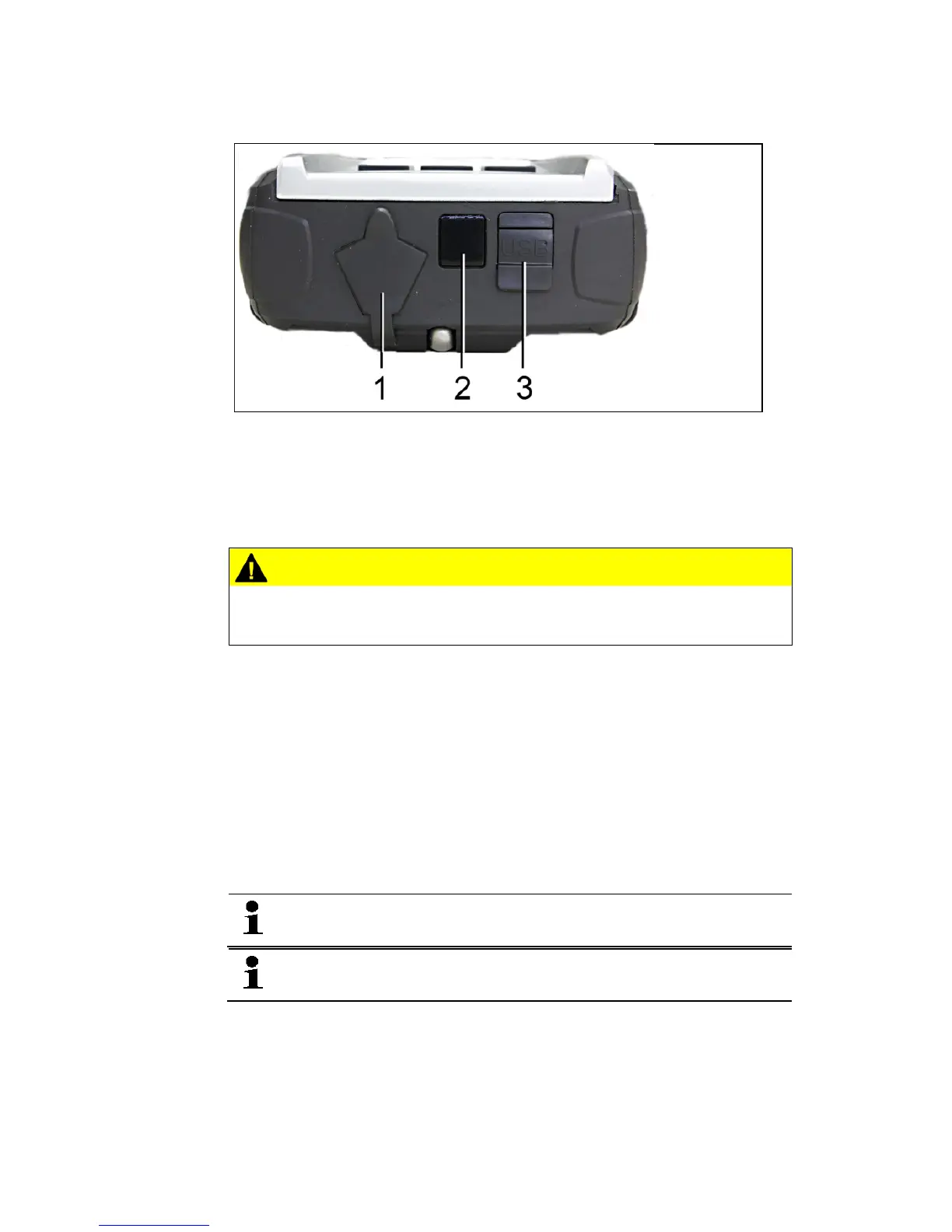
Interfaces
1 Mini-DIN connection for optional temperature sensors, testo 552
and accessories
2 IR-interface for testo protocol printer
3 Mini-USB connection for power supply unit and connection to
PC
CAUTION
Risk of injury from infrared beam!
> Do not direct infrared beam at human eyes!
5 First steps
Inserting batteries/rechargeable batteries
1. Unfold the suspension attachment and open the battery
compartment (clip lock).
2. Insert the batteries (scope of delivery) or rechargeable batteries
(4 x 1.5 V, type AA / NiMH / AA) into the battery compartment.
Observe the polarity!
3. Close the battery compartment.
When not in use for long period: Take out the batteries /
rechargeable batteries.
Recharge the rechargeable batteries completely before
using the instrument.
Shop for Data Logging products online at: www.DataLoggerStore.com 1.877.766.5412



 To Next Page