5 First steps
12
Switching the instrument on
> Press [].
- Initializing phase:
• All display segments light up (duration: 2s).
- Measurement view is opened.
The first time the instrument is switched on after a battery has been
inserted or replaced, the following factory settings are stored:
• Language: English UK
• Date: 01/01/2011
• Time: 12:00
• Temperature unit: °C
• Pressure unit: bar
• Vacuum unit: mbar
• Pressure mode: prel
• Weight unit: kg
• Refrigerant: R12
To change the default settings:
See Making settings, page 13.
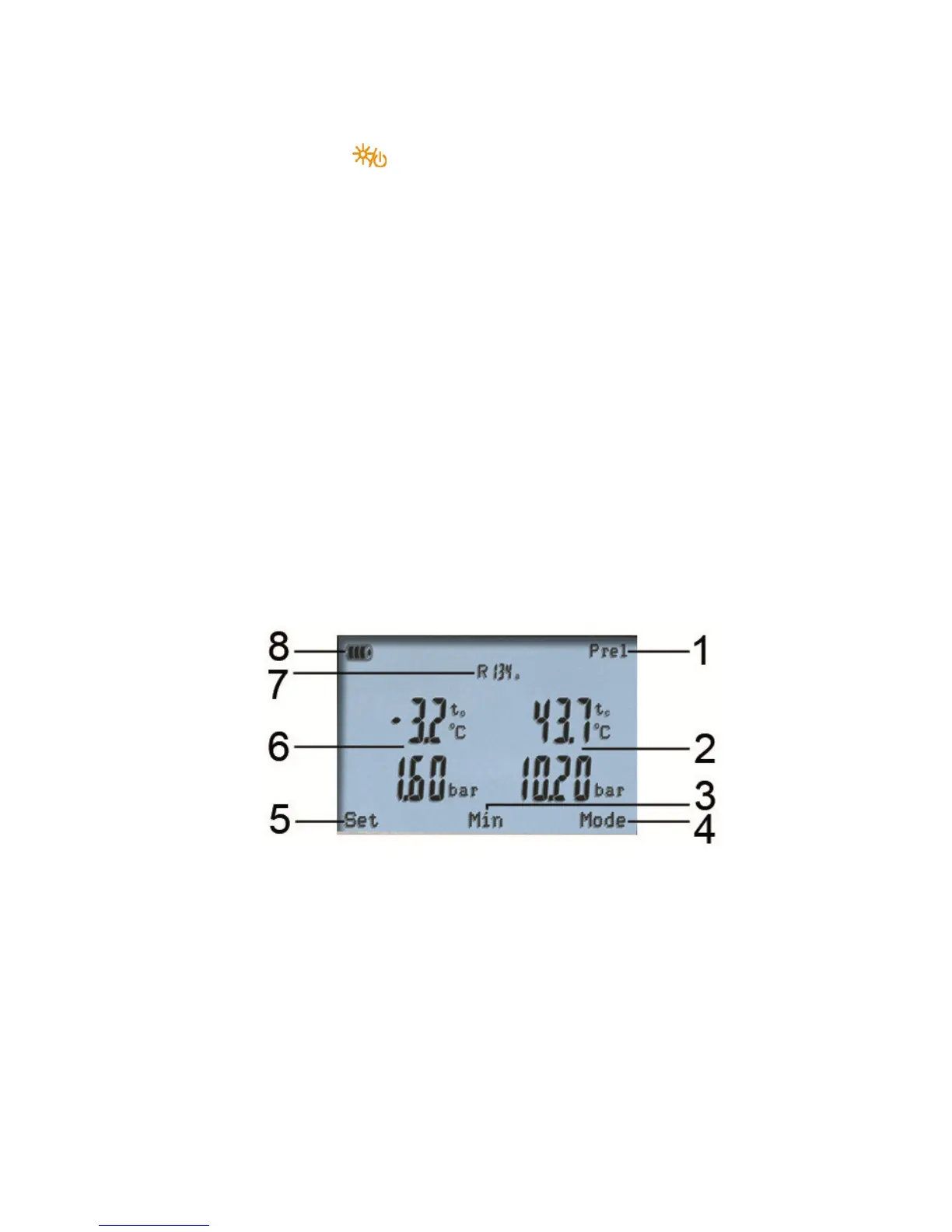
Display
1 Selected pressure mode
2 Condensation temperature/ acc. to temperature sensor right /
subcooling / differential temperature sensor left&right. The
display reading of measurement values varies in dependence
on the set mode
See also Performing the measurement, page 19.
3 [Min/Max/Mean/Normal] (exemplary for pressure/temperature
mode): The middle multi-function key can be used to display the
minimum, maximum and mean values.
4 [Mode] selectable via the right multi-function key
See also Performing the measurement, page 19.
Shop for Data Logging products online at: www.DataLoggerStore.com 1.877.766.5412



 To Next Page