8 Service and maintenance
18
1. Connect the thermocouple adapter to the instrument: Insert the adapter
into the COM jack and into the V/Ω/diode/capacitance. jack. Ensure
correct polarity!
- The thermocouple adapter switches on automatically.
- The instrument is in AUTO V mode.
2. Activate AUTO RCDC measuring mode for temperature
measurements: press [] >2 s.
- The measured values are indicated in °C and °F on the LC display.
8 Service and maintenance
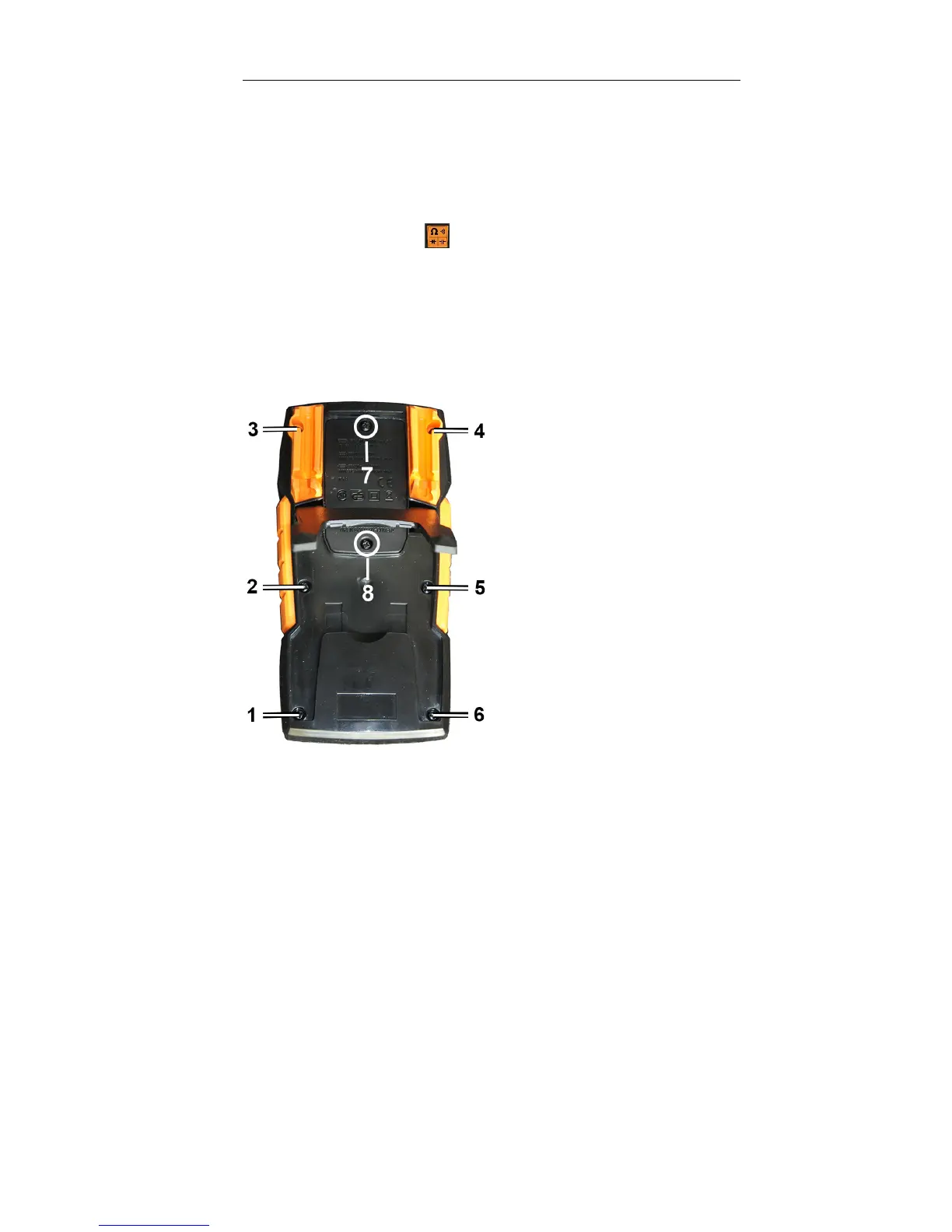
8.1. View of the back of the instrument
Screws 1 - 6: housing
Screws 7 and 8: open the battery compartment
8.2. Replacing the batteries
The batteries need to be replaced when the battery icon appears on the LC
display.
✓ Instrument is switched off and de-energized.
1. Fully disconnect the instrument from the test leads.
2. Using a screwdriver, unscrew the two metal screws (7, 8) on the
battery compartment until the battery compartment cover can be
removed. Do not unscrew the screws completely.
3. Remove the spent batteries.
4. Insert new batteries, type AAA / IEC LR03 (1.5 V), ensuring correct
polarity.
5. Put the battery compartment cover back on and screw down.


 To Next Page