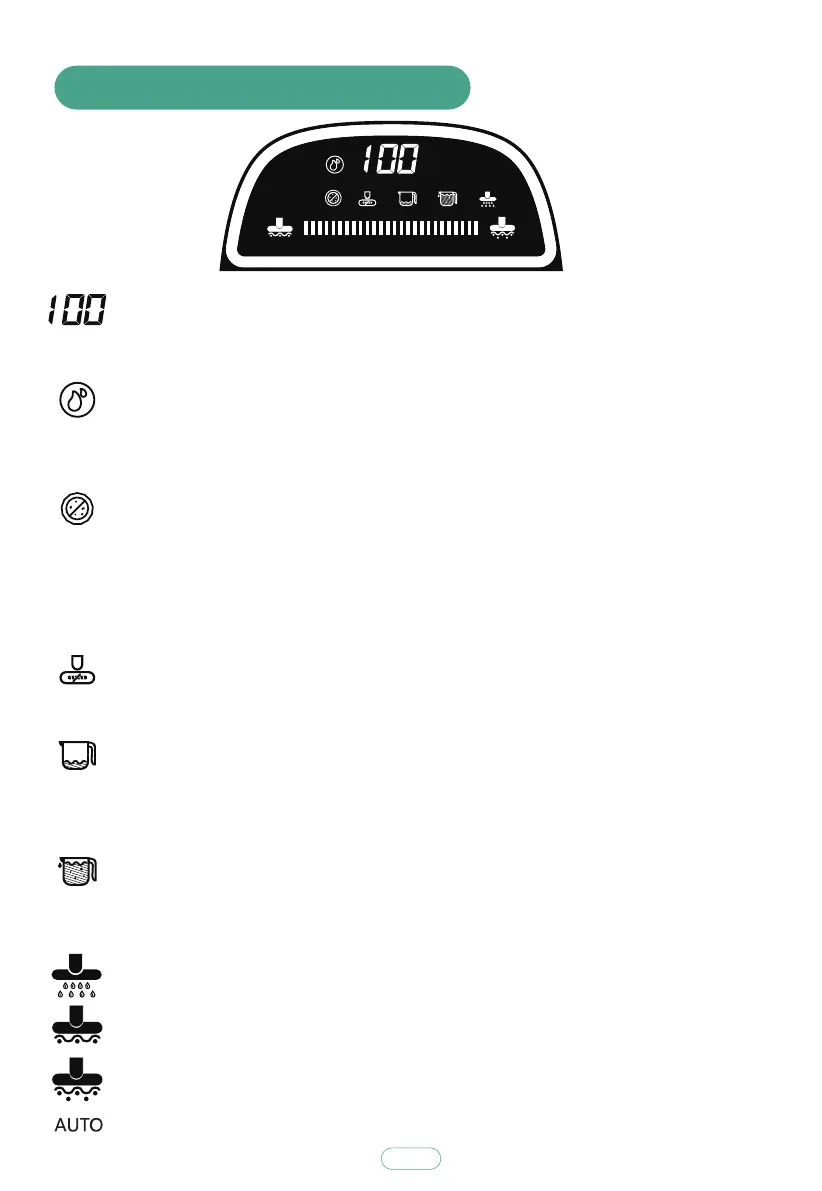
7. Introduction of Icons on Display
11
Energy-saving mode: The icon illuminates under auto-washing mode.
Strong mode: The icon illuminates under auto-washing mode.
Roller brush entangling: When roller brush is not assembled or is stuck or
entangled, voice prompt of “roller brush is not assembled” or “please
clean roller brush” will be heard, the icon will illuminate.
Insufficient water in clean water bucket: When water in clean water bucket
is insufficient, the icon will flash, voice prompt of “insufficient water in
clean water bucket” will be heard; after water is filled into bucket and
auto-washing is restarted, the icon will go out.
Sewage bucket is full: When sewage reaches warning line, the icon will flash,
machine will stop, voice prompt of “please empty sewage bucket” will be
heard; after sewage bucket is emptied and auto-washing is restarted, the
icon will go out.
Auto-cleaning: After auto-washing is finished, the icon will flash to remind
auto-cleaning. When machine is placed onto charging stand and its battery
level is above 30%, press “Auto-cleaning Button”, the icon will illuminate
and machine will enter auto-cleaning mode (auto-cleaning takes 80 s).
Battery level: Displayed from “0” to “100”, “0” indicates no power,
“100” indicates fully charged. Illuminating indicates working, flashing
indicates charging.
AUTO
Auto-washing mode: The icon illuminates under auto-washing mode.
Water outlet icon: Light on: water cleaning mode;Light off: dry suction mode.
UV disinfection: This is disabled by default under auto-washing mode, when
machine is lifted, UV lamp will turn out automatically, the icon will also turn
out; when machine is placed on floor, UV lamp will turn on, the icon will
illuminate. Long press UV Button for 2 s, machine will enter UV disinfection
mode, the icon will illuminate; long press UV Button again for 2 s, machine
will exit UV disinfection mode, the icon will turn out.



 To Next Page