EasyManua.ls Logo

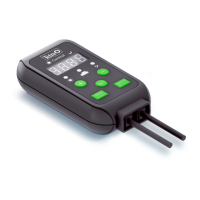
Tetra LightWave Timer - User Manual

Tetra LightWave Timer
140 pages
Print Icon
To Next Page IconTo Next Page
Loading...
UK
D
F
NL
I
E
P
S
DK
PL
CZ
RUS
Instruction manual
Bedienungsanleitung
Mode d‘emploi
Gebruiksaanwijzing
Istruzioni
Instrucciones
Manual de instruções
Bruksanvisning
Brugsanvisning
Instrukcja użytkowania
Návod k použití
Руководство по эксплуатации
LightWave Timer
3
14
24
35
46
57
68
80
91
102
114
125
For more information: www.tetra.net

Table of Contents

Questions and Answers

  • L
    Lisa GomezJul 28, 2025
    Why is my Tetra LightWave Timer Other LED light not lighting up?
    • M
      melissa62Jul 28, 2025
      If the Tetra LED light isn't lighting up, there might be a few reasons: * The plug-in connectors may not be properly inserted; ensure they are correctly connected. * The switch on the power supply may be turned off; press the switch to turn it on. * The brightness might be set too low; try increasing the brightness. * You might be using an incompatible power supply; use the original power supply.
  • C
    Christina BoydAug 2, 2025
    What to do if the Tetra Other LightWave Timer displays the wrong time?
    • R
      Ross ThompsonAug 2, 2025
      If the LightWave Timer is displaying the wrong time, it's likely because the power supply has been interrupted. To fix this, set the current time correctly.
  • A
    andrew98Aug 9, 2025
    Why is my Tetra Other LED light too dark or flickering?
    • H
      hurleyjessicaAug 9, 2025
      If the LED light is too dark or flickering, it could be due to a few reasons: * The brightness might be set too low; increase the brightness. * An effect may be enabled; once the effect has finished, the brightness will automatically reset. * You might be using an incompatible power supply; use the original power supply.
  • C
    ccalhounAug 14, 2025
    How to fix Tetra LightWave Timer Other effects that do not start or start at the wrong time?
    • M
      Michelle WagnerAug 14, 2025
      If the effects aren't starting or are starting at the wrong time, here are a few things to check: 1. The current time might not be set correctly; set the current time correctly. 2. The start time of the effect might not be set correctly; set the required start time. 3. The effect may be disabled; enable the effect.
  • M
    Michael FranklinAug 20, 2025
    What to do if the Tetra Other LightWave Timer will not switch on or the display does not work?
    • M
      michaelsandersAug 21, 2025
      If the LightWave Timer won't switch on or the display isn't working, check the following: * Ensure the power supply is connected to the mains. * Verify the LightWave Timer is connected to the power supply. * Make sure you're using the original power supply, as an incompatible one may be the cause.

Summary

Safety Warnings

Manual and Safety Information

About This Manual and Safety

Explains manual structure, foreword, and safety prevention guidelines.

Product Details

Scope of Delivery

Lists the components included with the LightWave Timer.

Product Basics and Intended Use

Details the timer's function and its recommended applications.

Assembly and Initial Setup

Assembly and Attachment

Instructions for physically attaching the device to an aquarium.

Initial Use and Power Interruption

Guidance on first-time setup and handling power supply interruptions.

Device Operation

Detailed Setup Procedures

Setting Current Time

Steps to set the current time on the LightWave Timer.

Setting On;Off Times

Configuring the switch-on and switch-off times for the LED light.

Sunrise;Sunset Effect Setup

Enabling and configuring the sunrise/sunset lighting effect.

Cloud Effect Setup

Enabling and configuring the cloud lighting effect.

Thunderstorm Effect Setup

Enabling and configuring the thunderstorm lighting effect.

Maintenance and Troubleshooting

Maintenance Procedure

Instructions for cleaning and maintaining the LightWave Timer.

Troubleshooting Common Issues

Solutions for malfunctions like power issues or LED problems.

Disposal and Specifications

Proper Disposal Methods

Guidance on how to safely dispose of the electronic device.

Technical Specifications

Key technical details including voltage, power, dimensions, and weight.

Warranty Information

Details on the product's warranty period and claim process.

Tetra LightWave Timer Specifications

General IconGeneral
BrandTetra
ModelLightWave Timer
CategoryOther
LanguageEnglish

Related product manuals