SEASIDE
11
EN
Blower menu
B l o w e r
A I R
AUTOCONFIRM:
If no button is pressed for 5 seconds while the Air menu remains active, the current setting AUTOCONFIRMS and the
display reverts to the Blower menu.
AIR adjustment display
1 5 3 6 ° C 2 0 : 3 0
A I R
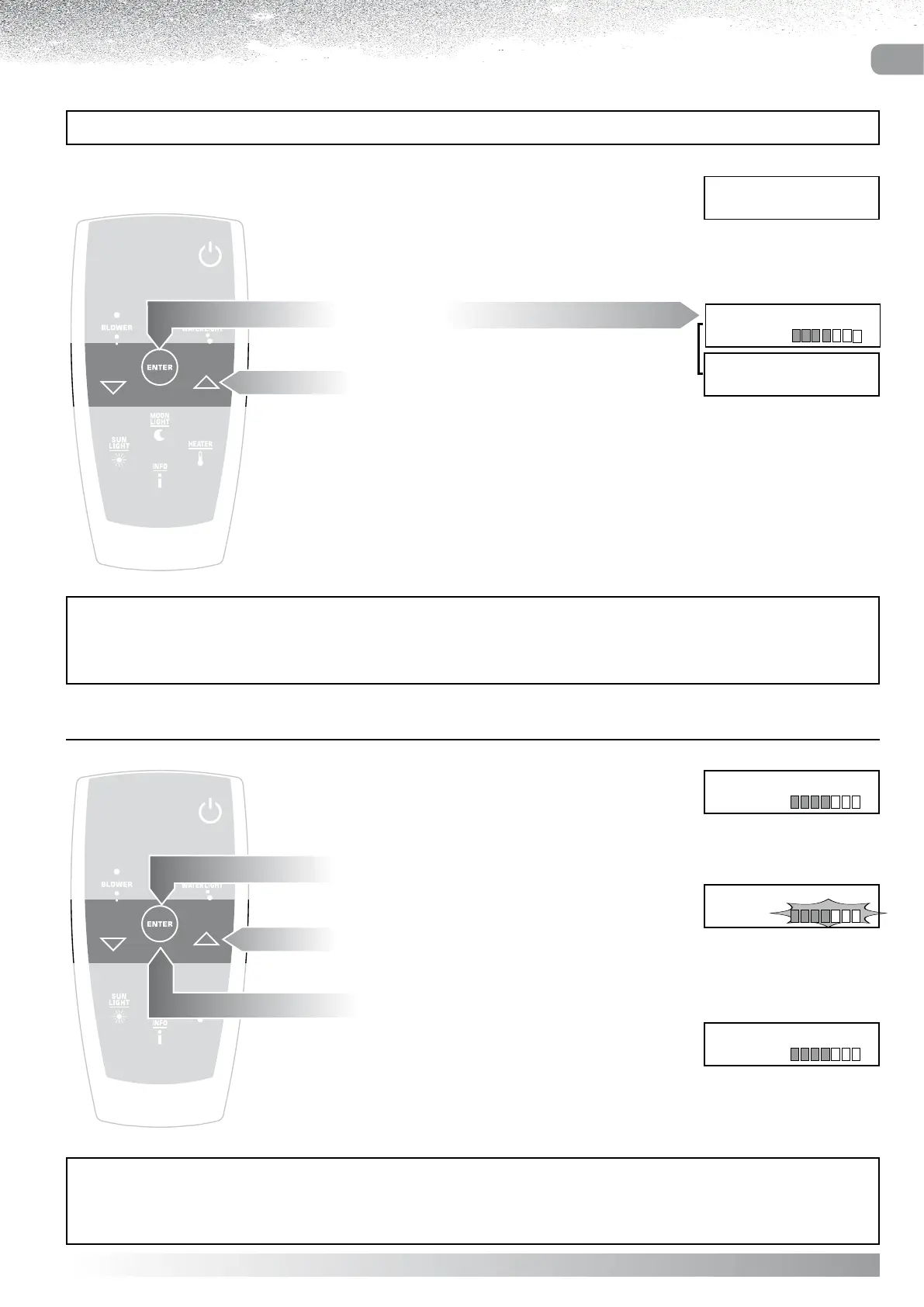
Select AIR from the Blower menu.
Press “ENTER”
the display will show the Air adjustment scale.
Use the “ and ” buttons to increase or reduce
the flow of air.
Confirm by pressing “ENTER”
the display will revert to the Blower menu.
Blower menu
B l o w e r
A I R
AUTOCONFIRM:
If no button is pressed for 5 seconds while the Blower menu remains active, the display reverts to the massage
currently selected.
BLOWER SETTINGS
With the BLOWER in operation, the user can:
- Adjust the air flow
- Change the duration of the Blower session
Display indicating Blower
in progress
1 5 3 6 ° C 2 0 : 3 0
B L O W E R
Blower
A I R
B l o w e r
T I M E R 3 0 m
Blower menu
Press “ENTER”
the display will show the Blower menu.
Select the setting to be changed
using the ”” and ”” buttons.
.



 To Next Page