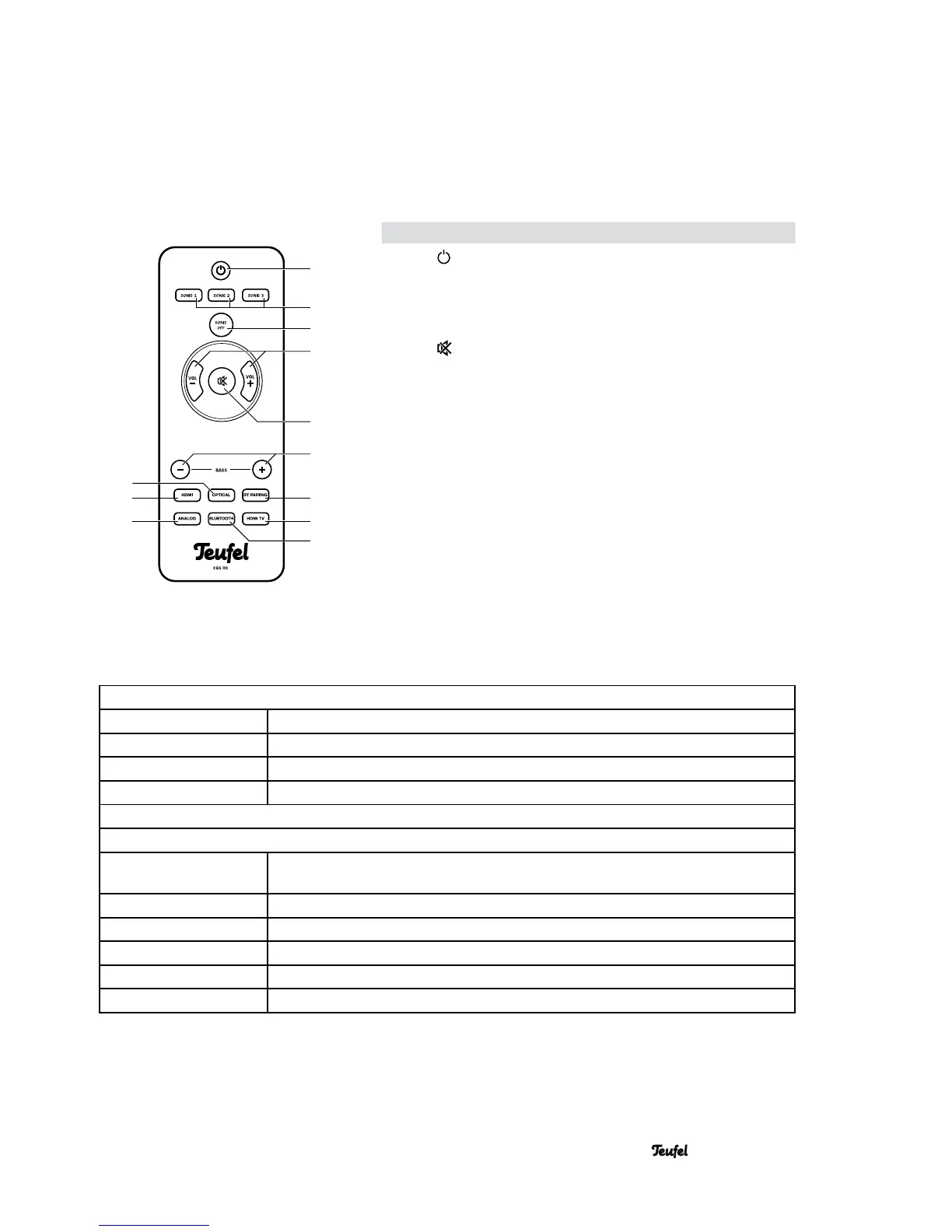
Item Name Description
12
Switch the device on / to standby.
13 SONIC 1-3
Select surround sound effects.
14 SONIC OFF
Turn surround sound effect off.
15 VOL – / +
Decrease (-) / increase (+) the volume.
16
Mute (turn sound on or off).
17 BASS – / +
Decrease (-) / increase (+) bass tones.
18 BT PAiRING
Register a Bluetooth device (pairing).
19 HDMI TV
Select TV as source via HDMI.
20 BLUETOOTH
Select Bluetooth device as source.
21 ANALOG
Select the analogue input as source.
22 HDMI
Select an external HDMI device as
source.
23 OPTICAL
Select the optical digital input as source.
Remote Control CBS RC
Meaning of the LEDs
Dolby/DTS-LED (10)
orange Playback of Dolby or DTS-coded audio signal.
white, brief blinking Receiving signals from the remote control.
white, slow pulsing Mute active.
white, fast blinking USB stick with software update inserted.
Power LED (11)
off Disconnected from the mains if the mains switch (8) is switched off (OFF position).
Playback when the mains switch (8) is switched on (ON position).
red Standby.
red, rapid blinking Error (see page 18).
blue Bluetooth active as source.
blue, slow blinking Bluetooth selected as source, but no Bluetooth connection active.
blue, fast blinking Bluetooth pairing active.
9
• Cinebase
12
13
14
15
16
21
22
23
17
19
20
18



 To Next Page