6 • ControlStation 2
Control elements and connections
Front side
Back side
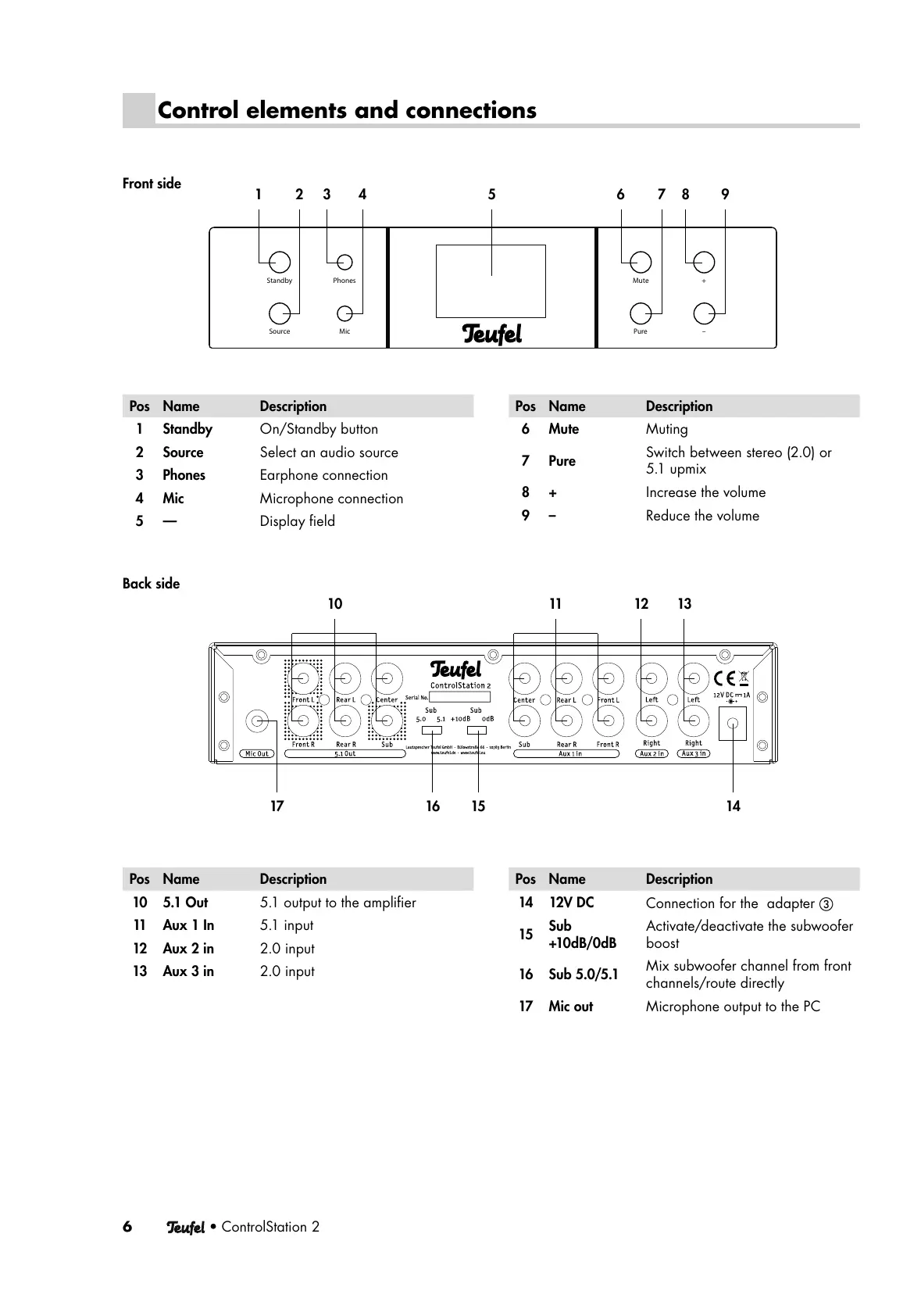
Pos Name Description
10 5.1 Out 5.1 output to the amplifi er
11 Aux 1 In 5.1 input
12 Aux 2 in 2.0 input
13 Aux 3 in 2.0 input
Pos Name Description
14 12V DC
Connection for the adapter 햴
15
Sub
+10dB/0dB
Activate/deactivate the subwoofer
boost
16 Sub 5.0/5.1
Mix subwoofer channel from front
channels/route directly
17 Mic out Microphone output to the PC
Pos Name Description
1Standby On/Standby button
2 Source Select an audio source
3Phones Earphone connection
4Mic Microphone connection
5— Display fi eld
Pos Name Description
6Mute Muting
7Pure
Switch between stereo (2.0) or
5.1 upmix
8+ Increase the volume
9– Reduce the volume
PhonesStandby
Source Mic
+Mute
Pure –
1234 5 6789
10 11 12 13
15 141617




 To Next Page