• ControlStation 2 9
Selecting a source
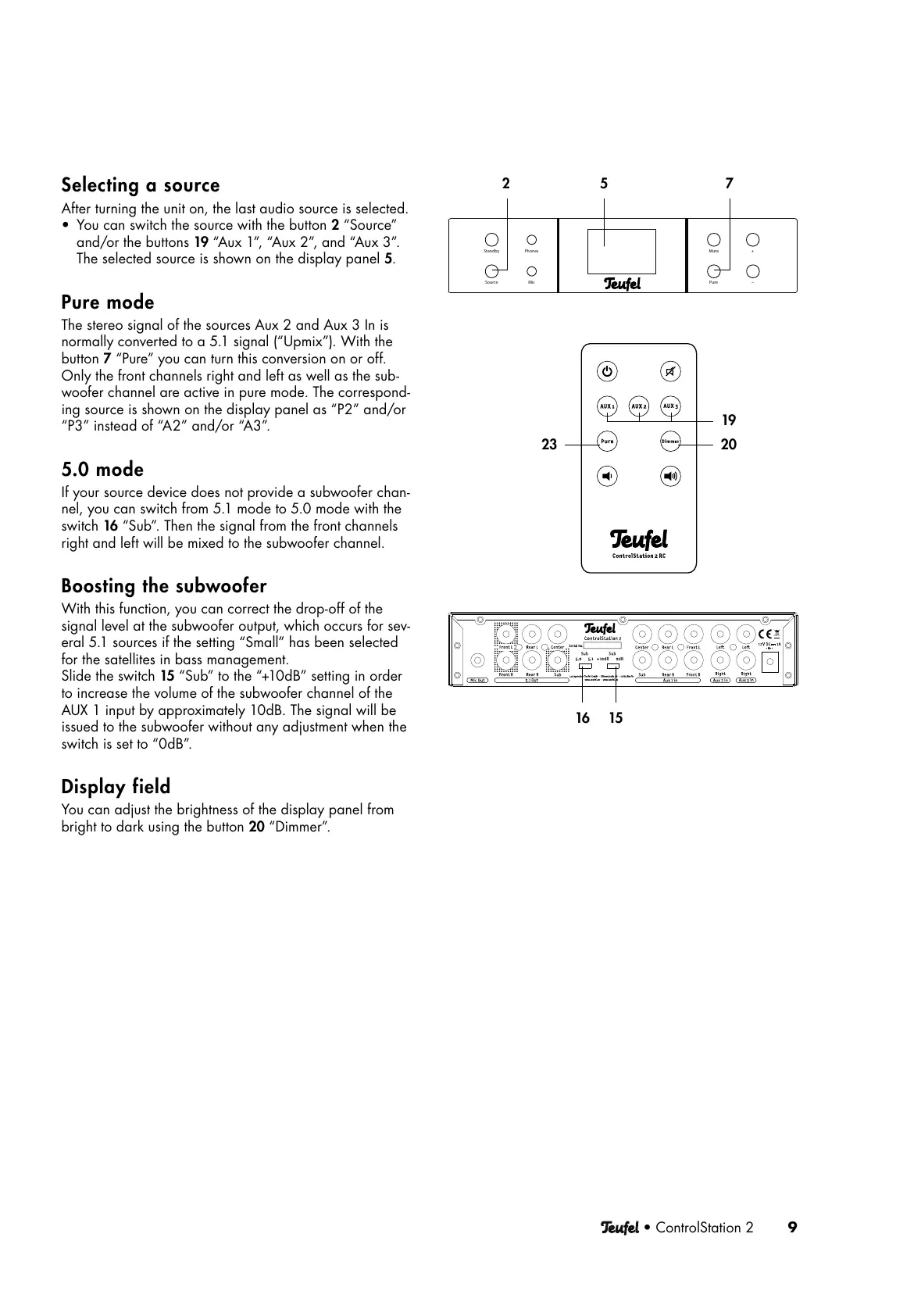
After turning the unit on, the last audio source is selected.
You can switch the source with the button • 2 “Source”
and/or the buttons 19 “Aux 1”, “Aux 2”, and “Aux 3”.
The selected source is shown on the display panel 5.
Pure mode
The stereo signal of the sources Aux 2 and Aux 3 In is
normally converted to a 5.1 signal (“Upmix”). With the
button 7 “Pure” you can turn this conversion on or off.
Only the front channels right and left as well as the sub-
woofer channel are active in pure mode. The correspond-
ing source is shown on the display panel as “P2” and/or
“P3” instead of “A2” and/or “A3”.
5.0 mode
If your source device does not provide a subwoofer chan-
nel, you can switch from 5.1 mode to 5.0 mode with the
switch 16 “Sub”. Then the signal from the front channels
right and left will be mixed to the subwoofer channel.
Boosting the subwoofer
With this function, you can correct the drop-off of the
signal level at the subwoofer output, which occurs for sev-
eral 5.1 sources if the setting “Small” has been selected
for the satellites in bass management.
Slide the switch 15 “Sub” to the “+10dB” setting in order
to increase the volume of the subwoofer channel of the
AUX 1 input by approximately 10dB. The signal will be
issued to the subwoofer without any adjustment when the
switch is set to “0dB”.
Display field
You can adjust the brightness of the display panel from
bright to dark using the button 20 “Dimmer”.
19
20
23
16 15
PhonesStandby
Source Mic
+Mute
Pure –
25 7








 To Next Page