2-ENG
30eco_eng_f_d_nl_fin.doc TI-30 eco RS, Config 1: Eng Deu
Fra Nld Bob Fedorisko Revised: 10/21/03 11:06 AM
Printed: 10/21/03 11:18 AM Page 2 of 80
Basic Operations
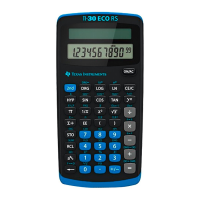
TI-30 eco RS
¦
To turn on the TI-30 eco RS, expose the solar panel
to light and press
!
.
Note:
Always press
!
to clear the calculator because memory and
display may contain incorrect numbers.
¦
To turn off the TI-30X eco RS, cover the solar panel
with the slide case.
2nd Functions
2nd functions are printed above the keys.
"
selects
the 2nd function of the next key pressed. For example,
2
"
t
calculates the cube of 2.
Results
The calculator can display up to 10 digits plus a minus
sign (
-
9,999,999,999 through 9,999,999,999) and a
2-digit exponent. Results with more than 10 digits
display in scientific notation.
Basic Arithmetic
D
>
8
2
60
D
5
8
12
J
120.
J
Completes all pending operations.
With constant (
K
), repeats the
operation and value.
O
Changes sign of value just entered.
1
D
8
O
D
12
J
5.
6
7
Parenthetical expression (up to 15
open).
J
closes all open
parentheses.


 To Next Page
 Loading...