© 1999
T
EXAS
I
NSTRUMENTS
I
NCORPORATED
TI-34 Û: A Guide for Teachers
65
Fractions
8
Fraction Entry Keys
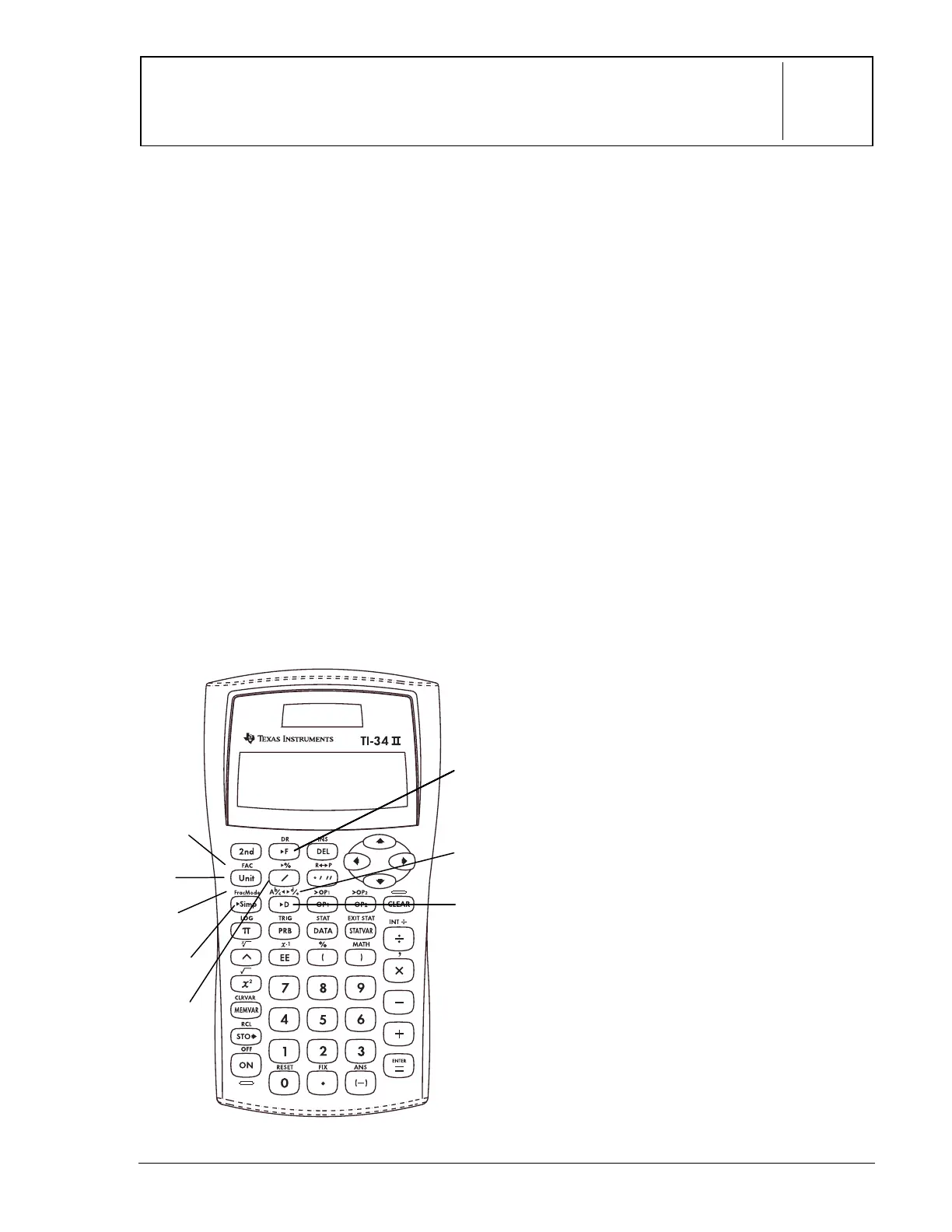
These numbered paragraphs provide
explanations for the corresponding numbered
keys on the illustration below.
1.
@
separates a whole number from
the fraction in a mixed number.
2.
>
separates a numerator from the
denominator.
3.
%
~
displays a menu of 4
settings that let you specify how
fraction results are displayed.
A
Ë
bàc
— displays mixed number results.
dàe
—displays fraction results.
Manual
—displays unsimplified fractions.
Auto
—displays results that are
simplified to lowest terms.
Simplification Keys
4.
}
simplifies a fraction using the
lowest common prime factor. If you
want to choose the factor (instead of
letting calculator choose it), press
}
, enter the factor (an integer),
and then press
<
.
5.
%?
displays
Fac
on the entry line
and the divisor used to simplify the
last fraction result. (You must be in
Manual
mode.) Press
%
?
to
toggle back to the simplified fraction.
Conversion Keys
6.
%O
converts between a mixed
number and a simple fraction.
7.
Q
converts a fraction to a decimal, if
possible.
8.
R
converts a decimal to a fraction, if
possible.
Notes
• The examples on the transparency
masters assume all default settings.
• To enter a mixed number or a fraction,
press
@
between the whole number
and the numerator and
>
between the
numerator and the denominator.
• You can enter a fraction or mixed number
anywhere you can enter a decimal value.
• You can use fractions and decimals
together in a calculation.
• Fractional results and entries are
automatically reduced to their lowest
terms.
(continued)
88888
6
7
1
5
2
3
4



 To Next Page
 Loading...