NOTE: TURN OFF THE POWER.
CHANGE FEED DOG SETTINGS
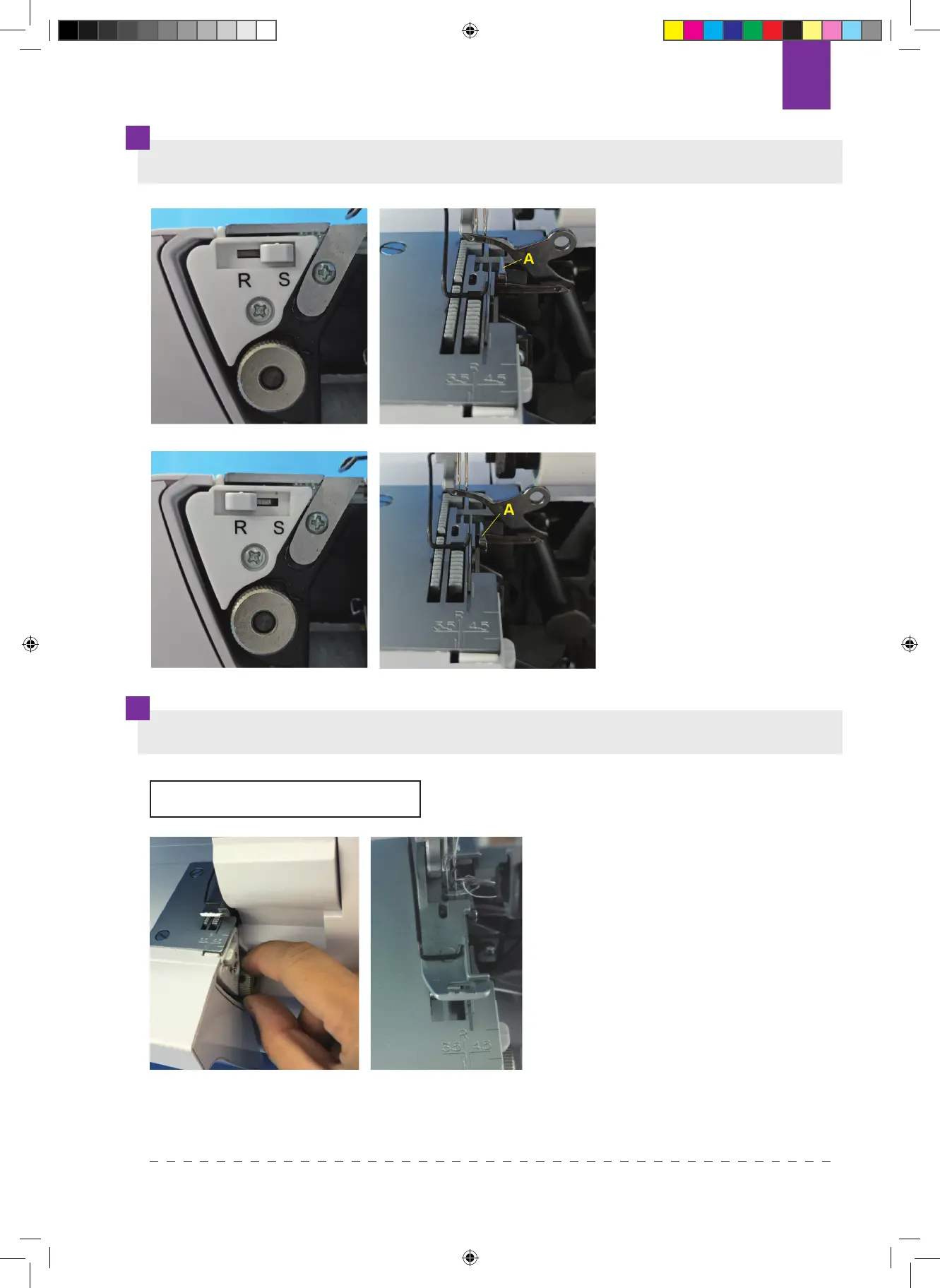
Standard hem stitching,
set change feed dog in “S”
position.
Curl hem stitching & cover
stitch sewing, set change
feed dog in “R” position.
When change feed dog is in
the “S” position, the tongue
“A” is in this position. This
setting can be used for all
standard hem stitching.
When change feed dog is in
the “R” position, the tongue
“A” is in this position. This
setting can be used for all
curl hem stitching.
STITCH WIDTH SETTING
Remove cloth waste box, turn
trimming width adjustment knob
(adjust range between 3.0-4.5mm).
The width of the adjustment is
marked on the Needle plate, “R”
indicates the trimming width at curl
hem stitching.
Note: If the looper cover is
opened, it is easier to adjust the
trimming width.
89
Texi Tegra 4 INSTRUKCJA 2019.indb 89Texi Tegra 4 INSTRUKCJA 2019.indb 89 18.09.2020 09:4218.09.2020 09:42


 To Next Page