Connecting to the Appliance
This section provides the following procedures for:
>
"Connecting the appliance to your network"below
>
"Connecting the appliance to a console device "on the next page
>
"Connecting to the GUI"on page22
Connecting the appliance to your network
Follow these instructions to connect and begin configuring the appliance.
To connect your appliance to your network:
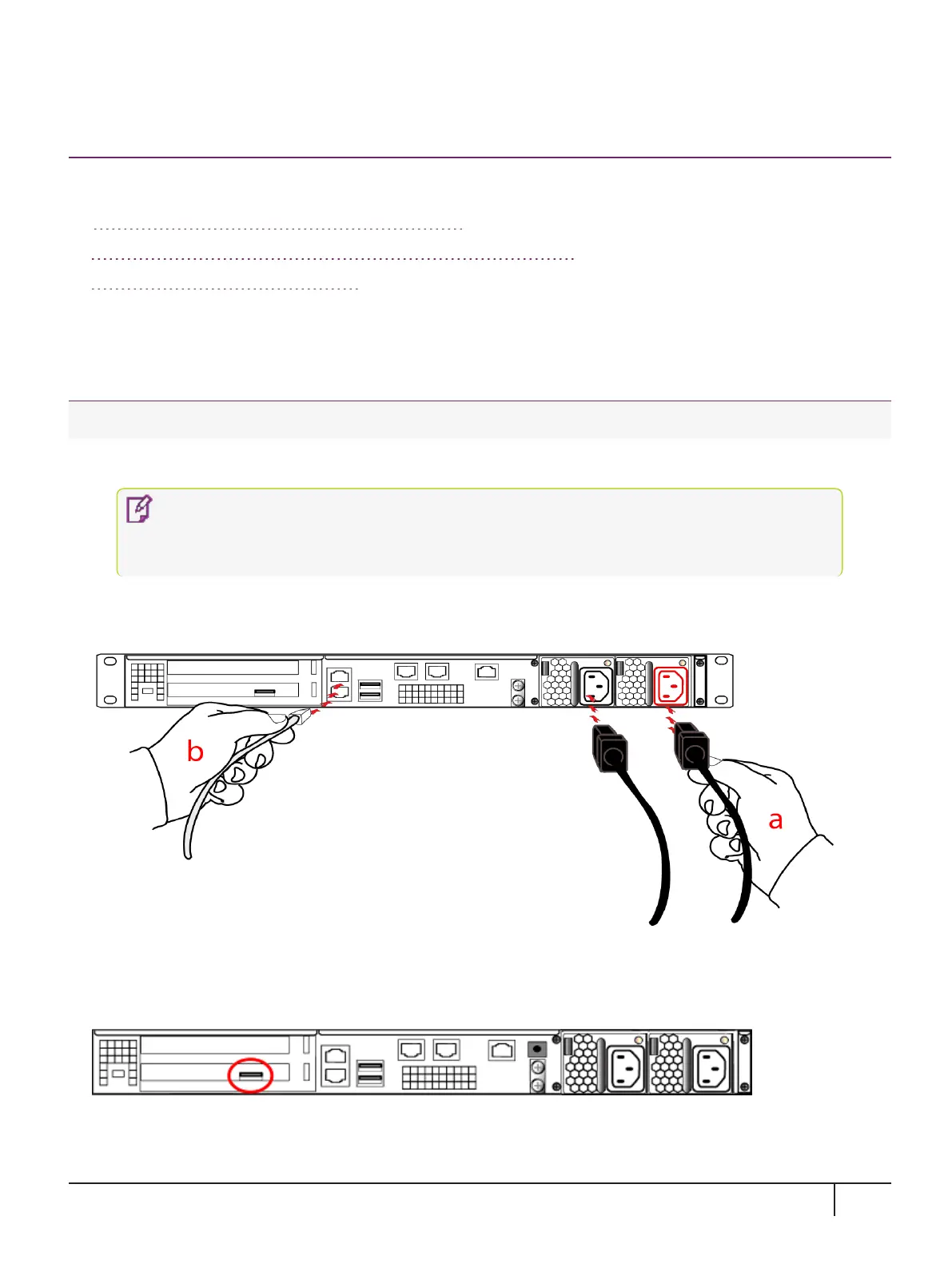
1. Insert the power (a) and network cables (b) at the rear panel.
NOTE The physical location of the network ports (Eth0, Eth1, Eth2 and Eth3) are
dependent on the appliance model. Correct locations for your model are printed on the
rear panel.
For proper redundancy and best reliability, the power cables should connect to two completely independent
power sources.
2. If you have a password-authenticated appliance, skip to the next step.
If you have a PED-authenticated appliance, connect the PED directly to the appliance's USB port (on the
rear panel's left side), using the included USB-to-MiniUSB PED cable.
3. Press and release the Start/Stop switch on the front panel to power up the appliance.
KeySecure k570 Appliance : Installation Guide
16 June 2020,Copyright© 2020 Thales Group.All rights reserved.
20


 To Next Page