NOTE The initial IP address is set via DHCP, which is displayed in the Console
Window . If you need to set a static IP address, you can set it from the console using the
nmcli tool after activating the appliance. For details, refer to the SafeNet NextGen
KeySecure > Deployment Guide > Network Configuration.
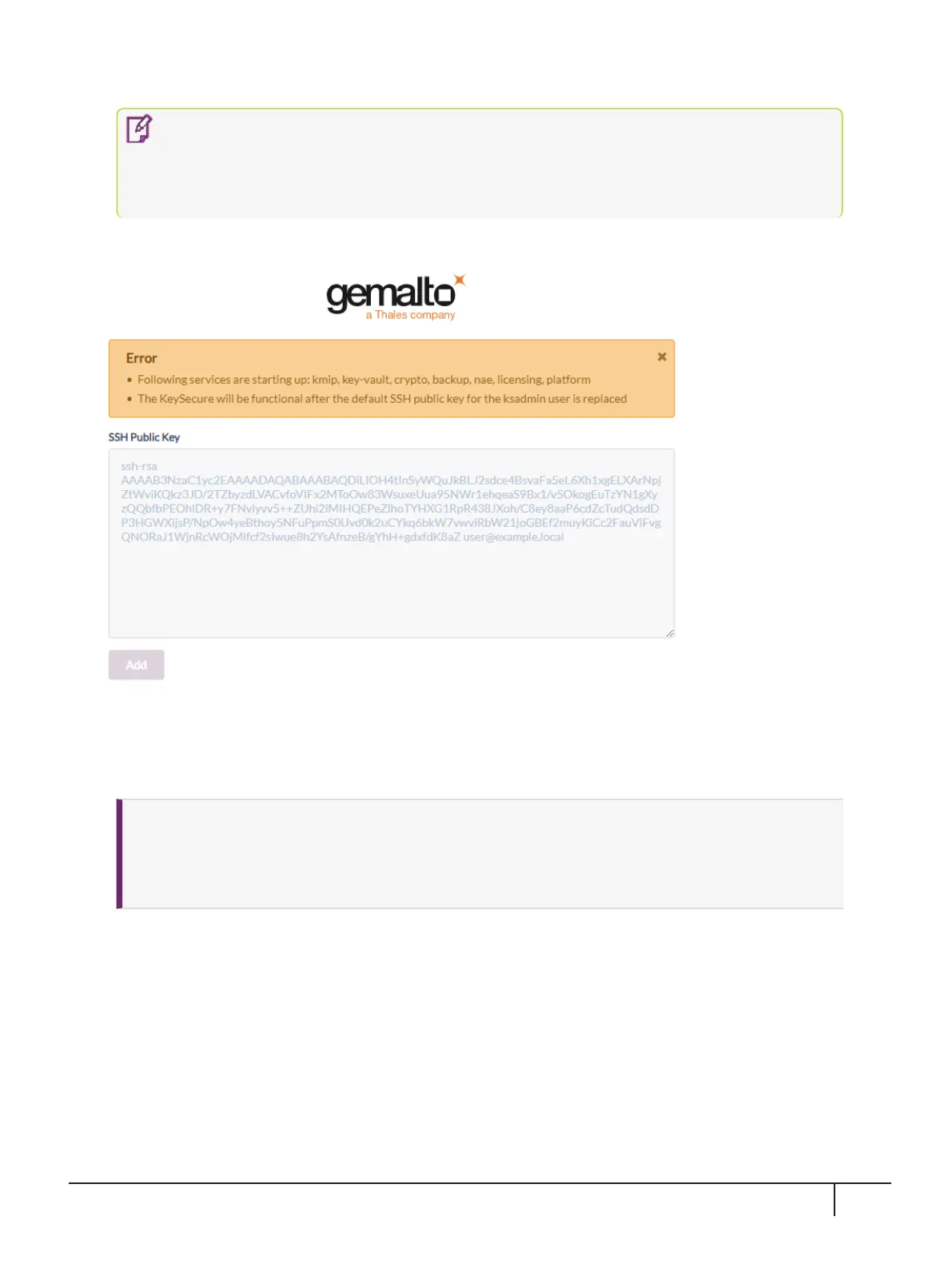
The initial NextGen KeySecure GUI screen is displayed, similar to the following:
The Error displayed is normal and simply requires the default SSH Public Key to be replaced.
2.
As the System Administrator (ksadmin), paste in your SSH Public Key in the box provided and then select
Add.
NOTE
>
The SSH Public Key must be a 'PEM-formatted RSA key'. You can generate this key using
'PuTTYgen' or similar utility.
>
Save this SSH Public Key at a safe location. You will need this key for future SSH access.
After replacing the default SSH Public Key, the Log In screen appears.
KeySecure k570 Appliance : Installation Guide
16 June 2020,Copyright© 2020 Thales Group.All rights reserved.
23


 To Next Page