— E22 —
Operation
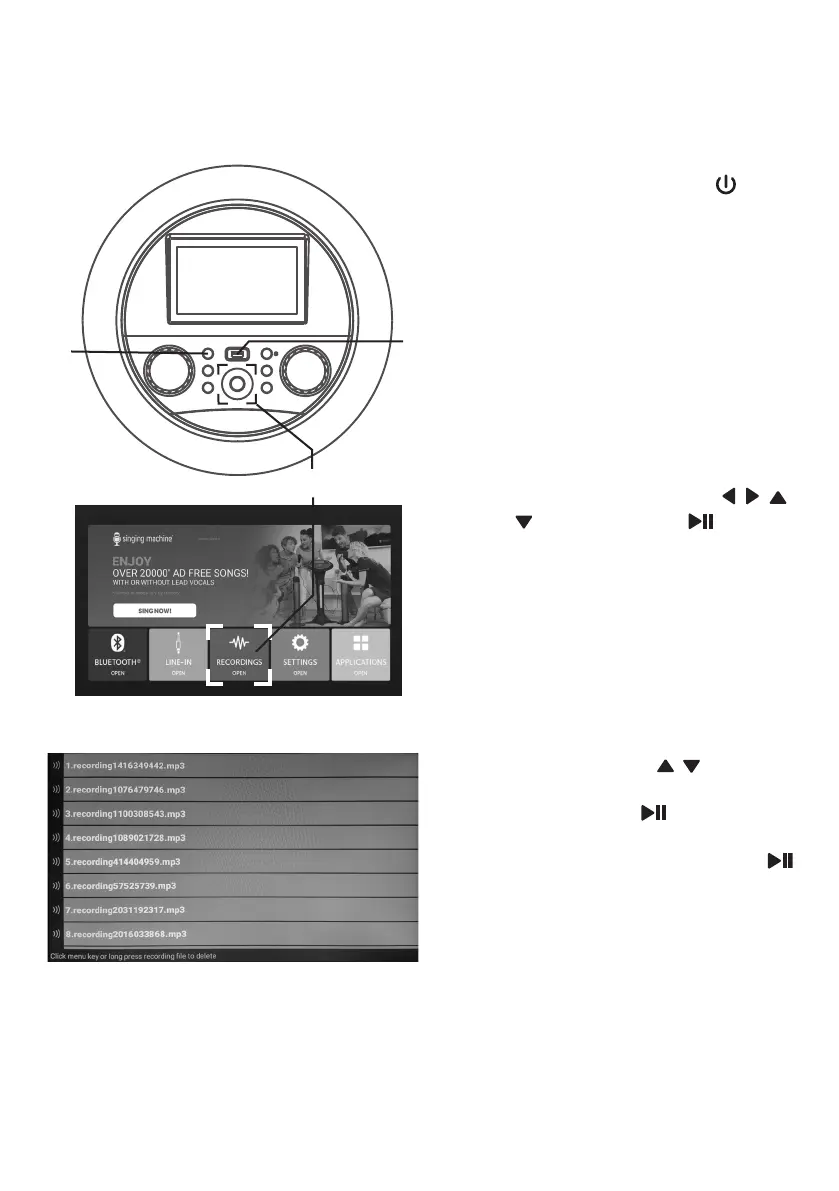
Playing Songs from the Recorded Files
1
Connect the unit as described
previously. Press the (ON/
STANDBY) button to turn the unit
on. The function indicator will light
up.
2
Insert a USB flash drive into the
USB port on the unit.
3
Select RECORDINGS icon using
the touch screen or / / /
Navigation and (PLAY/
PAUSE/ENTER) buttons to enter.
The function indicator will light
orange.
4
Select a recorded audio file from
the USB drive's song list using the
touch screen or / Navigation
buttons.
Then press the /ENTER button
on the control panel to start the
recorded audio file. Press the
/ENTER button during playback to
pause the file.
Note: To delete a file, press and hold the
file on the touch screen.
u
w
v


 To Next Page