6
Using the Rotary Dock
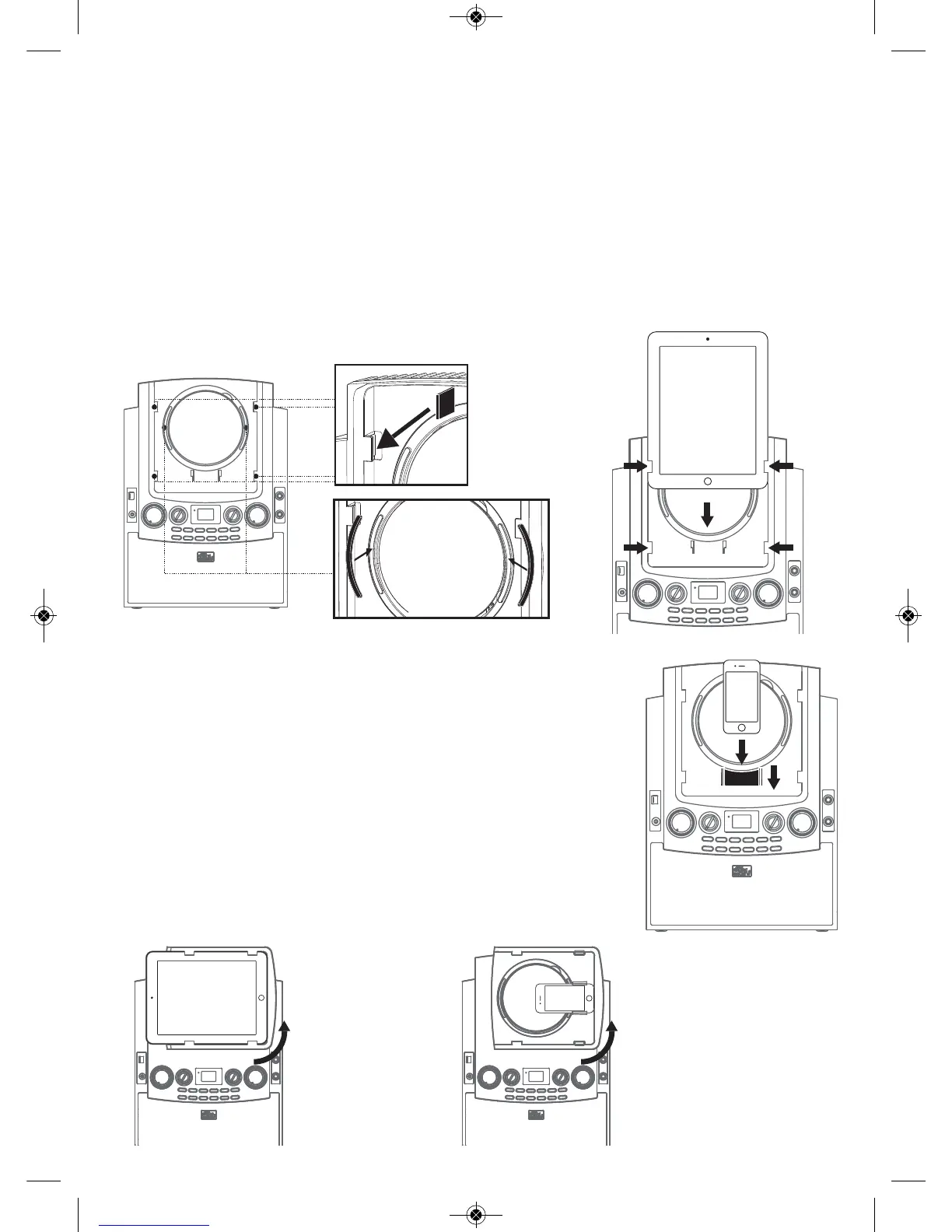
iPad Docking
1. Insert your iPad into the track of the rotary dock as shown below.
Note: If you are docking an iPad 2 or new iPad, additional rubber pads (included) need to be
attached to fit the iPad 2/new iPad to the rotary docking in position.
2. Connect via Bluetooth as shown on page 12 and your unit is ready to play.
iPhone and iPod Docking
1. Insert into the provided iPhone/iPod bracket (included) as
shown at right.
2. Connect via Bluetooth as shown on page 12 and your unit is
ready to play.
Rotating the Rotary Dock
If desired, you can rotate the Rotary Dock in order to view the
device horizontally as shown.
(DO NOT FORCE THE ROTATION AFTER ITS STOPPING POINT.)
Your Singing Machine comes with an iPad/iPhone/iPod cradle which is compatible with
different iPad/iPhone/iPod models.
iSM990-ENG-v2_Layout 1 7/23/13 8:56 AM Page 6


 To Next Page