MAKING THE CONNECTIONS
ENGLISH
E7
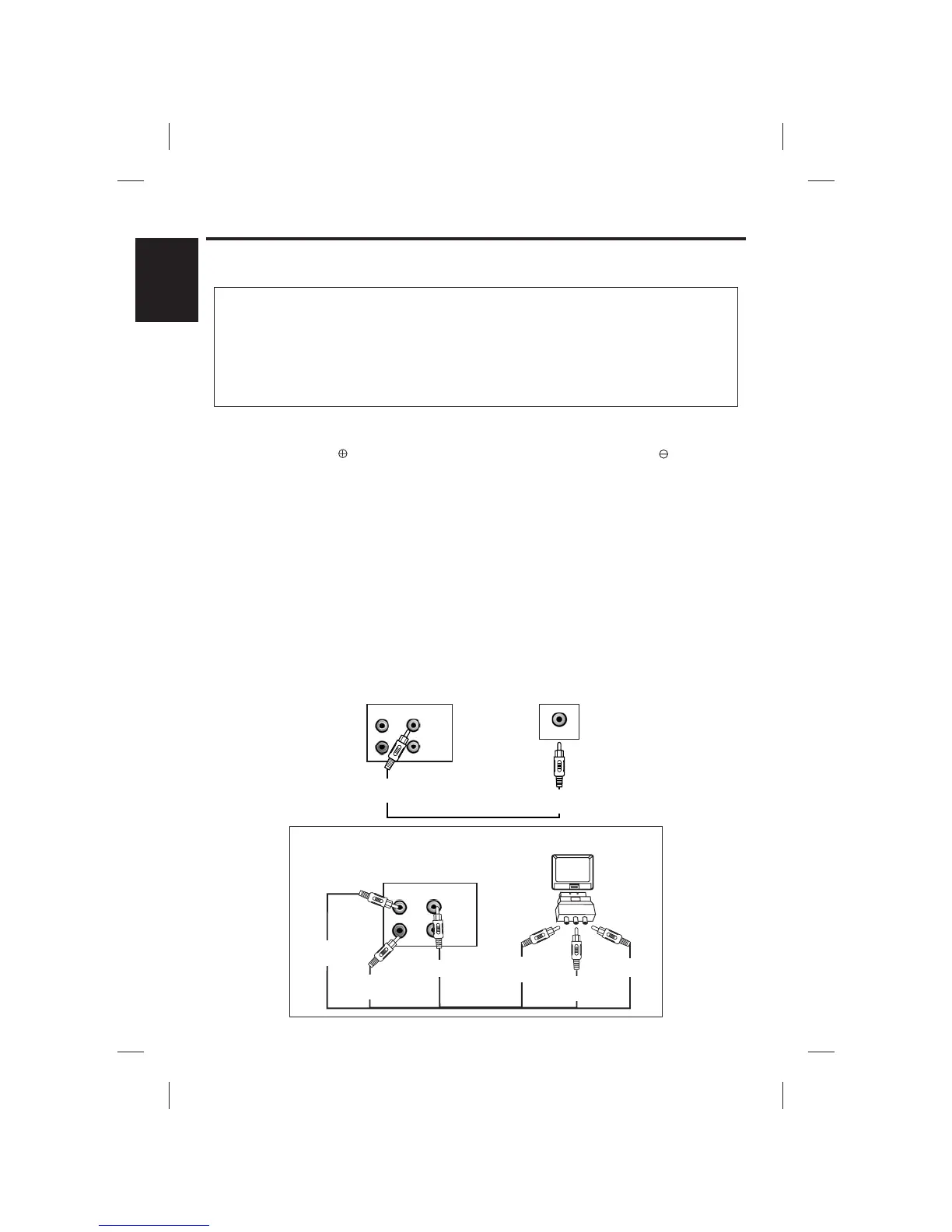
REAR VIEW OF
SINGING MACHINE
REAR VIEW
OF TV
VIDEO IN
(Yellow Jack)
VIDEO OUT
(Yellow Jack)
VIDEO IN
VIDEO
OUT
AUX
OUT
R
L
CAMERA
OUT
CONNECTING POWER
VIDEO CONNECTION (FOR TV)
You can power the system from a standardAC outlet by using the supplied power cord.
lyrics
DC JACK
CONNECTING TOYOUR TV
DC jack is provided for external DC power for use in a car, boat or RV. Please be sure that inside of
the jack is connected to 12V positive side and the outside of jack is connected to , negative side
battery.
The Singing Machine provides a patch cord to give you the option of connecting your unit to an
external audio/sound system and video device. The patch cord has three RCA jacks at each end.
White and Red are for left and right audio connections and the Yellow is for connecting the video.
Make sure that you have a CDG disc in the Singing Machine and playing when you are making
this connection. You will know you have the proper settings on your TV or VCR as soon as you see
the Singing Machine logo or lyrics on the screen!
Please follow the steps below to display on the TV screen:
(1) Locate the multicolored patch cords.
(2) Connect video cable (yellow) to the VIDEO OUT of the back of the Singing Machine.
(3) Connect the other end of the video cable (yellow) to the Video Input on your TV.
For UK only
CAUTION: The unit is designed to operate from a main supply of 230VAC~50Hz. The unit is
fitted with a 13 amp (BS 1363) main plug. Should the fuse in the mains plug require
replacing a 3 amp (BS 1363) fuse must be fitted. Ensure the voltage of your electrical power
supply matches this indicated on the rating label located on the rear or base of the unit.
If the socket outlets in your home are not suitable for the plug supplied with the unit, the plug
should be removed and an appropriate on fitted.
VIDEO
OUT
AUX
OUT
R
L
CAMERA
OUT
REAR VIEW OF TV
VIDEO INPUT
(Yellow Jack)
AUDIO INPUT
L
(White Jack)
TV
SCART INPUT
0000000000
0000000000
IN
Scart Adapter
(Provided)
AUDIO INPUT
R
(Red Jack)
VIDEO OUTPUT
(Yellow Jack)
REAR VIEW OF
SINGING MACHINE
AUX OUTPUT
R
(Red Jack)
SCART ADAPTER CONNECTION
(FOR TV WITH SCART INPUT)
AUX OUTPUT
L
(White Jack)











 To Next Page