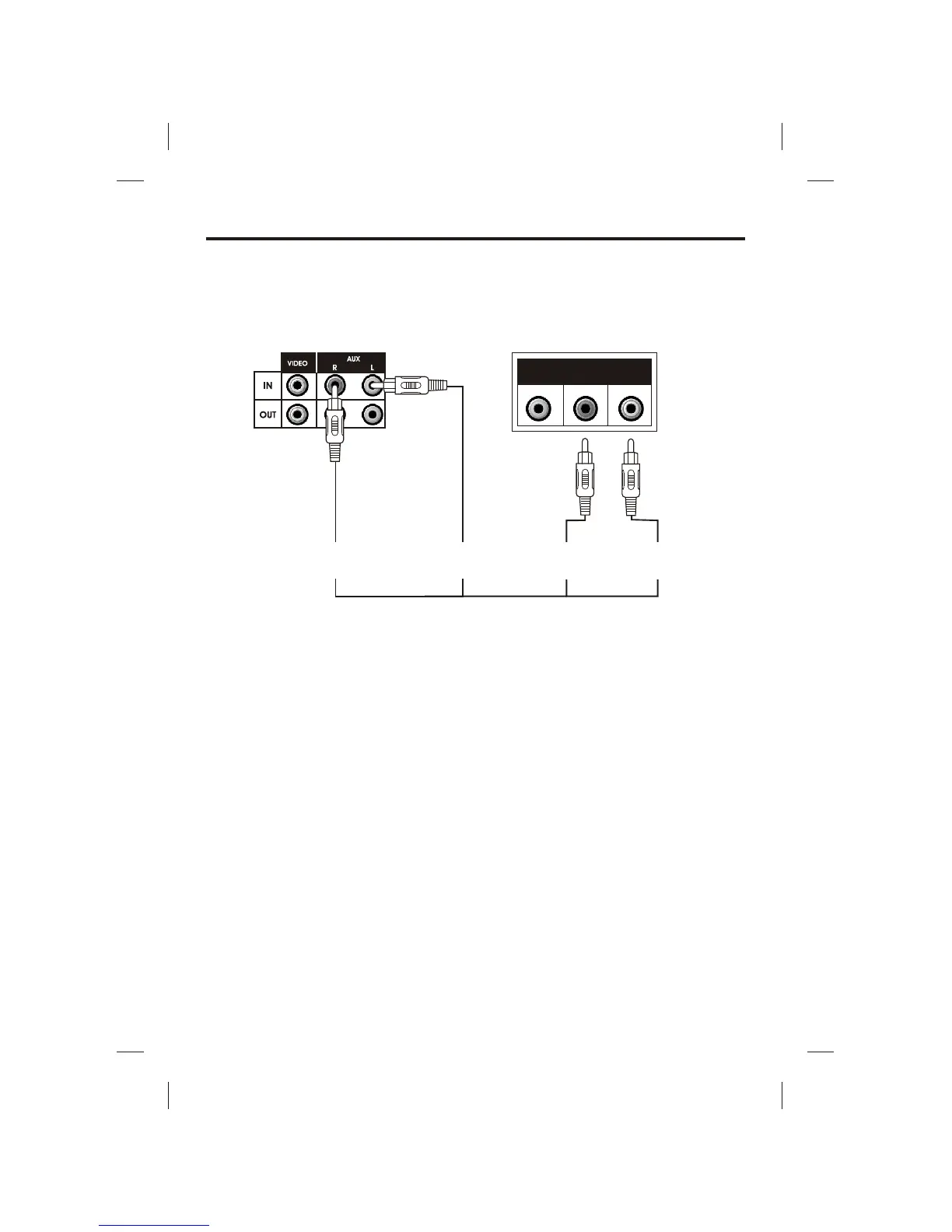
MAKING THE CONNECTIONS
10
CONNECTING AN AUDIO COMPONENT FOR INPUT
To connect another audio source (such as a Tuner, an AV Receiver or a VCR) so you can sing
along with its music, simply connect the Audio Output jacks (Red & White RCA jacks) to the
Singing Machine’s AUX IN L & R jacks.
MONITOR Selector
! To display CDG lyrics on the Singing Machine’s monitor, set the MONITOR Selector to
CDG/AUX mode and FUNCTION Selector to CDG mode.
! To display your image on the Singing Machine’s monitor, set the MONITOR Selector to
CAMERA mode.
! To display a video signal from another A/V component, set the FUNCTION Selector to AUX
mode and MONITOR Selector to CDG/AUX mode.
! To turn off the monitor on the Singing Machine, set the MONITOR Selector to OFF mode.
! Adjust the BRIGHTNESS, CONTRAST and VERTICAL HOLD controls at the back of the
Singing Machine to have the best picture quality.
VIDEO OUT Selector
! To display CDG lyrics on the other machine, set the VIDEO OUT Selector and FUNCTION
Selector to CDG mode.
! To display your image on the other machine, set the VIDEO OUT Selector to CAMERA mode.
! To display image on the other machine from another video source, set the VIDEO OUT
Selector and FUNCTION Selector to AUX mode.
VIDEO
OUT
AUDIO
OUT
L
R
AUX INPUT
L
(WHITE JACK)
ANOTHER
AUDIO COMPONENT
AUDIO OUTPUT
L
(WHITE JACK)
AUDIO OUTPUT
R
(RED JACK)
AUX INPUT
R
(RED JACK)
REAR VIEW OF
SINGING MACHINE







 To Next Page