3
trigger, a laser beam will appear to help guide you unless the
laser is turned off.
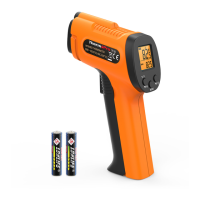
. Laser Pointer Indication: When pressing the measurement
4
battery power is low.
. Low battery Indication: Will appear on the display when
5 UPPER DISPLAY: Displays the latest temperature measurement. .
6
will appear, and you can adjust the emissivity setting.
. EMISS: Press and hold the MODE button for 3 seconds, EMISS
7
adjusting the Emissivity setting, the current emissivity setting will
be displayed.
. LOWER DISPLAY: Displays MAX/MIN/AVG temperature; When
8 MAX/MIN: Maximum and minimum temperature for the latest
measurement.
.
9 AVG: Average temperature for the latest measurement..
12. Press to turn on/off the backlight; When adjusting the
emissivity, press to increase the emissivity.
Operation
Surface Temperature Measurement
NOTE: The ThermoPro TP30 cannot measure the temperature of
objects behind glass. Inaccuracy may also occur when exposed to
steam, dust or any other contaminants in the air.
13. Laser Hole
14. IR Sensor
15. Measurement Trigger: Hold and release to take temperature
readings.
16. Battery Compartment
1. Place the included AAA batteries into the Battery Compartment,
then press the Measurement Trigger to activate the thermometer.
11 MODE: Press to cycle through and display MAX/MIN/AVG
.
10. Press once to turn on/off Laser Pointer; Press and
hold for 3 seconds, to switch between °C and °F; When adjusting
the emissivity, press to lower the emissivity.
temperature; Press and hold for 3 seconds, to adjust the
emissivity setting.
-4- -5-


 To Next Page