1956.001.599 - rev. 02 - 2019
English
Coolmobile 21-25
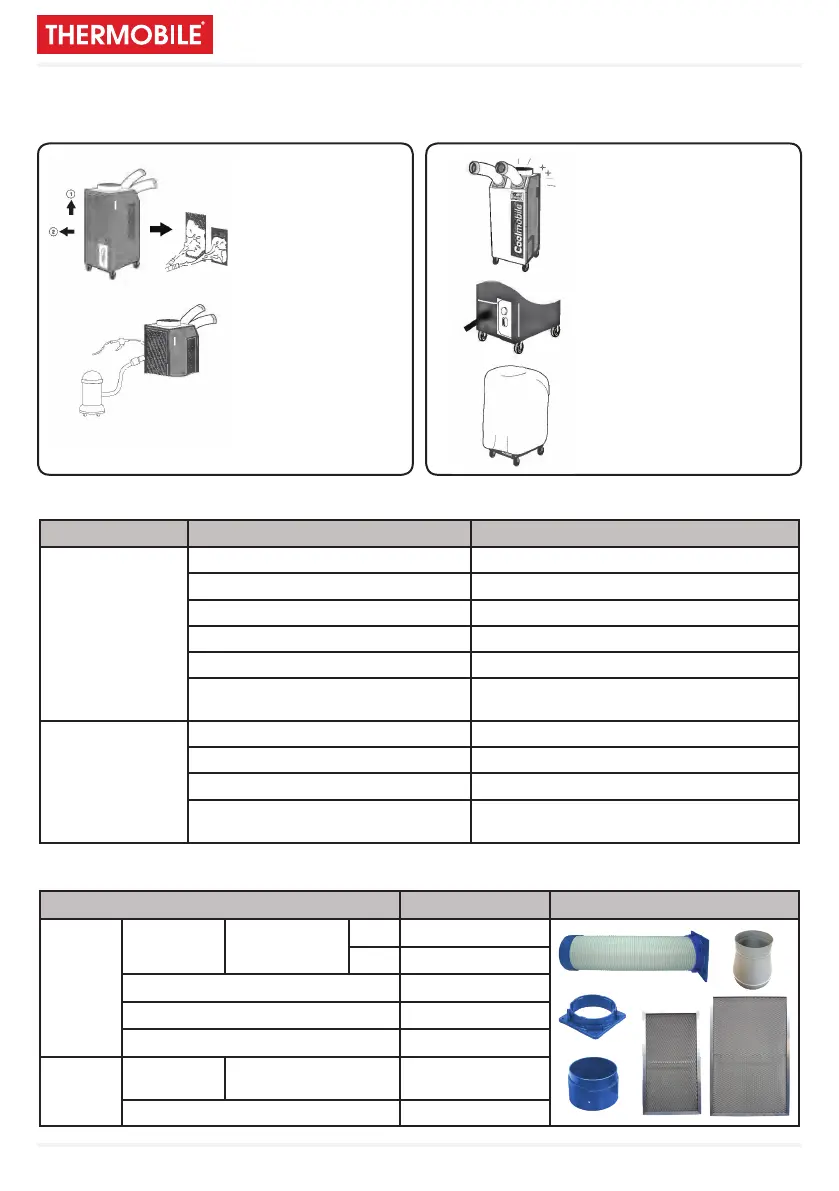
Cleaning and maintenance
Cleaning the air lters Maintenance
Trouble shooting
Accessories
1. To remove lters,
slide up a little 1 and
pull towards you 2.
2. Clean the lters with
water or compressed
air.
3. Clean evaporator and
condenser units with a
vacuum cleaner or
compressed air.
1. Alter cleaning, completely
dry the inside of the unit by
operating on ‘Fan Mode’
only tor 3 to 4 hours.
2. Turn “OFF” at control
panel, re move plug from
socket. Coil and store
cable neatly.
3. Keep machine suitably
covered to prevent damage
by damp, humidity and
dust.
TROUBLE CHECK SOLUTION
DOES NOT
WORK
Power plug correctly connected Connect plug correctly
POWER button “OFF” Press POWER button to “ON”
Blown fuse in mains plug Replace fuse (MUST BE 13amp)
Fuse (supply) blown Exchange fuse in board
Breaker on switch board tripped Check load capacity and reset
Ambient temp. too high
(over 45°C) (Coolmobile : 40°C)
Use only below 45°C
POOR
COOLING
Filter blocked with dust Clean lter
Dust in heat exchanger Clean heat exchanger
Obstacle against inlet side Remove and allow 50cm. clearance
Ambient temp. too high
(over 45°C) (Coolmobile : 40°C)
Use only below 45°C
ITEM Coolmobile 21-25 DRAWING
COLD
AIR
OUTLET
DUCT Diam. 125mm
0,5m ✔
3m OPTION
DUCT COVER (FINISHING COLLAR) ✔
CONNECTION FLANGE ✔
ALUMINIUM FILTER CASSETTE ✔
HOT AIR
EXHAUST
REDUCER REDUCES DUCT
43cm -> 30cm
OPTION
ALUMINIUM FILTER CASSETTE ✔


 To Next Page