WWW. WWW. WWW. WWW. WWW. WWW.
If you have any questions or queries regarding this product, or any other products or services
Call our technical helpline for free on 0800 019 5899
6
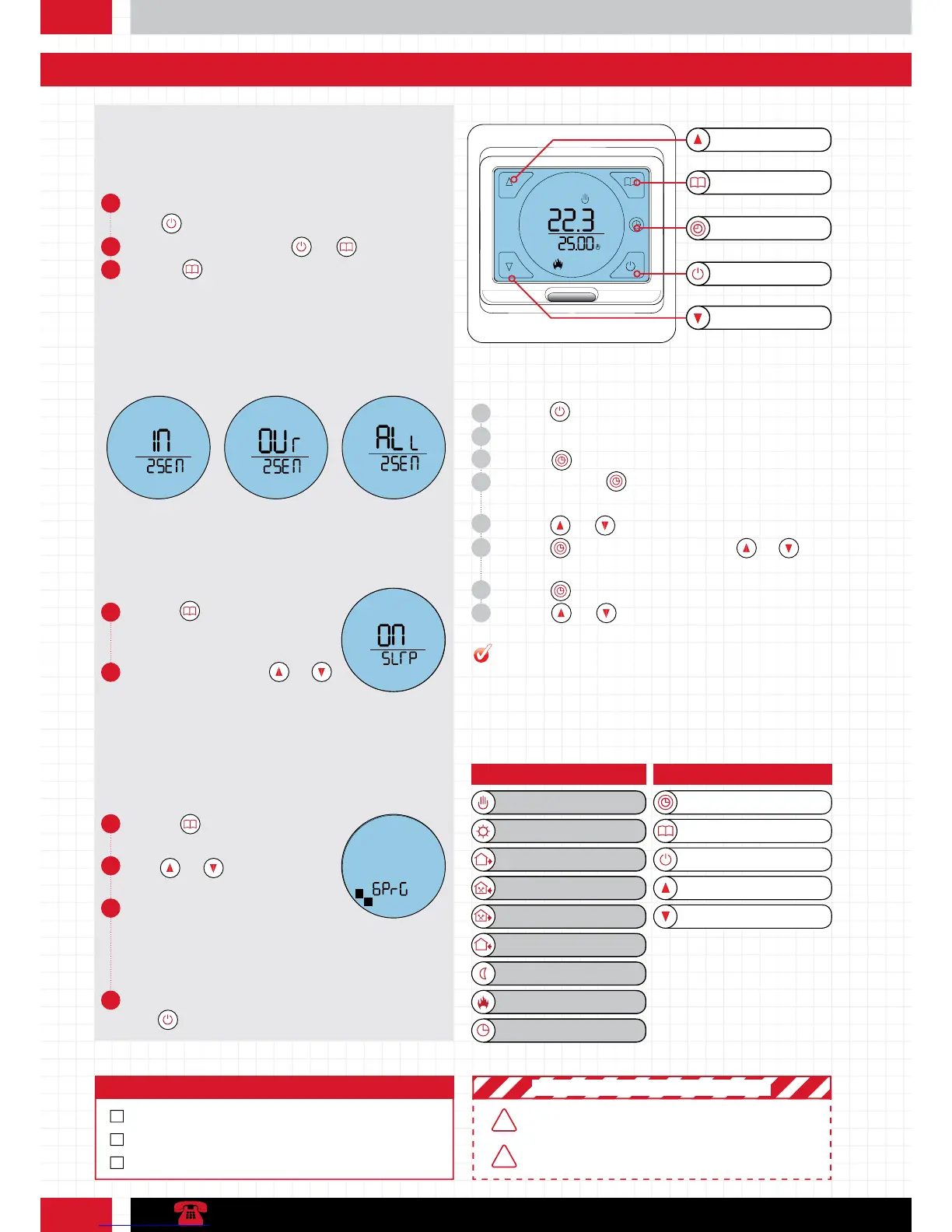
Stage 2: Programming your thermostat
Button key:Icon key:
Period 1
Period 3
Manual control mode
Period 2
Heating on
Program mode indicator
Period 5
Period 4
Period 6
Up button
Power button
Down button
Menu button
Clock button
1 Tap the button to switch unit on.
2 The backlight will fade after around 10 seconds.
3 Tap the button to switch it back on at any point.
4 Press and hold the button for around 7 seconds or until
the minutes begin to flash.
5 Use the and arrows to select the correct minute.
6 Tap the button to switch to hour and use and to
select the correct hour.
7 Tap the button again to edit the day.
8 Use the and arrows to select the correct day number:
1 = Mon 7 = Sun.
Function 1: Set the time & date
Power button
Clock button/Backlight
Menu button
Down button
Up button
1 To access advanced settings switch the unit off by tapping
the button.
2 Then press and hold both the and button.
3 Tap the button to switch to Sensor mode (2SEN) and
set to OUT
6 Tap the button to set your program
days.
7 Tap and to set the program
days.
8 Program options include:
9 Switch off to save your settings using
the button.
• Seven days same
• Five days & weekend
• Six days same & 1 separate day
• Program off
4 Tap the button until you see Frost
protection mode (5LrP - pictured
left).
5 Set this to “On” using the and
arrows.
Before you start
5259 has some advanced settings which must be configured before
programming. These include Sensor Setup, Frost Protection &
Heating Schedule Options.
Heating Schedule options
Frost Protection
Sensor mode
Your heating schedule can be configured to suit most lifestyles. The options
are Mon – Fri (1-5) the same with Sat – Sun (6-7) separate. Mon – Sat
(1-6) the same with Sun (7) separate and All Days (1-7) the same. You can
also switch off the heating schedule if you require. 1-5 days settings have 3
comfort periods. 6-7 day settings has 1 comfort period.
When set to ON, the built in frost protection feature will ensure the
temperature of your substrate never dips below 10
o
c. This protects against
frozen substrates and ensures economical heat up times.
The 5259 has three sensor settings. Air Sensor (IN), Floor Sensor (OUT)
and Air Sensor with Floor Limit (All). We recommend Floor Sensor (OUT)
for the most accurate control. The thermostat sensor is defaulted to “IN” so
should be changed before use.
Air Sensor (IN) Floor Sensor (OUT) Air Sensor with Floor
Limit (All)
The 5259 will go to a maximum of 27
0
C. We recommend a maximum
of 25
0
C for efficiency. (High temperatures may damage your floor finish)
PRO TIP
MAKE SURE ADVANCED SETTINGS ARE FINALISED BEFORE
THERMOSTAT SETUP
BE SURE TO SELECT THE RIGHT MODE FOR THE RIGHT
INSTALLATION. THE WRONG SETTING COULD COST
YOU MONEY
! IMPORTANT SAFETY PRECAUTIONS !
Step 4: Checklist
IS THE CONDUIT AND SENSOR PROBE IN POSITION
EXPLORE ALL SETTINGS AND FEATURES
SELECT PREFERRED ADVANCED SETTING
!
!



 To Next Page