-6-
-7-
is released, HOLD will appear on the
display.
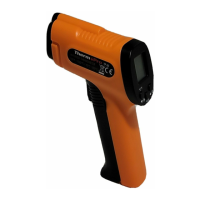
3 Laser Pointer Indication: When
pressing the measurement trigger, a
laser beam will appear to help guide
you.
.
4 Low battery Indication: Will
appear on the display when the
battery voltage is lower than 2.6V
.
5 UPPER DISPLAY: Displays the latest
temperature measurement.
.
6 EMISS: Press and hold the MODE
button for 3 seconds, EMISS will
appear, and you can now adjust the
emissivity.
.
7 LOWER DISPLAY: Displays MAX/MIN/
AVG temperature; When adjusting the
.
8 MAX/MIN: Maximum and minimum
temperature for the latest
measurement.
.
9 AVG: Average temperature for the
latest measurement.
.
10. Press once to turn on/off
Laser Pointer; Press and hold for 3
seconds, to switch between °C and °F;
When adjusting the emissivity, press
the button to lower the emissivity.
11 MODE: Press mode button to cycle
through and display MAX/MIN/AVG
temperature; Press and hold for 3
seconds, to allow you to adjust the
emissivity.
.
emissivity, the current emissivity will
be displayed.


 To Next Page