-8-
-9-
12. P
backlight; When adjusting the
emissivity, press the button to
increase the emissivity.
ress to turn on/off the
Operation
Surface Temperature Measurement
NOTE: The ThermoPro TP30 cannot
measure the temperature of objects
behind glass. Inaccuracy may also
occur when exposed to steam, dust or
any other contaminants in the air.
1. Once the batteries are properly
installed, press the Measurement
Trigger to activate the device.
2. Point the TP30 towards the surface
you wish to measure.
3. Press and hold the Measurement
Trigger and the laser will activate for
aiming guidance. (Laser will only
appear if turned on. Laser is turned
on by default.)
4. Keep holding the Measurement
Trigger as you move the TP30 if you
wish to continually take a measure-
ment of the surface.
5. Once the laser is pointed to the
desired point of measurement, release
the Measurement Trigger and the
Upper Display will show the last
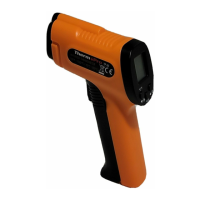
13. Laser Hole
14. IR Sensor
15. Measurement Trigger: Hold and
release to measure and hold the
temperature.
16. Battery Compartment


 To Next Page