Press the joystick to the left to exit the current
menu.
3.3.3.4.3 Accurate Distance Measurement
Move the cursor to select the type of object
that is your target object in the submenu.
Short press the joystick one time to save your
selection. The height of the selected type of
object can also be set by the user.
Press the joystick to the left to exit the current
menu.
Notes: The actual height of the types of objects
should be consistent with the set parameters
for accurate distance measurement.
14
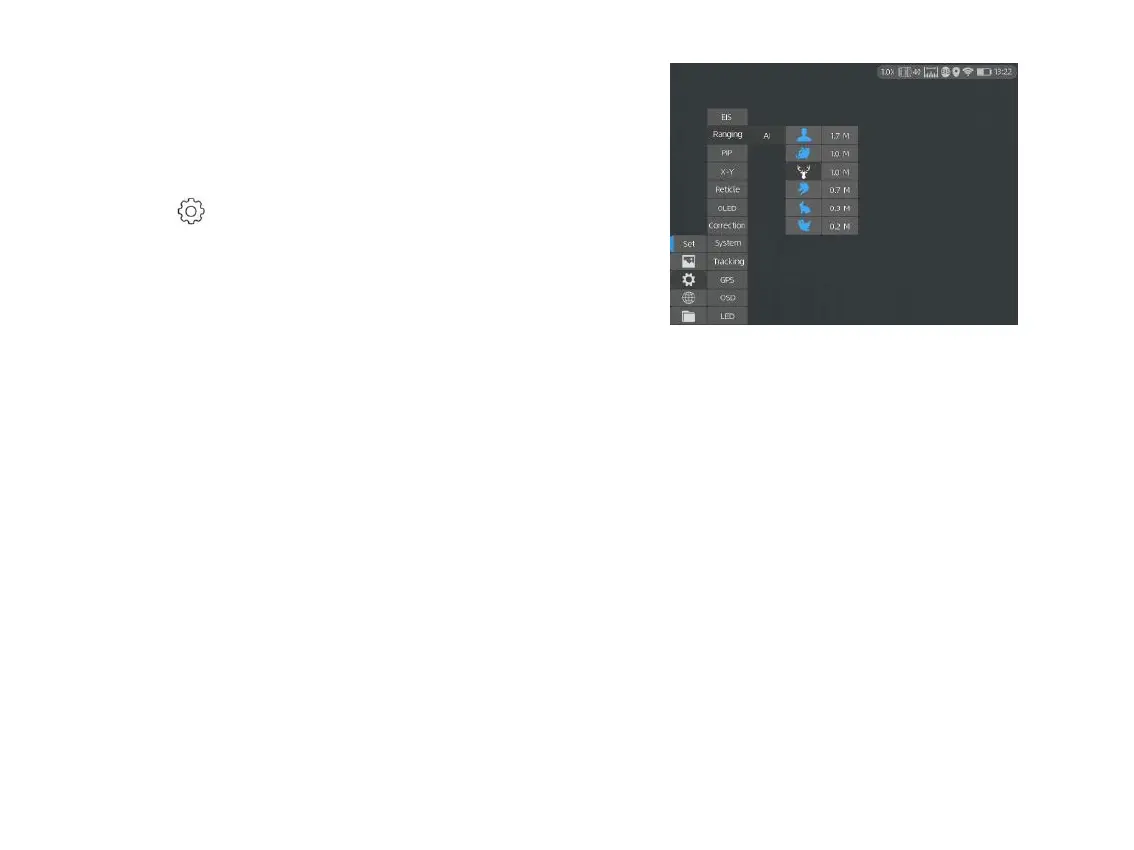
3.3.3.4.1 Turning on AI Ranging Function
Double click the joystick to enter the main menu,
and check whether the AI ranging function is
enabled (this function is enabled by default). If
not, press to enter the System Setting menu,
and press Ranging and AI to turn on this function.
Short press the joystick to left to turn on AI
Ranging function, and the corresponding icon
will turn to blue at the upper right corner.
3.3.3.4.2 Unselecting the Type of Objects
Move the cursor and short press the joystick
one time to unselect the type of object that is
not your target object in the submenu.
The icon of the unselected type of object will
turn to white, as shown in the below figure.
The distance of unselected type of object will
not be shown on your device.
Notes: There are six types of objects to be
selected for AI measurement in total. If the AI
ranging function is not enabled by user before
using this device, this funtion will not be
working properly.



 To Next Page