Electronic Image Stabilization. Can
be turned on/off in the system
setting.
In the picture, the image is 2x
enlarged from the center of the
cross.
The position of the crosshair in the
picture can be adjusted and
separately saved.
Choose the style of the crosshair.
“0” represents none, and “1-7”
represents seven different styles.
Blue, purple and gray are optional
for OLED hue.
The mask works to calibrate the
uniformity of images.
All configuration parameters are
restored to the factory default
values after resetting.
You can adjust and upgrade the
device system.
Support multiple languages.
Select local time zone and adjust
the date and time.
The blind pixel in the picture can be
replaced.
Turn on heat tracking to mark the
target with the highest temperature
in real time in the screen.
16
Turn on GPS function to obtain real-
time satellite positioning, longitude
and latitude coordinates and time
information.
Turn off LED. The work indicator is
turned off and the hidden work
mode is started.
Especially enhance target’s detail.
It’s recommended to be used in bad
weather conditions.
Gain both background and target’s
detail with wide dynamic algorithm.
Adjust image sharpness to make the
image edge sharper. The
recommended value is 5.
Adjust image noise to make the
image cleaner. The recommended
value is 5.
Adjust image brightness to make the
image brighter. The recommended
value is 5.
Adjust image contrast to make the
target more prominent in the image.
The recommended value is 5.
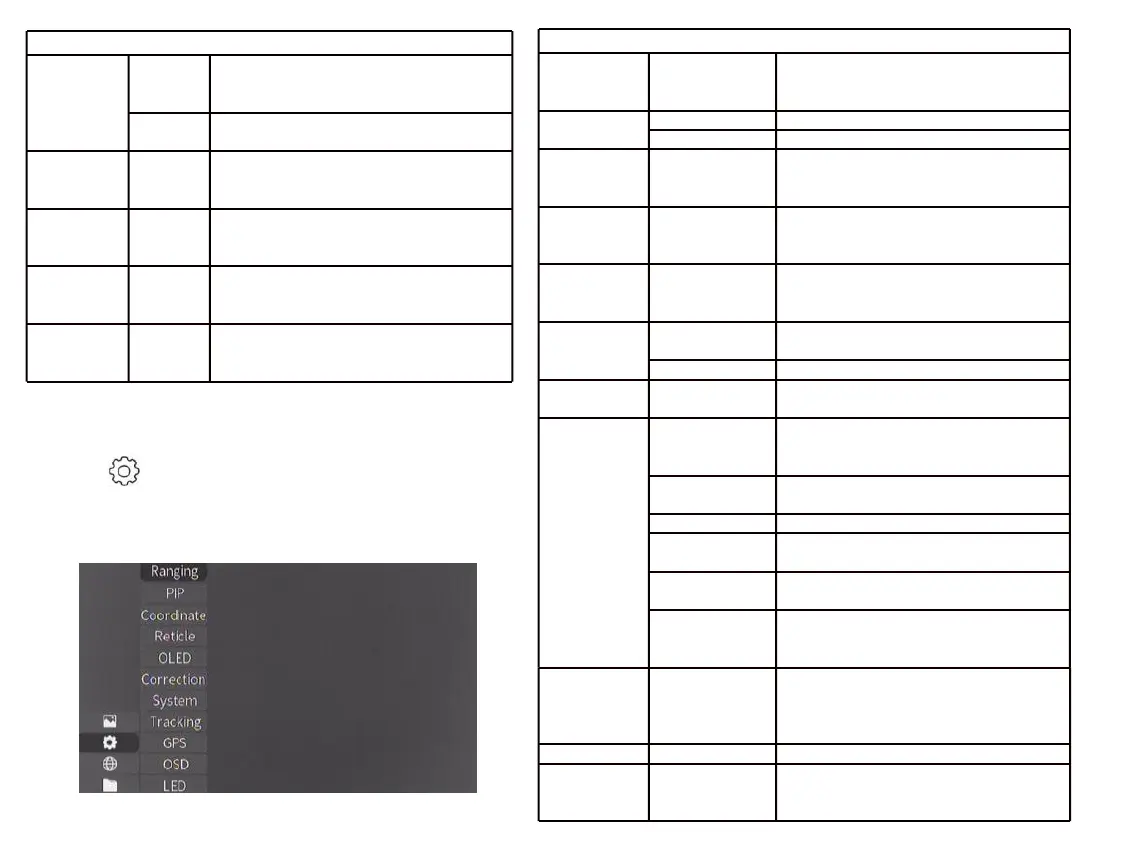
3.4.2 System Setting
Press to enter the System Setting menu.
Select by moving the joystick, and short-
press the joystick to confirm the selection.



 To Next Page