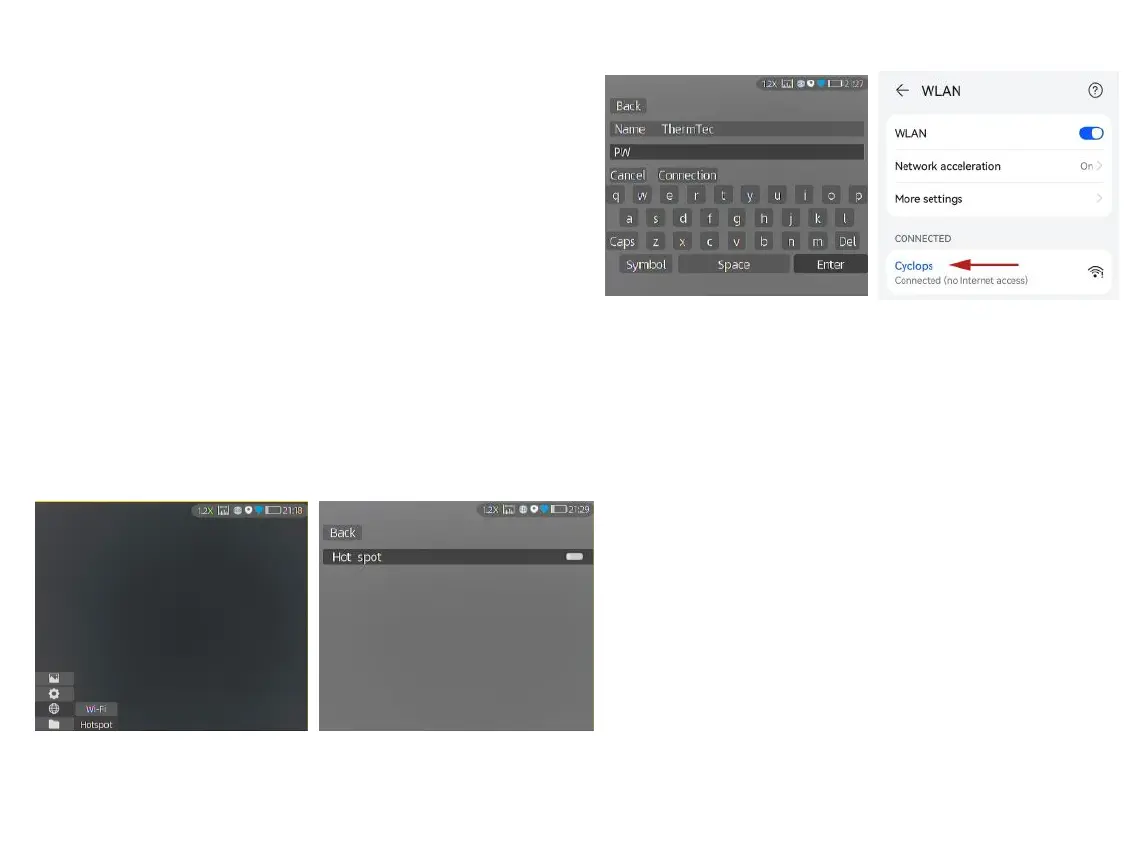
① Short-press the joystick to enter the sub-menus of
Network Connection, and select WIFI for
configuration.
② Access the Hotspot sub-menu, and the monocular
will release a hotspot network. Set the hotspot name
and password and confirm them through the joystick.
③ Enable mobile device to connect with monocular
Hotspot by setting the WLAN on mobile device.
④ After mobile device is connected with monocular
Hotspot, open the mobile APP to connect the
monocular.
3.4.5 APP Push Notification
The APP push notification function can detect
and identify the target type (human or animal) in
real time, measure the distance, and pop up a
push notification on the APP.
The specific operation steps are as follows:
Note: Android phones can get push notification
always on display by launching the APP in the
background.
19
3.4.3.3 ① 3.4.3.3 ②
3.4.3.3 ③
3.4.3.3 ④
3.4.4.3 Connect via Hotspot



 To Next Page