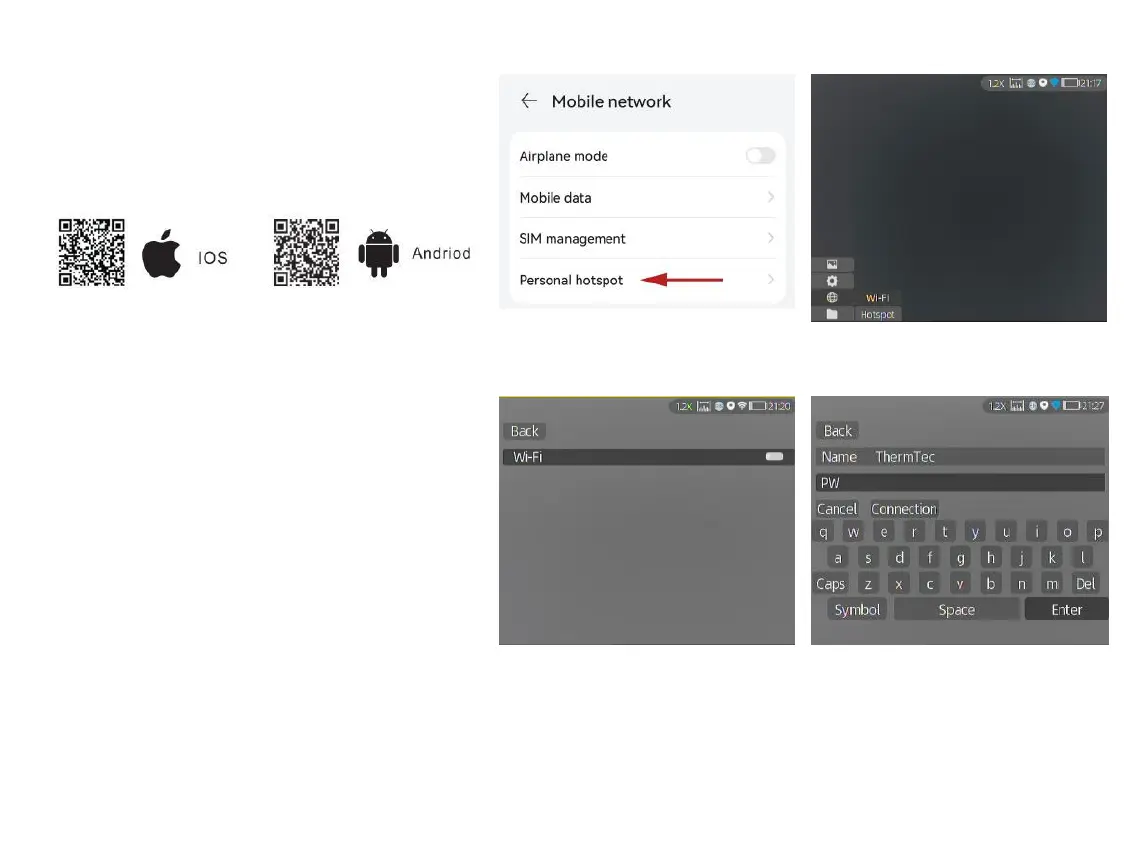
Search "Smart Thermal" in APP store, or scan
the below QR code to download the APP.
3.4.4.2 Connect via Wi-Fi
① Open smart device’s personal hotspot.
② Short-press the joystick to enter the sub-
menus of Network Connection, and select
WIFI for configuration.
③ Access the Wi-Fi sub-menu on monocular
and select the Wi-Fi released by smart
devices, and then enter the password
through the joystick to connect the Wi-Fi.
④ After the monocular is connected via Wi-
Fi, open the mobile APP to connect the
monocular.
18
3.4.4.2 ①
3.4.4.2 ②
3.4.4.2 ③ 3.4.4.2 ④
3.4.4.1 APP Download



 To Next Page