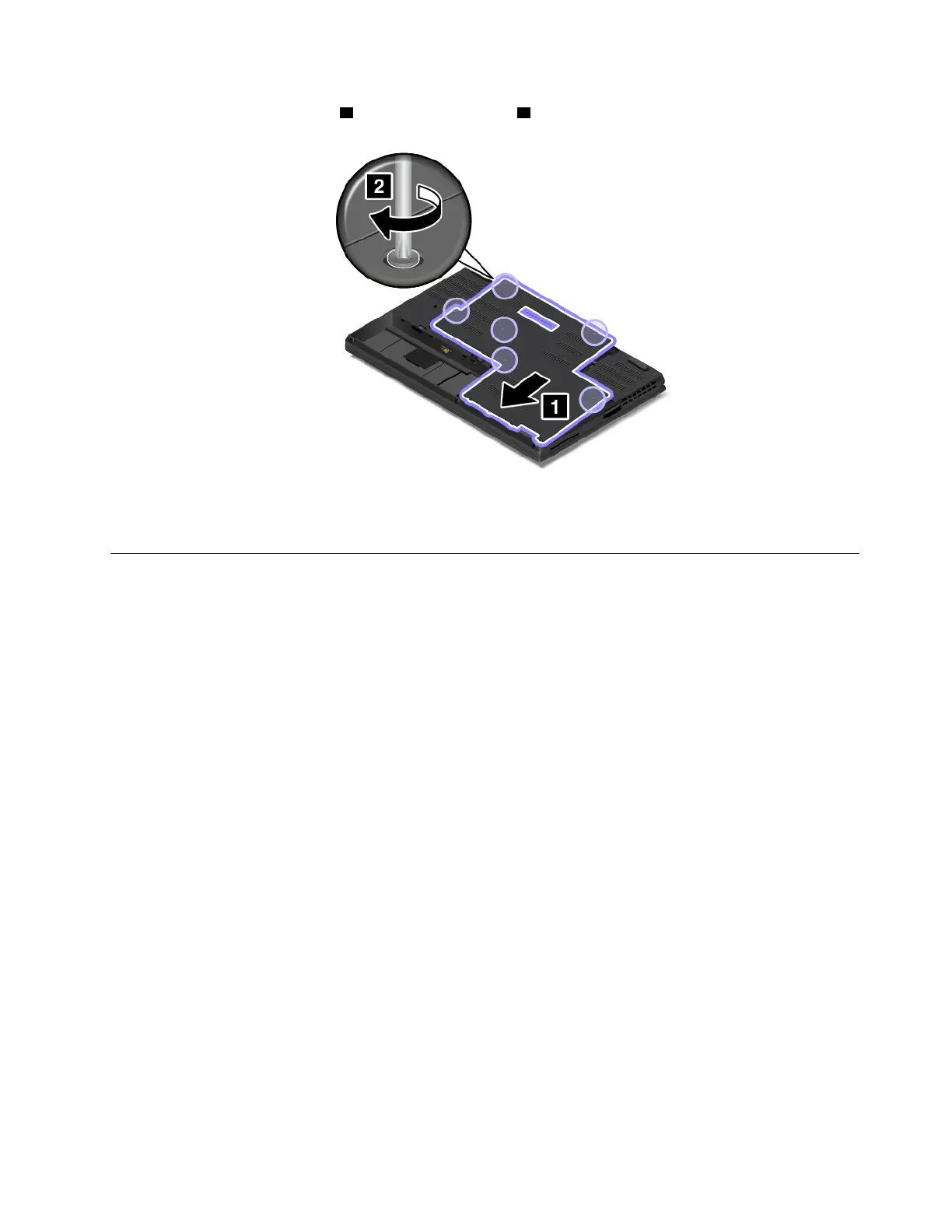
4. Install the new bottom cover 1 and tighten the screws 2 .
5. Reinstall the removable battery. See “Replacing the removable battery ” on page 113.
6. Turn the computer over again. Connect the ac power adapter and all cables to the computer.
Replacing the hard disk drive
Before you start, print these instructions. Read the important safety information first. See “Important safety
information” on page v.
Attention: The internal storage device, such as hard disk drive or M.2 solid-state drive, is very sensitive.
Incorrect handling can cause damage and permanent loss of data. Observe the following guidelines:
• Replace the internal storage device only if you upgrade it or have it repaired. The connectors and slot of
the storage device are not designed for frequent changes or replacement.
• Do not drop the storage device or subject it to physical shocks. Put the storage device on a material, such
as soft cloth, that absorbs any physical shocks.
• Do not apply pressure to the cover of the storage device.
• Do not touch the connector.
• Before removing the storage device, make a backup copy of all the information on it, and then turn off the
computer.
• Never remove the storage device while the computer is operating, in sleep mode, or in hibernation mode.
Some models might support installation of two hard disk drives. Ensure that you select the correct drive
when you configure the system settings in ThinkPad Setup.
Chapter 9. Replacing devices 117



 To Next Page