GapGun MX+/SPC3d6 Connectivity Guide
© Third Dimension Confidential Document D11-678 Page 12
SPC3d6.0
TCP/IPV4
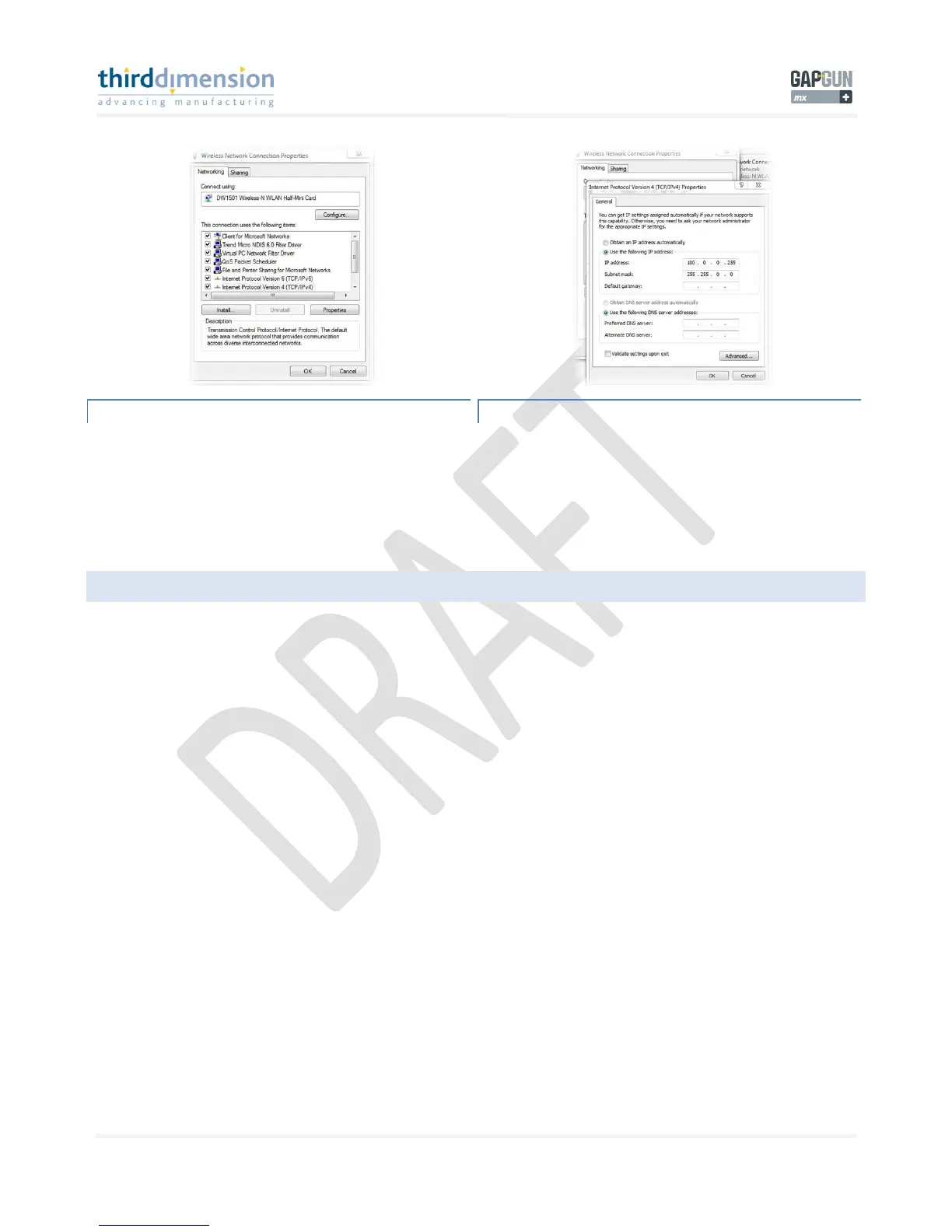
When the properties window appears you need to click on
‘Internet Protocol Version 4(TCP/IPv4)’.
Once highlighted click on ‘Properties’ to edit the properties of
the TCP/IPv4 connection.
TCP/IPV4 PROPERTIES
Once here you need to type in the values for the GapGun MX+
IP and Subnet mask.
Here you should enter the following;
IP address = 100.0.0.255 (Same as GapGun Server settings)
Subnet mask = 255.255.0.0. Click OK to continue.
5.4 POINT-TO-POINT CONNECTION
For a point to point connection between the GapGun MX+ and the SPC3d server the GapGun MX+ will look for the server at
address 100.0.0.255. SPC3d will connect to any GapGun MX+ with the server address 100.0.0.255.
You could have 4 GapGun MX+’s with IP addresses 100.0.0.1, 100.0.0.2, 100.0.0.3, 100.0.0.4, which all have an SPC3d server
address of 100.0.0.255 and SPC3d will be able to connect to all 4 GapGun MX+’s.
If you have multiple PCs running individual SPC3d software packages each PC would require a different server IP address.



 To Next Page