GapGun MX+/SPC3d6 Connectivity Guide
© Third Dimension Confidential Document D11-678 Page 2
SPC3d6.0
2 ENTERING ADMINISTRATOR MODE
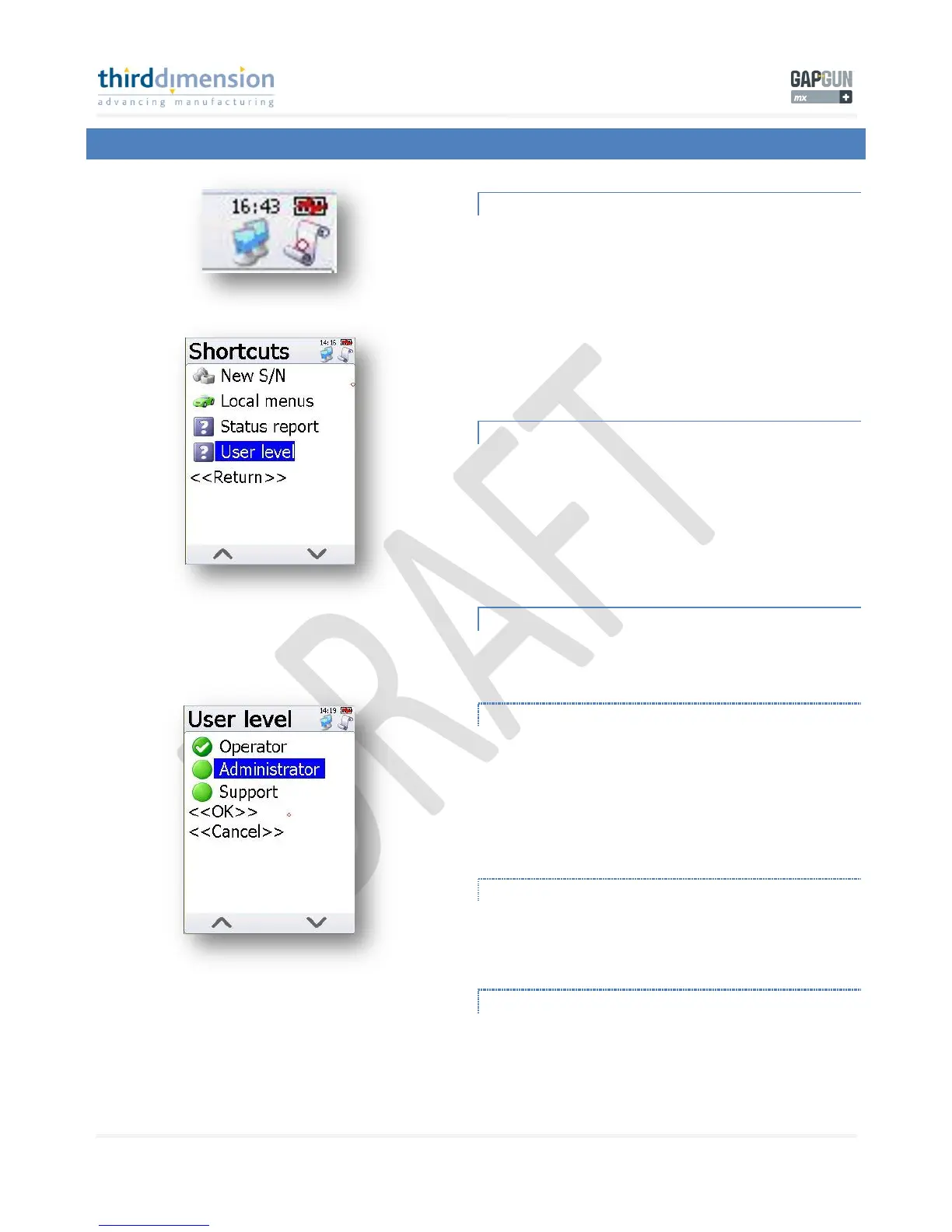
SHORTCUTS SCROLL
These icons are in the top right corner of the GapGun MX+
handle screen. Tap on the small ‘scroll’ icon to enter the
‘Shortcuts’ menu.
SHORTCUTS MENU
From within the Shortcuts menu you can select ‘User Level’;
this will lead you to the User Level selection menu.
USER LEVEL MENU
Here you can see the 3 different User Levels available. Tap on
‘Administrator’ to enter into ‘Admin Mode’.
OPERATOR
The operator functions are covered in the following manuals;
D11-603 Roaming Mode Operator Guide
D11-608 Direct Link Mode Operator Guide
D11-635 Data Transfer Operator Guide
ADMINISTRATOR
This is covered in this document;
D11-655 Admin Mode Administrator Guide
SUPPORT
This option is reserved for Third Dimension only.



 To Next Page