GapGun MX+/SPC3d6 Connectivity Guide
© Third Dimension Confidential Document D11-678 Page 19
SPC3d6.0
TCP/IPV4
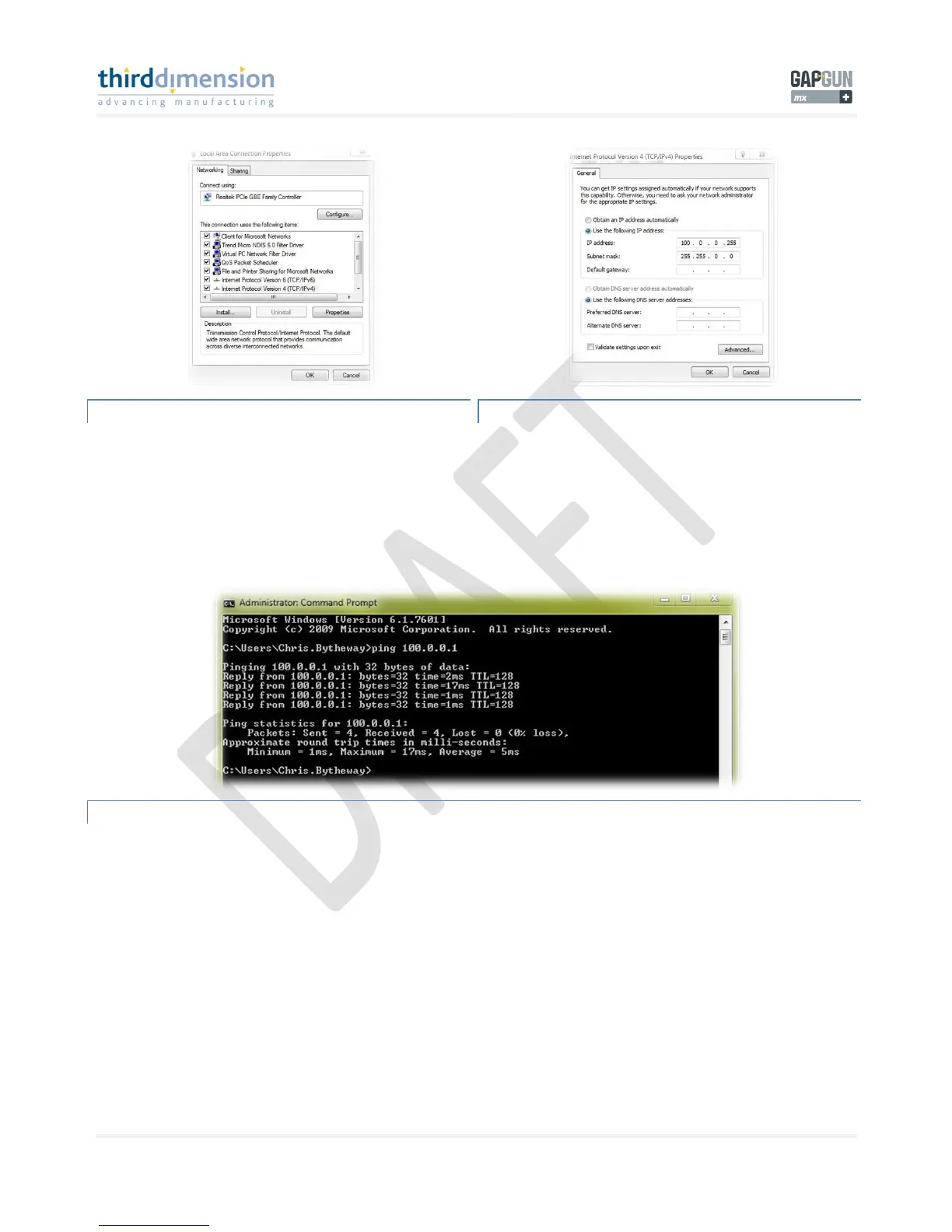
When the properties window appears you need to click on
‘Internet Protocol Version 4(TCP/IPv4)’
Once highlighted click on ‘Properties’ to edit the properties of
the TCP/IPv4 connection.
TCP/IPV4 PROPERTIES
Once here you need to type in the values for the GapGun MX+
IP and Subnet mask. Here you should enter the following;
IP address = 100.0.0.255 (Same as GapGun Server settings)
Subnet mask = 255.255.0.0
Click OK to continue.
PING 100.0.0.1
You can check that the LAN connection is active by using the ‘Ping’ command from a DOS prompt in windows. The connection
should return 4 times, this signifies that the PC is talking to the GapGun MX+ waistpack. The same Ping can be performed from
the GapGun MX+ handle to the PC; see ‘Ping’



 To Next Page