16
D - CONFIGURATION AND USE
9
List of cameras to search: tick the cameras
with recordings you wish to view
10
Viewing windows: double-click to display one
or more windows and cameras simultaneously
11
Take a photo from the video in playback and
activate/deactivate sound
12
Type of trigger: tick the type of recordings you
want to search: at (programmed), manual,
upon movement detection, by alert in general
13
Day you want to view
14
Position: enter the precise time from which you
want to view the video
To search for a video and view it:
• Click the list of cameras on the top right of the
screen or on the cameras that you wish to view.
• In the "type d’enregistrements [type of
recording]" area, indicate the type of
recordings that you are searching for
• In the "date d’enregistrement [date of
recording]" area, indicate the day you want to
view
• Click "Recherche [Search]": each camera
is listed at the bottom of the screen. The
coloured areas correspond to the videos in the
computer memory:
• At the bottom of the screen, click the cameras
for which you would like to display the videos
• Use the playback controls to play, fast forward,
rewind or use the "Positionner [Position]" area
to indicate the precise time with the cursor.
To program an alert to be sent when movement
is detected, you need 2 email addresses: the
address of the sender which will be used by
the camera, and the address which will receive
the alerts. The camera uses the username and
password of the sender address to connect and
send the email. Conguration depends on the
chosen email provider's settings.
Note: the 2 email addresses can be the same
(you will simply be sending an email to yourself)
In our example, we use www.gmail.com:
sender-address@gmail.com sends the alerts,
recipient@gmail.com receives the alerts.
Both addresses need to have been created
beforehand.
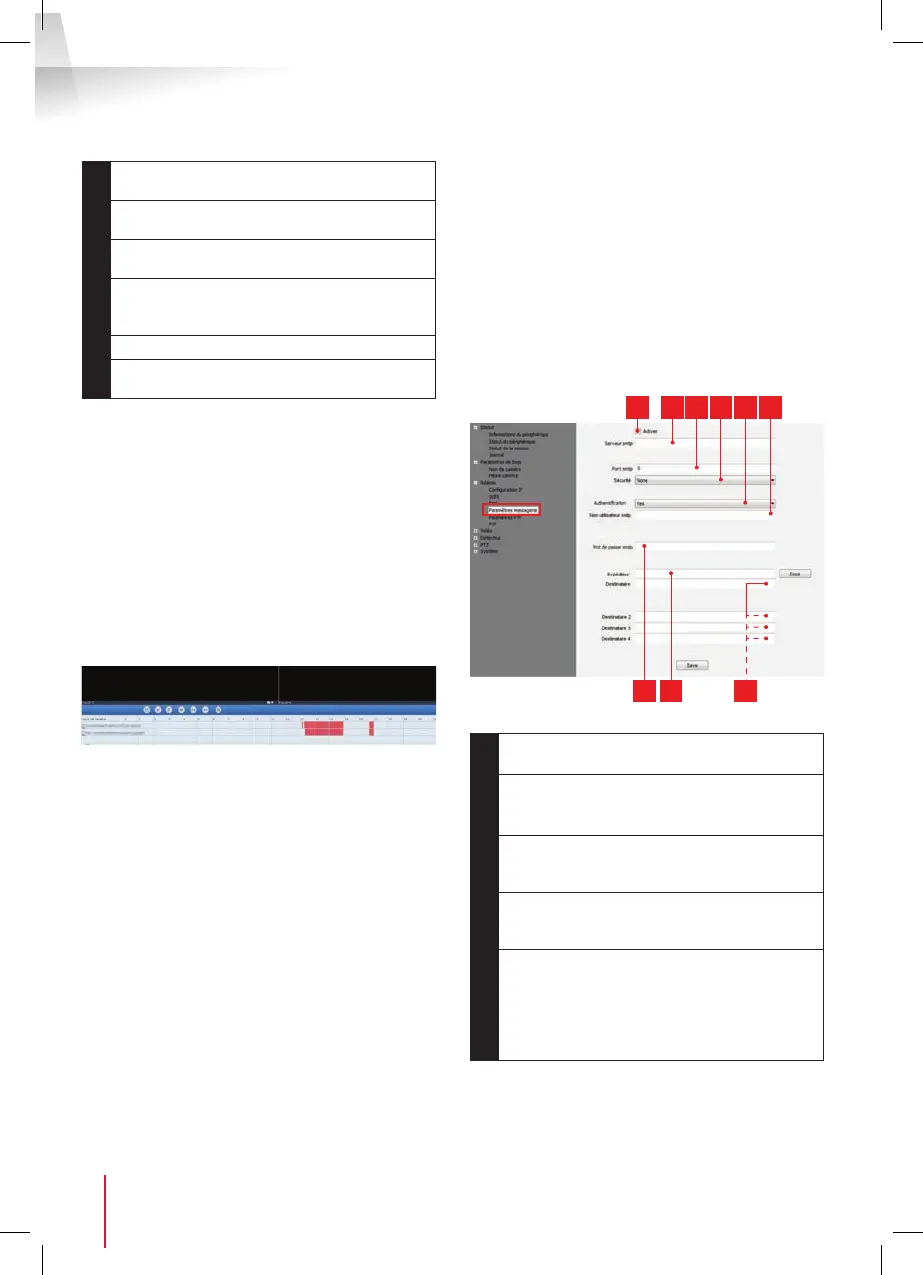
To program email alerts for movement detection,
right click a camera in the list at the top right of
the main screen or on the screen image, then
select "Paramètres caméra [Camera settings]".
Then go to "Réseau [Network]", "Paramètres
messagerie [Message settings]":
1 2 3 4 5 6
7 8 9
1
Tick the "Activer [Activate]" box to activate
email sending
2
SMTP server: depends on the email provider
of address that sends the alert. In our
example, using Gmail, smtp.gmail.com
3
SMTP port: varies with the email provider
of the address sending the alert. In our
example using gmail, 465
4
Security: security when connected to the
email provider. In our example using Gmail,
TLS
5
Authentication: indicates whether connection
is compulsory (authentication) to send an
email. In our example using Gmail: Yes (in
other words: you cannot send an email
via Gmail if you are not logged into your
account).


 To Next Page
 Loading...