19
EN
EN
720P HD WIFI IP CAMERA
D - CONFIGURATION AND USE
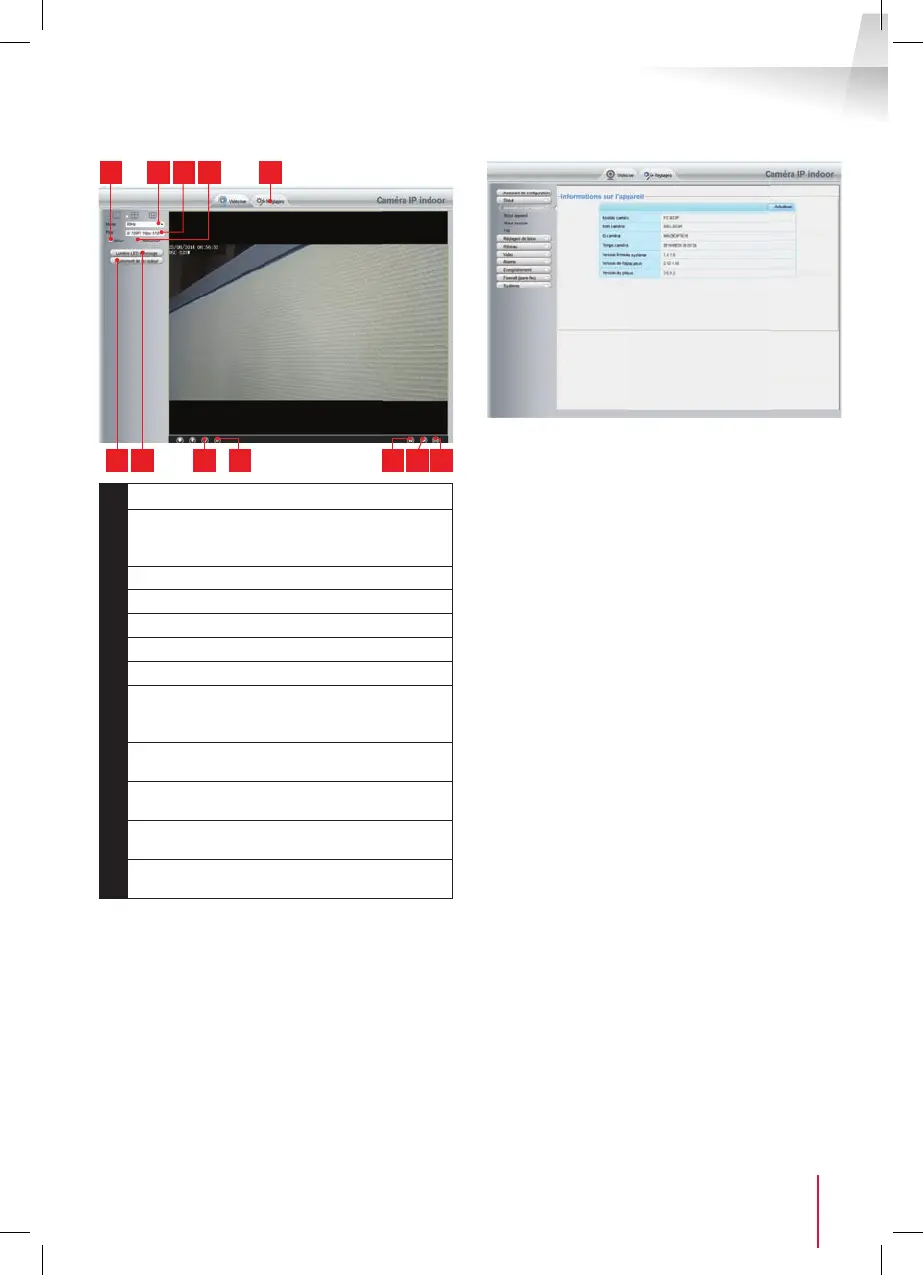
86 7 11
521 3 4
9 1210
1
Vertical image inversion
2
Anti- icker: if the image lighting is arti cial,
select 50 Hz. If the light source is natural,
select "extérieur [outdoor]".
3
Quick quality and frame rate selection
4
Horizontal image inversion
5
Tab for access to the camera con guration
6
Brightness, contrast and colour settings
7
Manual activation of night vision
8
Activate computer microphone if
present: lets you speak through the camera's
speaker
9
Activate the camera microphone: lets
you listen to the camera surroundings
10
Take a snapshot of the camera image
on the computer
11
Take a video of the camera image on the
computer
12
Display the image in full screen (double-
click to revert)
You can access your camera settings by clicking on
"Réglages [settings]" at the top of the window:
Here you will nd the same functions as those
accessible from the ThomView software. Refer to the
previous paragraph to see these functions.
NOTE: if you use your browser to switch your camera
from a wired to a wireless network, the connection
will be lost because the camera IP address will
change. You must restart the IP Camera Search Tool
to detect the camera again.


 To Next Page