12
D - USING THE PRODUCT
1. USE OF THE GATE VIDEO AND SETTINGS
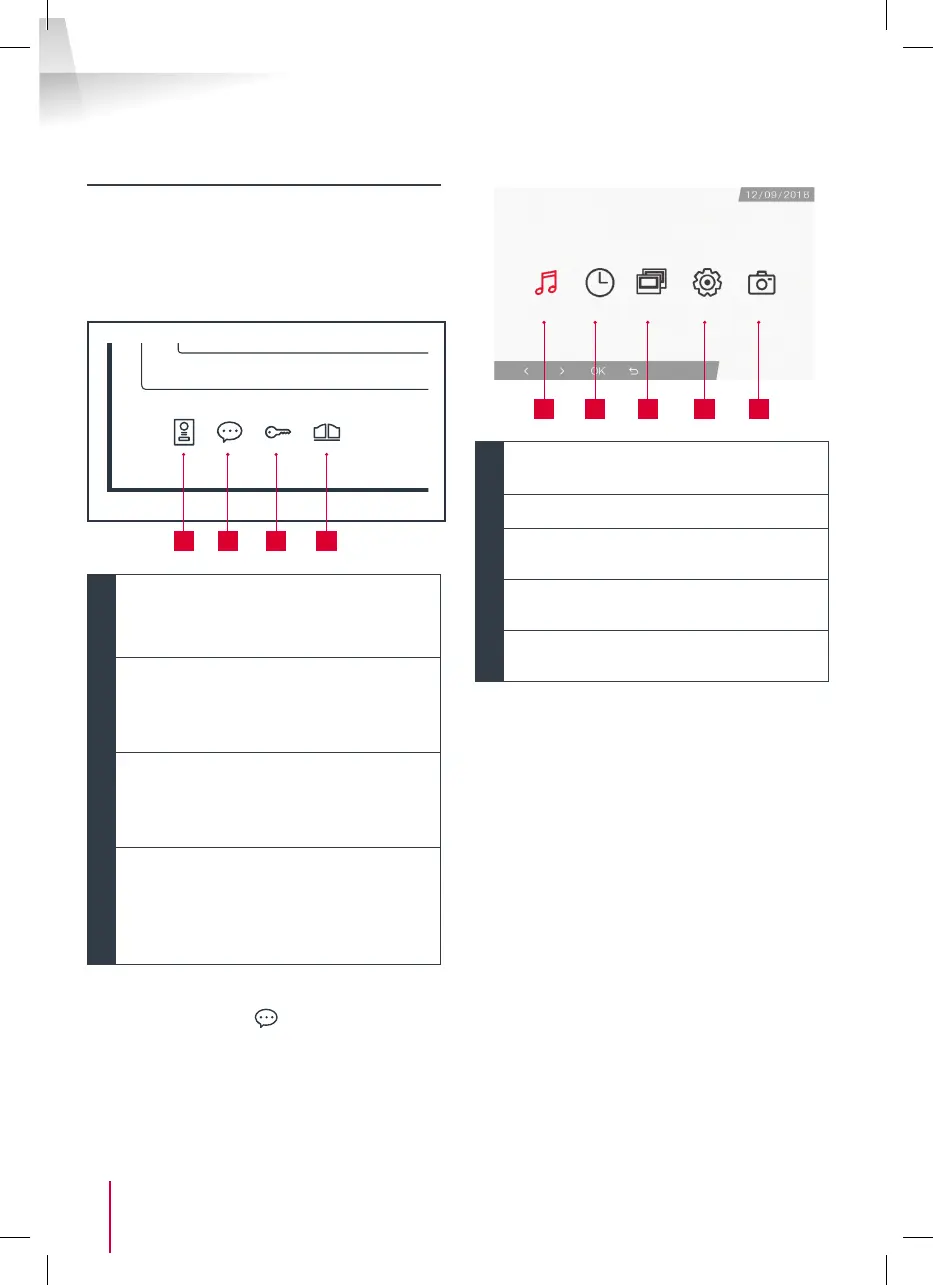
- The Thomson Smart Bracket II is controlled
through touch-sensitive keys.
- The button functions vary depending on the
menu accessed. The icons at the bottom left hand
side of the screen help to guide you as to their use.
1 2 3 4
1
Monitor switched off: Spy mode: view
intercom panel camera
In the menus: navigation arrow
2
Monitor switched off: access the main
menu
During a call: answer the call/end the call
In the menus: navigation arrow
3
Monitor switched off: access the main
menu
During a call: Open electric strike plate
In the menus: OK/Selection
4
Monitor switched off: access the main
menu
During a call: Open dry contact (gate
motor)
In the menus: Back
WARNING: in Spy mode, the sound is not activated.
You need to press on the
key to start a discussion.
• Main menu
1 2 3 4 5
1
Doorbell melody selection and volume
settings
2
Setting the date and time
3
When a second monitor is connected,
select this icon and press on OK to call it
4
Adjusting the settings of your Smart
Bracket II videophone
5
Management and viewing of photos
captured



 To Next Page