13
F - FAQ
If your problem is not covered below, please contact our technical support department.
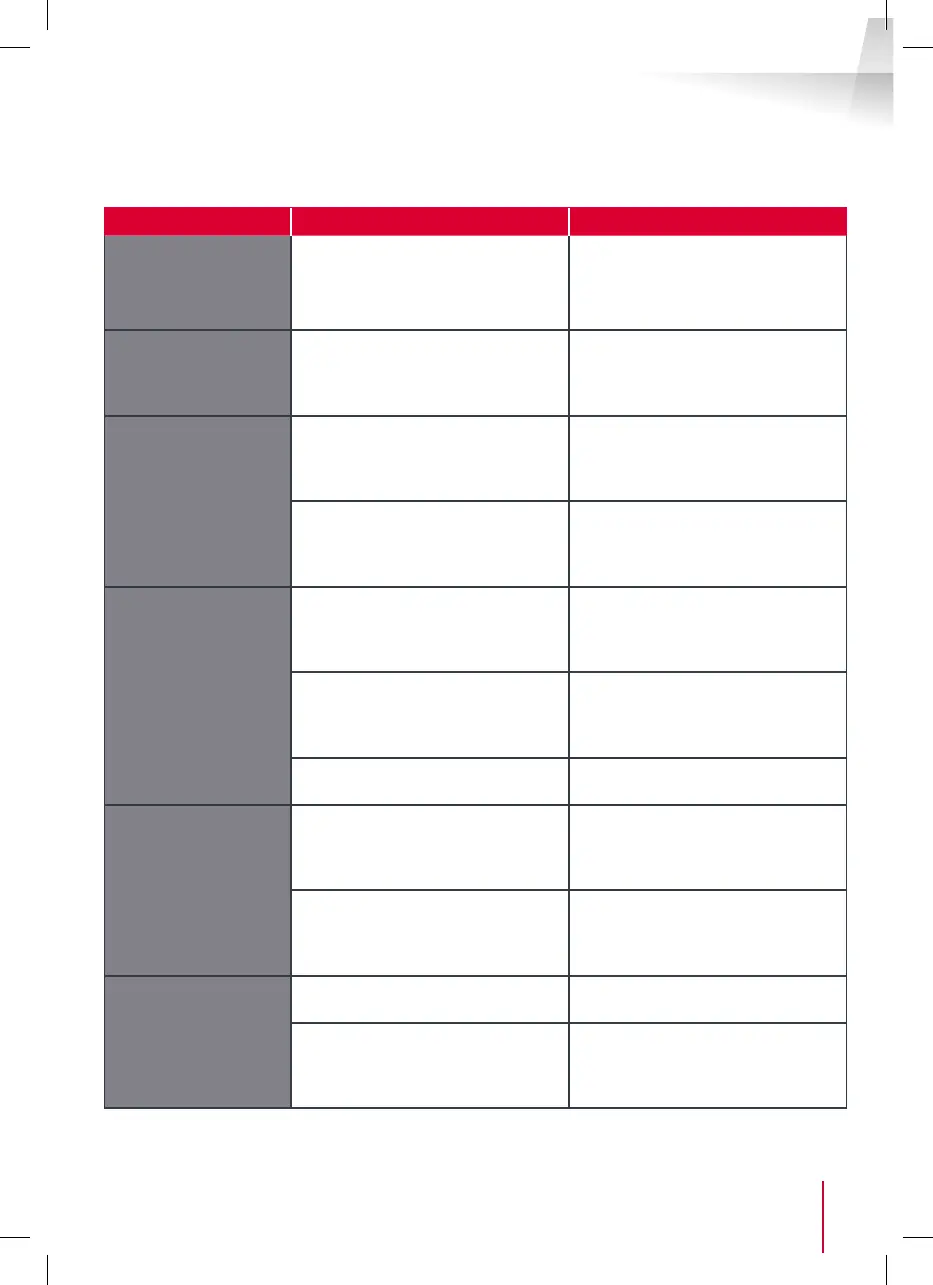
Symptoms Possible causes Solutions
The intelligent bracket
is showing an error
(red light) when the
screen is lit.
This is completely normal. The diagnostics run by the
intelligent bracket should be
relied on only when the screen is
disconnected.
The monitor will not
switch on.
The adapter is not connected
to the mains/the monitor is
not inserted correctly into the
intelligent bracket.
Check that all power supply cables
are correctly connected.
No image on screen
(black or blue screen).
The intercom panel and the
intelligent bracket are not
connected correctly.
Remove the screen of the
intelligent bracket and run
diagnostics.
Check the connections.
The cable section used is not
suitable for the distance between
the monitor and the intercom
panel.
Check the distance covered by the
cable section with the help of this
operating manual.
The image is blurred.
The cable section used is not
suitable for the distance between
the monitor and the intercom
panel.
Check the distance covered by the
cable section with the help of this
operating manual.
The cables that connect the
intercom panel to the monitor are
too close to 230V mains power
cables.
If possible, use a separate duct
for the cables that connect the
monitor to the intercom panel.
The intercom panel lens is dirty or
scratched
Clean the lens of the intercom
panel with a soft cloth.
Background noise
when talking.
The cable section used is not
suitable for the distance between
the monitor and the intercom
panel.
Check the distance covered by the
cable section with the help of this
operating manual.
The cables that connect the
intercom panel to the monitor are
too close to 230V mains power
cables.
If possible, use a separate duct
for the cables that connect the
monitor to the intercom panel.
The gate control
does not release the
automated door.
The cable section used is not
suitable.
Check the cable section with the
help of this operating manual.
The intercom panel and the
automated gate are not connected
correctly.
Check the connections and input
used for the automated gate with
the help of the operating manual
for the automated gate.



 To Next Page