E-DOC-CTC-20060911-0081 v1.0
Chapter 2
Basic Installation
12
Configuring the Internet connection
Proceed as follows:
1 If prompted, enter the User name and Password for your Thomson Gateway security settings and click
OK.
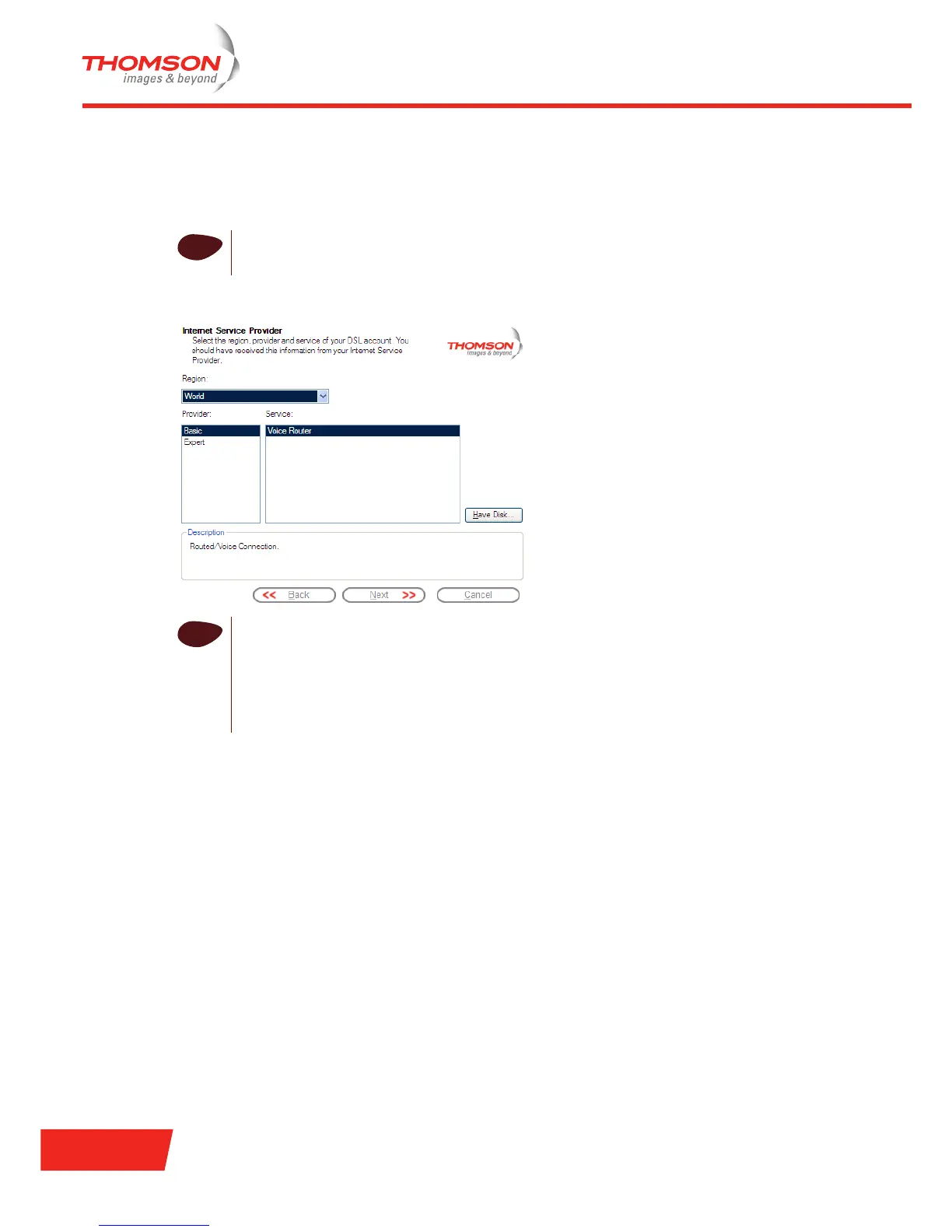
2 Select the appropriate Region, Provider and Service for your Internet connection as specified by your
Internet Service Provider and click Next.
3 Your connection to the Internet connectivity is set up:
Select the VPI/VCI - and, if required, the Connection Type - as specified by your Internet Service
Provider and click Next.
Enter the User Name and Password for your Internet account settings as specified by your Internet
Service Provider and click Next.
4 The procedure continues with some additional configurations.
Proceed with “ Configuring the Thomson Gateway (and your computer)” on page 13.
i
The factory default user is ‘Administrator’ and its password is blank. It is advisable to specify
another user name and password during the configuration procedure to protect your Thomson
Gateway from security violation. See “2.5 Basic Security” on page 29 for more information.
i
If the Internet Service Provider has included a separate disk with a dedicated service profile,
click Have Disk to browse to the location of the appropriate service profile template file.
From here on, the procedure might differ from the description below. The requested
information will depend on the selected service profile and should be provided by your Internet
Service Provider. Subsequent screens will guide you through the configuration of both the
Thomson Gateway and your computer. Enter the requested information and click Next
whenever requested.



 To Next Page